
Student Tagging in Martial Arts: A Practical Guide

Student tagging means attaching short labels to student records so you can find, group, and follow up with the right people in seconds. Done well, tags turn a messy roster into working lists: who is testing for a belt next month, who hasn’t trained in two weeks, which families are on the competition track. Done badly, they become a junk drawer nobody trusts. This guide shows you what to tag, what to leave alone, how to name tags, and how to handle the privacy side when your students are kids.
TL;DR
- A tag is a flexible label for ad hoc lists. Rank, attendance, and billing already have their own fields, so tag only what those fields can’t express.
- Start with five to eight tags in three groups: where a student is in their journey, what they’re working toward, and what you need to do next.
- Use one naming convention, one owner for the tag list, and a quarterly cleanup. Inconsistent tags break your reporting.
- Keep tags factual and neutral. Anything you wouldn’t say to a parent’s face doesn’t belong in a record parents may someday ask to see.
- Many of your students are minors, so tag with privacy in mind and follow COPPA and your waiver rules.
Table of Contents
- What student tagging means in a martial arts school
- Which student details are worth tagging
- What not to tag
- How to use tags for instruction, engagement, and retention
- A starter tag set you can copy
- Keeping tags accurate, consistent, and respectful
- Privacy: who should see tags, and what the rules say
- Where tags fit in your software stack
- Perspective: tags should save you time, not make more work
- Put tagging to work in DojoTrack
- FAQ
- Sources
What student tagging means in a martial arts school
A tag is a short text label you attach to a student profile. Universities that use tags in their student success platforms describe them the same way: flexible, personalized labels for ad hoc lists covering needs that other grouping methods don’t account for. That definition fits a dojo well.
Your school already has structured data:
- Rank: white belt, yellow belt, one stripe, and so on.
- Attendance: classes attended, last visit, streaks.
- Membership: plan, start date, billing status, family link.
These fields are fixed. Every student has them, and they behave the same way for everyone. Tags handle everything else: the things that are true of only some students, change over time, or don’t fit a drop-down menu.
Tags vs. rank, attendance, and membership
| Data type | What it answers | Example | Where it lives |
|---|---|---|---|
| Rank | Where is this student in the curriculum? | Green belt, two stripes | Belt field |
| Attendance | How often do they train? | 1 class in the last 14 days | Attendance log |
| Membership | What do they pay and for what? | Family plan, month-to-month | Billing and plan |
| Tag | What else do we need to know or do? | Testing-ready, Tournament team, Needs makeup class | Flexible label |
A useful rule: if every student has the data and it follows a set scale, it’s a field. If it’s a yes-or-no situation that applies to some students for a while, it’s a tag.
Which student details are worth tagging
Most owners over-tag in their first month. They create 60 labels, use 12, and forget what the rest meant. Group your tags by the job they do, and you’ll need far fewer.
Journey tags: where they are with you
These describe the student’s stage as a customer, not their belt.
- Trial: came in on an intro offer and hasn’t enrolled.
- New (first 90 days): the window where most dropouts happen, so it deserves extra attention.
- Returning: a former student who came back.
- Frozen: membership paused for injury, travel, or school.
Goal and program tags: what they’re working toward
These power your class organization and your communication.
- Testing-ready: the instructor has signed off for the next promotion.
- Tournament team: training for competition.
- Leadership or junior assistant: helping teach younger classes.
- Black belt club: an advanced track with its own sessions.
- Adult beginner: useful for scheduling an on-ramp class.
If you promote on defined criteria, tags work well as the “flag” step. Our guide to BJJ belt promotion criteria coaches can track shows how to break a promotion decision into measurable pieces, and a testing-ready tag is the output of that process.
Action tags: what you need to do next
These are short-lived. They exist to be removed.
- Needs waiver update
- Needs gi or uniform
- Birthday this month
- Follow-up call
- Needs makeup class
An action tag with no end date becomes clutter. Remove it the moment the task is done.
Logistics tags: practical facts
- Family linked (siblings or parent and child on one account)
- Carpool or pickup arrangement
- Allergy or medical alert (see the privacy section before using this one)
- Equipment on loan: pairs well with a checkout process like the one in our post on equipment checkout tracking.
What not to tag
Tags are easy to create, which is exactly why you need rules about what stays out.
- Subjective judgments. “Lazy,” “difficult,” “drama parent.” Instructors do vent about students, and online martial arts forums are full of threads about unmotivated students and problem members. A venting thread is fine. A permanent label in your system is not.
- Diagnoses or behavioral conditions. If a child’s needs affect how you teach, record what helps (“prefers a quiet warm-up”) with the parent’s knowledge, not a clinical label.
- Anything you couldn’t defend. Imagine the parent reading it. If it would make you wince, rewrite it as a neutral fact or delete it.
- Things better handled by a field. Don’t make a tag called “Green Belt.” Your belt field already does that, and a duplicate will go stale the day the student promotes.
How to use tags for instruction, engagement, and retention
Tags earn their keep when they trigger action. Here are the workflows we see matter most for school owners.
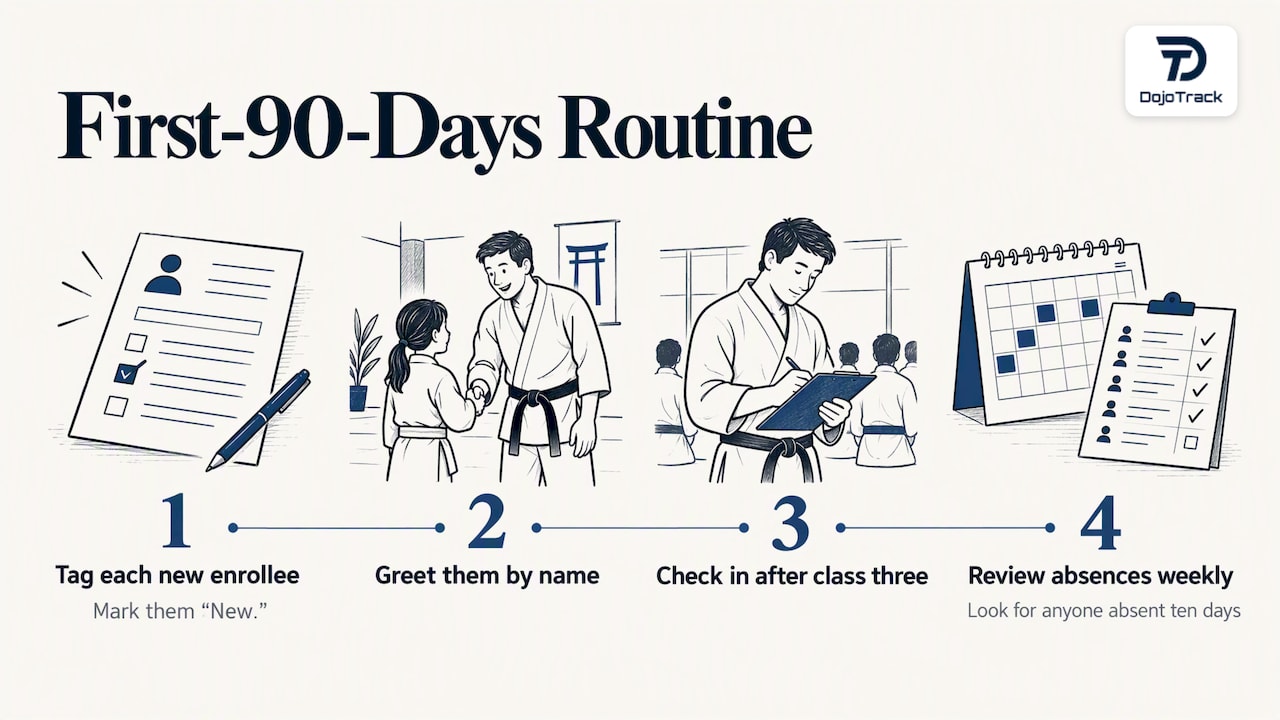
1. Run a first-90-days program
Tag every new enrollee “New.” Then build a simple routine: the head instructor greets that list by name, you check in after the third class, and you look at the list weekly for anyone who has missed ten days. New students who feel known are more likely to stay, and the tag makes it possible to know who they are without scrolling the whole roster.
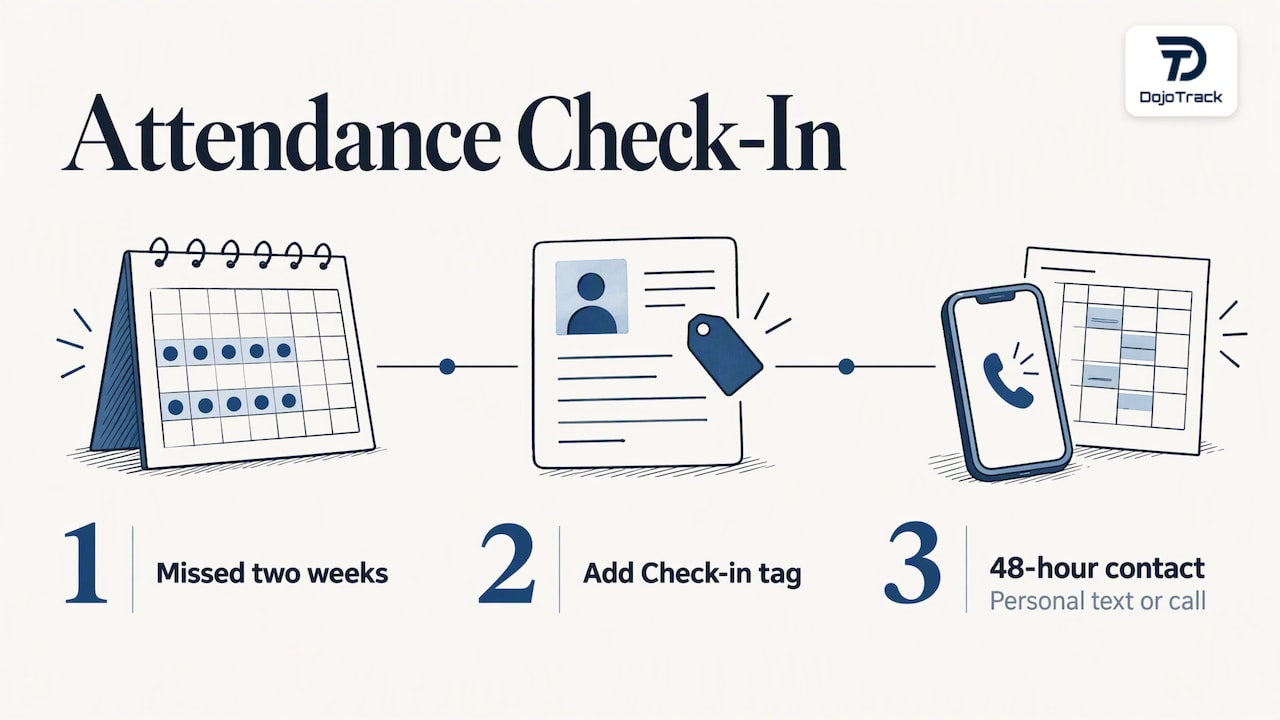
2. Catch drift before it becomes a cancellation
Pair an attendance threshold with a tag. For example, anyone who has missed two weeks gets “Check-in” and a personal text or call within 48 hours. The message is simple: we missed you, is everything okay, here’s the next class that fits your schedule. Don’t mention billing. You want a conversation, not a collections tone.
In DojoTrack, our AI-driven retention analytics flag students who look at risk of dropping out, so you don’t have to build this list by hand each week. You decide how to reach out. Whatever tool you use, the principle holds: a short, current list of students to contact beats a spreadsheet of everyone.
3. Organize classes and promotions
A “Testing-ready” tag gives you the exact invitation list for a promotion event. A “Tournament team” tag gives you the roster for extra sessions and travel emails. A “Junior assistant” tag tells you who to ask when the kids’ class is short a helper. You get the list in seconds instead of reconstructing it from memory.
4. Send messages that fit the audience
Blast messages train people to ignore you. Segmented ones get read. A reminder about the tournament carpool matters to the tournament team and is noise for adult fitness students. Our post on push notification segmentation for martial arts schools goes deeper on how to split your audience so each message feels personal.
Text messaging is where segmentation also saves money. On DojoTrack, texts cost $0.017 each, so a message sent to 40 tournament families costs a fraction of one sent to 400 students. The cost is small, but targeting keeps it that way and keeps people from muting you.
5. Run a retention check on your tags themselves
Once a quarter, look at which tags correlate with students who stayed and which with those who left. If “New” students who got a three-class check-in stay longer than those who didn’t, you’ve found a process worth protecting. If a tag never leads to any action, retire it.
A starter tag set you can copy
This set of eight covers most small schools. Rename to fit your culture.
| Tag | Group | Removed when |
|---|---|---|
| New | Journey | Student passes day 90 |
| Trial | Journey | Student enrolls or lapses |
| Frozen | Journey | Membership resumes or ends |
| Testing-ready | Goal | Promotion is completed |
| Tournament team | Goal | Season ends or student leaves team |
| Check-in | Action | Contact is made and noted |
| Needs waiver update | Action | New waiver is signed |
| Family linked | Logistics | Accounts no longer connected |
Add more only when a real recurring task demands it.
Keeping tags accurate, consistent, and respectful
The value of tags depends on trust. If staff stop believing the list, they stop using it.
Pick a naming convention and stick to it
Guidance for tag use in student success systems recommends a clear naming convention and a managed system so confusion stays low and reporting stays clean. In practice:
- Use one style: sentence case, singular, no abbreviations. “Tournament team,” not “tourney” and “Tournament Team” and “comp team.”
- Put a short prefix on groups if your system has many tags, such as “Goal: Tournament team” and “Action: Check-in.”
- Never create near-duplicates. “Frozen” and “Paused” will split your list in half.
Give the list one owner
One person, usually the owner or the front-desk manager, approves new tags. Everyone else can apply them. This takes two minutes a month and prevents tag sprawl.
Search before you create
The same discipline applies to student records. A data integrity manual from a U.S. college tells users to search thoroughly before creating a new record so they don’t produce duplicates. Duplicate student profiles are a quiet killer for tags: half the history sits on one profile, the tag on another, and your list lies to you. Check for a sibling, a returning student, or a parent who signed up under a different email before adding anyone new.
Clean up on a schedule
On the first Monday of each quarter:
- Export or list every tag with its student count.
- Delete tags with zero or one student unless there’s a clear reason.
- Merge near-duplicates.
- Check that action tags older than 30 days are either finished or still valid.
- Tell your staff what changed.
Privacy: who should see tags, and what the rules say
Many of your students are children, and that changes how careful you need to be. This isn’t legal advice. If you’re unsure whether a practice is compliant, ask an attorney who works with small businesses in your state.
Limit who can see what
Not every staff member needs every tag. A front-desk volunteer needs “Needs waiver update.” They don’t need a note about a family’s payment hardship. Set role-based access where your software allows it, and keep sensitive tags (medical alerts, billing issues) restricted to owners and head instructors.
Children under 13 and COPPA
If you collect information from children online, the Children’s Online Privacy Protection Act is the rule to know. The FTC explains that COPPA requires verifiable parental consent before commercial online services collect personal information from children under 13. It also notes that covered operators must notify parents and get approval, and that a school can consent on a parent’s behalf only for educational purposes, not other commercial ones.
For a martial arts school, the practical takeaways are:
- Collect parent contact details and let the parent manage the child’s account, rather than building profiles that kids fill out themselves.
- Don’t use children’s data for advertising or sell it to anyone.
- Read the privacy policy of any software you use. The FTC advises schools to review privacy and security policies and understand how operators collect, use, and disclose student information, and it points out that an operator’s use of data for commercial purposes like targeted advertising can affect whether a school can consent for parents.
That guidance is written for schools and ed-tech, and a private dojo is not a K-12 school. Treat it as a standard to meet, not a loophole to claim.
FERPA is usually not your rule, but its logic helps
FERPA applies to schools that receive federal education funds, which most private martial arts studios do not. Still, its principle is a good model. The Department of Education says covered schools generally need signed, dated written consent to disclose personally identifiable information from education records, with an exception for a real, significant health or safety emergency. Adopt the same habit: don’t share a student’s information with a third party without written permission, and make a clear exception for genuine emergencies, like giving a medical alert to paramedics.
Waivers and consent
Your waiver is the right place to explain what you collect and how you use it. Our guide to minor waiver requirements for martial arts schools covers what to include for students under 18. Add a short line about communications, such as texts and push notifications, so parents opt in knowingly.
Dispose of old records properly
Paper still hides in dojos: sign-up sheets, old waivers, test score cards. Guidance in that same data integrity manual points to securely disposing of documents containing student names or ID numbers, such as by shredding paper. Move to digital records where you can, and shred what’s left when you no longer need it.
Where tags fit in your software stack
You can start tagging in a spreadsheet. You’ll outgrow it when you have more than about 50 students, because the list needs to update itself. The three things to look for in any studio platform:
- Tags that live on the student profile, visible next to attendance, rank, and billing, not in a separate document.
- Filtering and messaging by tag, so a list becomes an action in two clicks.
- Family-aware records, so a tag on one child doesn’t have to be re-entered for a sibling, and a parent’s contact details are not duplicated.
If you use check-in hardware, linking a physical tag to a membership is a different idea with a similar goal: fast, accurate records. See RFID check-in for gyms if front-desk speed is your bottleneck.
Perspective: tags should save you time, not make more work
We built DojoTrack after running martial arts schools ourselves, and the pattern we saw was consistent. Owners didn’t lack data. They had belt notes in one place, billing in another, leads in a notebook, and attendance on a clipboard. When a parent asked a simple question, or when a student quietly stopped showing up, nobody could connect the dots in time.
That’s why we think of tags as a small tool, not a strategy. The strategy is knowing your students and reaching out at the right moment. Tags just make that practical when you have 150 students and one hour between classes. Keep them few, factual, and tied to action. If a tag doesn’t change what you or your instructors do this week, it’s noise.
We also believe a martial arts school’s records should be treated like a family’s trust. Kids, parents, and instructors share a community, and the data behind it deserves the same respect you’d show on the mat.
— DojoTrack
Put tagging to work in DojoTrack
DojoTrack brings memberships, attendance, belt tracking, family accounts, waivers, billing, and messaging into one martial arts platform, so the groups you care about sit beside the data that defines them. You can start on the Free plan at $0 per month and move up as you need more automation. Paid plans are Launch at $95 per month, Scale at $125, Expand at $165, Grow at $195, and Master at $245. See the details on the DojoTrack pricing page, or look at the full platform first.
FAQ
How many tags should a martial arts school use?
Start with five to eight. That covers journey stage, goals, and next actions for most schools. Add a new tag only when a recurring task needs it, and retire any tag that hasn’t led to action in a quarter.
Should I tag students who are struggling or unmotivated?
Tag the action, not the judgment. Use “Check-in” or “Needs makeup class” instead of a label about attitude. This keeps records fair, avoids embarrassment if a parent sees them, and points staff toward a helpful next step.
Is it legal to store information about children in my student database?
Yes, schools do it every day, but it comes with duties. COPPA applies when operators collect personal information online from children under 13, and it calls for parental notice and consent. Collect through parents, limit access, and ask a local attorney if your setup is unusual.
What’s the difference between a tag and a belt rank?
Rank is a structured field every student has, set by your curriculum. A tag is a flexible label that applies to some students for a time, such as “Testing-ready” or “Tournament team.” Use tags for situations your standard fields can’t capture.
Can I use tags to message just one group of students?
Yes, if your software supports filtering by tag. It’s one of the best uses, because targeted messages get read more often and cost less when you pay per text. Our guide on push notification segmentation shows how to plan it.
Sources
- Tags in Student Success, Help Center
- Testing, testing: A review session on COPPA and schools, FTC
- COPPA Guidance for Ed Tech Companies and Schools, FTC
- FERPA and disaster guidance, U.S. Department of Education
- Eastern Florida State College Data Integrity Manual