
RFID Check In for Gyms: Link Tags to Memberships in Four Steps

RFID check-in, whether through cards, wristbands, or fobs, speeds member entry, automates attendance tracking, and provides controlled access to your facility. It only delivers those benefits when the tags talk to your membership management system (MMS), because that connection is what validates each member and logs every visit. Getting that integration right is the real work of a rollout.
TL;DR:
- Record arrivals and departures, not just door admissions, if you need reliable attendance, billing, or time spent on site reports.
- Match tags to daily use: wristbands suit classes and pools, cards cost less but are easily lost, and fobs fit once daily visits.
- Before ordering in bulk, have the vendor test a sample tag against your reader; MIFARE, LEGIC, and NFC compatibility can differ by hardware.
- Corporate wellness access needs an eligibility check beyond account lookup, and staff need instructions for expired memberships or app first check ins.
- A desk reader setup can launch within a few weeks; turnstiles and custom integration typically take 4 to 12 weeks, so pilot one door before expansion.
Table of Contents
- How does RFID check-in actually work?
- Choosing tags and readers: cards, wristbands, and fobs
- How to integrate RFID check-in with your membership system
- Rollout checklist: testing, onboarding, and replacement policy
- Keeping RFID check-in secure and private
- What RFID check-in costs and how long rollout takes
- How DojoTrack supports attendance and RFID-linked check-in
- Reporting and analytics capabilities enabled by RFID check-in
- Troubleshooting common RFID system issues in gym environments
- Which facilities should move on RFID now, and which can wait
- Let DojoTrack handle attendance while you focus on the mat
- FAQ
- Sources
How does RFID check-in actually work?
The flow behind every RFID check-in is simpler than it looks, and understanding it helps you scope what your staff and software actually need to support. A member taps a card, wristband, or fob against a reader. The reader decodes the unique ID stored on the tag and sends it to your MMS, which looks up the matching account and returns a decision: grant access, deny it, or flag an issue like an expired membership.
The process breaks down into four steps:
- Tag read: the reader captures the RFID signal and extracts the ID string.
- Lookup: your MMS matches that ID against a member record.
- Decision: the system grants or denies entry based on membership status.
- Logging: a visit record is created, timestamped, and stored for attendance reporting.
Some gyms stop at the access-control layer: the door unlocks and that is the end of it. Many operators, especially martial arts schools tracking belt progress or class frequency, need more than a locked door. They need accurate attendance records tied to each student, which means the check-in event has to be written back to the MMS, not just used to trigger a turnstile.
That is where developer documentation becomes relevant even for non-technical operators. Software built for fitness and martial arts facilities typically exposes distinct events for check-ins, checkouts, and admissions, and understanding that distinction upfront prevents confusion later when you are trying to reconcile attendance numbers with billing or retention reports. A system that only logs “admissions” without separating checkouts, for instance, will not give you accurate time-on-site data, which matters if you run open-mat hours or drop-in pricing.
Choosing tags and readers: cards, wristbands, and fobs
The tag format you choose affects both member experience and your ongoing replacement costs, so it is worth matching the format to how your members actually move through your space.
- Wristbands hold up well in classes, sparring, and pool environments where a card would get lost or damaged; they are a common choice for martial arts schools with heavy mat time.
- Cards are the cheapest option and easy to brand with your logo, but they are also the easiest to leave at home or lose in a gym bag.
- Fobs attach to keychains, survive daily wear, and work well for members who check in once a day rather than multiple times per session.
Hardware choice matters just as much as the tag itself. Fixed readers mounted at entry doors work for unstaffed or after-hours access. Kiosk or desk readers suit front-desk check-in where staff can intervene for payment issues or guest passes. Turnstiles make sense for high-traffic facilities that need to physically prevent tailgating, particularly for 24-hour access models.
Before you buy anything, confirm standards compatibility. MIFARE and LEGIC are the two chip standards most fitness and access-control vendors support, and NFC compatibility determines whether members could eventually use a phone instead of a physical tag. EGYM’s facility preparation guide recommends branded RFID wristbands built on MIFARE and requires verification for any third-party chips before they go live on a reader network.
Pro Tip: Ask your hardware vendor to verify a sample tag against your specific reader model before you order in bulk, since chip standard mismatches are one of the most common causes of failed rollouts.
How to integrate RFID check-in with your membership system
Integration is where most of the real decisions happen, and it is worth treating this as a data-mapping exercise rather than just a hardware purchase. At minimum, your MMS needs to store the RFID string itself alongside a tag format identifier, and you should maintain an internal inventory of which physical tag maps to which member, so a lost card can be deactivated without guesswork.
Modern fitness and gym software typically exposes a small set of API actions that cover the entire workflow:
- Account lookup: retrieving a member record by RFID value, commonly a
GETrequest against an accounts-by-RFID endpoint. - Check-in and checkout logging: posting visit events tied to a specific account ID so attendance history stays accurate.
- Tag assignment: adding, replacing, or removing RFIDs tied to a member record as tags are issued or replaced.
- Admission validation: for corporate wellness or third-party membership programs, confirming eligibility before granting access.
EGYM’s developer documentation for member RFIDs lays out this pattern directly, with endpoints for retrieving an account by RFID and posting check-ins and checkouts against that account, plus a separate endpoint for replacing or adding RFIDs tied to a user. That structure is a useful reference even if your own MMS vendor handles things slightly differently, because it shows the minimum data model any RFID integration needs: an ID, an account match, and a logged event.
Corporate and third-party programs add complexity. If your facility participates in a corporate wellness benefit, the check-in flow usually requires an extra validation step beyond a simple membership lookup. EGYM’s Wellpass integration tutorial walks through this exact scenario, including specific error codes like a corporate membership that has expired or an admission that requires an app-first check-in instead of a badge tap. Any gym offering corporate access needs a plan for surfacing these errors at the front desk rather than leaving a confused member standing at a locked door.
Rollout checklist: testing, onboarding, and replacement policy
A phased rollout keeps your front desk running smoothly while you work out the inevitable kinks. Follow this sequence:
- Test compatibility first. Confirm your chosen tags work with your reader hardware, and send sample tags to your vendor for verification if you are sourcing non-branded chips.
- Pilot at a single door. Choose your busiest entrance or your main class-check-in point, and run RFID alongside your existing process for a short trial period.
- Enroll members in batches. Assign tags during scheduled check-in windows rather than trying to issue every member a tag on day one.
- Communicate the change clearly. Tell members what to expect, how to request a replacement, and what happens if they forget their tag.
- Set a lost-tag policy. Decide in advance whether replacements carry a fee, how quickly a lost tag gets deactivated in the system, and who on staff owns that task.
- Document guest and drop-in handling. Decide how a Plus1 guest or a trial member checks in without a permanent tag, since not every visitor will be enrolled.
Front desk staff should know this workflow cold before the pilot door goes live, since they will field most of the questions and exceptions in the first few weeks.
Keeping RFID check-in secure and private
RFID tags should carry as little information as possible: store only an ID string on the tag itself, and keep every meaningful detail, name, membership status, payment history, inside your MMS where it is protected by your existing access controls. A lost card that reveals nothing more than a meaningless number is far less of a liability than one that carries personal data.
- Deactivate lost tags immediately in your MMS rather than waiting for a replacement request to process.
- Reissue a new ID rather than reusing an old one, to avoid any chance of a found tag still working.
- Keep audit logs of every access event, so you can trace exactly who entered and when if a dispute or incident comes up.
CISA’s facility security self-assessment offers a useful checklist for evaluating physical and operational controls around entry points, and its core principle, minimizing exposed data while maintaining a clear audit trail, applies directly to RFID access systems in a gym setting.
Pro Tip: Review your lost-tag log monthly. A pattern of frequent losses at one location often points to a tag format mismatch with how members actually use your facility, not carelessness.
What RFID check-in costs and how long rollout takes
Budgeting for RFID check-in means accounting for a handful of recurring cost drivers rather than one flat price, since hardware, software, and labor all scale differently depending on your setup.
- Readers and turnstiles: your largest hardware line item, with turnstiles costing more than simple fixed readers.
- Tags: cards are typically the cheapest per unit, wristbands and fobs cost more but last longer under heavy use.
- Integration time: connecting your reader hardware to your MMS, including testing the API calls for lookup, check-in, and tag assignment.
- Installation and cabling: relevant mainly for fixed readers and turnstiles that require wiring to a door controller.
- Staff training hours: time spent teaching front-desk staff the new workflow and exception handling.
A simple deployment, desk readers with manual tag assignment at the front desk, can go live within a few weeks. A full build with turnstiles and a deep MMS integration typically runs 4 to 12 weeks, depending on hardware lead times and how much custom API work your software requires.
Before you commit budget, hand your operations or finance lead a short list: confirmed reader-tag compatibility, a vendor quote for hardware, an integration timeline from your MMS provider, and a training plan for staff. That list turns an open-ended project into a scoped one.
How DojoTrack supports attendance and RFID-linked check-in
Attendance tracking is central to how we built our system, because for martial arts schools, a visit is not just a door swipe. It is a data point tied to belt progress, retention risk, and billing. When an RFID ID maps to a member profile in the system, that check-in event feeds directly into attendance history and into AI-driven retention alerts, which flag students whose visit patterns suggest they are at risk of dropping out before a front-desk conversation would catch it.
Operators moving from a legacy system do not have to rebuild member records from scratch. Our data migration support carries existing attendance and membership history into the platform, so RFID-linked check-in data has a complete record to build on from day one rather than starting mid-stream.
Reporting and analytics capabilities enabled by RFID check-in
Once check-in events are flowing into your MMS automatically, the attendance data you get is far more reliable than anything built on manual sign-in sheets. Every tap generates a precise timestamp, which means your reports reflect actual visit patterns instead of a front-desk guess.
That precision opens up a few reporting angles that matter for day-to-day operations:
- Peak-hour analysis, so you can staff instructors and front-desk coverage around when members actually show up rather than when you assume they do.
- Attendance-frequency trends per member, which feed directly into retention efforts since a drop in visit frequency is one of the clearest early warning signs of a student about to quit.
- Class and program utilization, showing which sessions draw consistent attendance and which ones are underused.
For martial arts schools specifically, tying RFID check-in to belt curriculum tracking means you can see whether a student’s class attendance lines up with their promotion pace, a connection that is nearly impossible to maintain accurately with a paper sign-in book. The reporting value of RFID check-in comes less from the hardware itself and more from how consistently the data reaches your MMS, which circles back to why the integration work matters more than the tag format you choose.
Troubleshooting common RFID system issues in gym environments
Most RFID problems in a gym setting trace back to one of a few recurring causes, and knowing them ahead of time saves your front desk a lot of frustrated mornings.
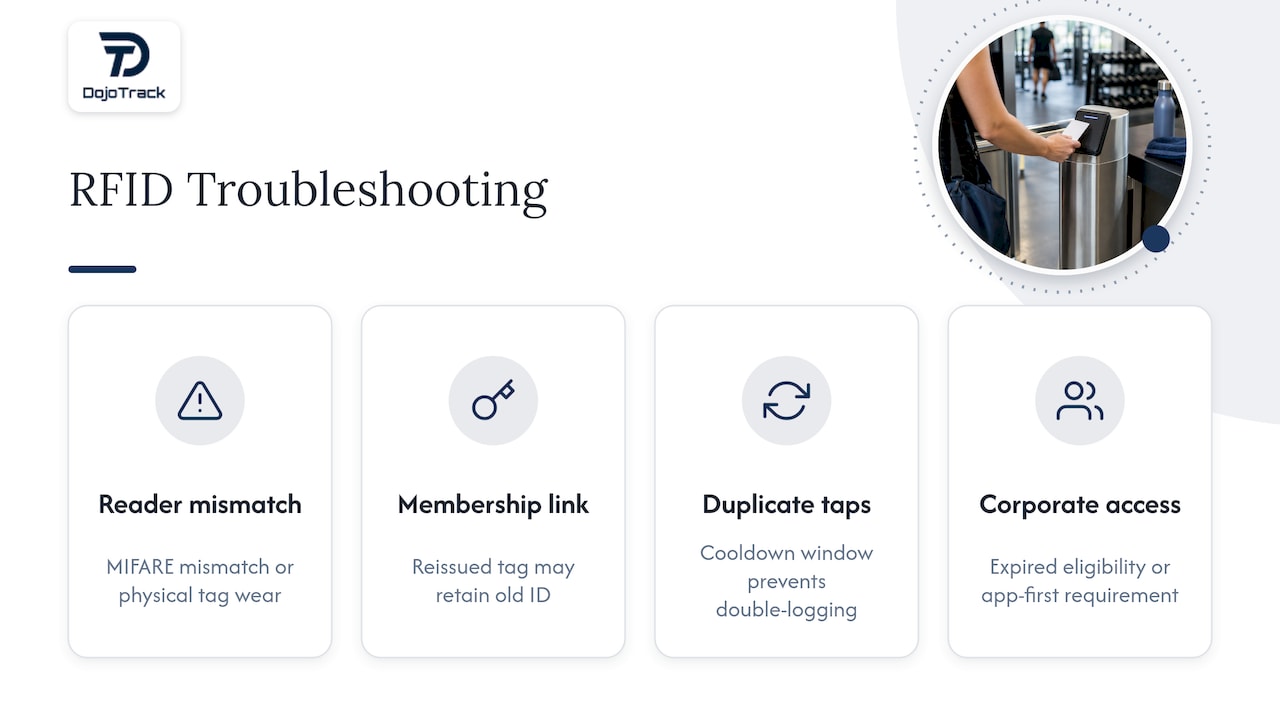
Reader fails to recognize a tag. This is usually a chip-standard mismatch, a MIFARE tag presented to a reader configured for a different standard, for instance, or physical wear on the tag itself from being kept in a pocket with keys.
Member shows as denied despite an active membership. Check whether the MMS record and the RFID assignment are actually linked correctly; a tag reissued after a lost-card replacement sometimes fails to overwrite the old ID properly.
Duplicate check-in events. This typically happens when a member taps twice in quick succession, once out of habit, once because the first tap was slow to register. Most systems can be configured with a short cooldown window to prevent double-logging.
Corporate or third-party membership errors. As covered in the integration section, programs like Wellpass surface specific error codes for expired eligibility or app-first requirements, and front-desk staff need a quick reference for what each code means so they are not improvising an explanation at the door.
Keeping a simple troubleshooting sheet at the front desk, covering these four scenarios, cuts down on escalations to whoever manages your software on the back end.
Which facilities should move on RFID now, and which can wait
RFID check-in pays off fastest for high-throughput facilities, multi-location studios, and dojos with large group classes where a manual sign-in sheet creates a real bottleneck at the start of every session. If your front desk is already managing that crunch by hand, the automation is worth prioritizing now.
Smaller studios with irregular attendance patterns can afford to pilot rather than commit fully. The fastest path to value for most operators is a single-door pilot with manual, back-office tag assignment, proving the workflow before expanding to turnstiles or additional entrances.
— DojoTrack
Let DojoTrack handle attendance while you focus on the mat
Running RFID check-in well comes down to one thing: how cleanly the data lands in your membership system. We built DojoTrack specifically so that attendance, belt tracking, and member profiles live in one place, which means an RFID-linked check-in does not just open a door, it updates a student’s record in real time.
Here is what that looks like in practice:
- Attendance tracking tied directly to each member profile, feeding our AI-driven retention alerts.
- A student mobile app that lets members track belt progress and class schedules alongside their check-in history.
- Free core tools to get started with membership and attendance management before you add advanced automation.
If you are weighing a rollout, our pricing page outlines the Free, Launch, Scale, Expand, Grow, and Master plans, or you can sign up directly to see how attendance and member data come together in one system.
FAQ
Can I go to the gym alone at 17?
Policies on unaccompanied minors vary by facility, so check your specific gym’s age policy rather than assuming a universal rule. Some gyms allow minors to train alone with a signed waiver, while others require a guardian present until a certain age.
Can I put a vending machine in a gym?
Yes, vending machines are a common addition in gym lobbies and waiting areas, and placement typically depends on available space and local health or business licensing requirements. Facility owners generally handle this as a straightforward equipment and leasing decision rather than one tied to membership software.
Is there a way to check how busy the gym is?
RFID check-in systems that log every tap in real time can show current occupancy and historical peak-hour patterns once that data feeds into your membership system’s reporting. Without that integration, gyms typically rely on manual headcounts or front-desk estimates instead.
How does the gym know it’s you?
An RFID tag itself does not identify you by name. It carries a unique ID number that your gym’s membership system matches to your account the moment the reader scans it, which is why keeping that ID-to-member mapping accurate inside the software matters more than what is printed on the card.
Sources
- CISA — Houses of Worship / facility security self-assessment
- EGYM developer docs — Member RFIDs and checkin endpoints
- EGYM facility preparation guide — login method