
Belt Promotion Automation: What to Automate and What to Keep

Belt promotion automation means letting software count classes, watch time in rank, flag students who are ready, and send the notices that follow. The instructor still decides who advances. The best setup automates the bookkeeping around a promotion and leaves the judgment to the people on the mat. That split gives you accurate records and no missed students, and your Saturday afternoons stop disappearing into spreadsheets. DojoTrack is built for this: it includes automated belt tracking and promotions, attendance tracking, and email and SMS communication in one platform, and you can start on a free plan.
TL;DR
- Automate the counting: classes attended, time in rank, curriculum progress, and the notices that go to students and parents.
- Keep the decision human: skill, attitude and readiness are judged by an instructor, and the software records the result.
- Write your promotion rules down per belt and per age group before you configure anything.
- Run a monthly review of “almost eligible” students so nobody is missed and nobody is promoted early.
- Route youth messages through the parent record and keep photo consent on file.
Table of Contents
- What belt promotion automation actually covers
- Step 1: Write your eligibility rules per belt
- Step 2: Set rules for different ranks, ages and programs
- Step 3: Build the review-and-approve workflow
- Step 4: Automate the notices to students and families
- Step 5: Keep clean records and protect families’ information
- Step 6: Test and improve your process
- A short example
- Where DojoTrack fits
- Our perspective
- FAQ
- Sources
What belt promotion automation actually covers
A promotion is really five jobs hiding under one event:
- Counting. How many classes has this student attended since their last promotion? How many weeks have passed?
- Flagging. Who has crossed the minimums and should be looked at?
- Judging. Can the student actually do the techniques, forms or sparring the rank requires, and do they show the right attitude?
- Notifying. Telling the student or the parent about the test, the date, the fee and what to bring.
- Recording. Writing down the new rank, the date and who approved it, then ordering the belt or patch.
Jobs 1, 2, 4 and 5 are administrative. They are repetitive, easy to get wrong when you are tired, and exactly what software does well. Job 3 is the reason students trust your belt. Keep it with your instructors.
Many owners still do the counting from paper sign-in sheets or a binder of cards. It works until you have 150 students, three age groups and two instructors who remember different numbers. That is when promotions get missed, and when a parent asks why another child tested first.
Step 1: Write your eligibility rules per belt
Automation can only enforce rules that exist in writing. Before you touch any settings, put every rank on one page with its requirements. Real schools publish theirs, and the range shows how much schools differ.
Elite Freestyle Karate’s student handbook lists minimums by belt: white to yellow takes 6 weeks and 18 classes, while brown to black takes a year and 120 classes with 20 sparring rounds. It also requires a set number of curriculum stripes before a student can test, and sets pre-test conditions such as tuition being current and the right uniform and equipment.
MATKD’s testing requirements define eligibility as a mix of a minimum class count, a mastered pattern, demonstrated techniques, and attitude. Youth students also need parent or guardian permission, and blue belts and above must show leadership.
Notice the pattern. Every requirement falls into one of two buckets:
| Requirement type | Examples | Who checks it |
|---|---|---|
| Countable | Classes attended, weeks in rank, sparring rounds, tuition current | Software |
| Judged | Technique quality, attitude, leadership, readiness, maturity | Instructor |
Do this exercise for your own school. Build a table with one row per belt and four columns: minimum classes, minimum time, required curriculum items, and judged criteria. The first two columns go into your system as hard numbers. The last two become the checklist an instructor uses when reviewing a flagged student.
Decide what counts as a class
This is where most disputes start. Decide in advance whether these count toward the minimum:
- Make-up classes and open mat
- Private lessons
- Classes in a different program (a BJJ student sitting in on kickboxing)
- Seminars and events
Write the answer down and apply it to everyone. A clear make-up class policy that families can read in one page makes it easier to explain why a missed class was or was not credited.
Step 2: Set rules for different ranks, ages and programs
One rule set rarely fits every student. Look at how working schools split theirs.
Gracie Barra Frisco describes a 13-belt youth system for ages 3 to 15. Stripes one and two are usually awarded for attendance, around 30 sessions. The third stripe reflects technical knowledge from a 16-week curriculum, and the fourth reflects maturity and readiness. The first two stripes are countable, and the last two are judged. That is a natural fit for automation: let the system award or flag the attendance stripes, and let instructors own the others.
Laramie Kempo Karate Club runs separate Junior and Adult rank systems. Its youth manual requires four stripes plus approval from the school head for youth testing. It holds a pre-test about a week before the test, run by at least two black belts, and the highest-ranking black belt present makes the final call. Its testing dates are posted at least three months ahead.
Ohio Martial Arts’ testing page shows a calendar-driven model: monthly tests for lower ranks and quarterly tests for higher ranks. On testing day the school verifies that each student attended the proper number of classes, and belts are presented about a week later in class.
Three takeaways for your setup:
- Separate tracks by age group. A five-year-old and an adult should not share thresholds.
- Match the system to your calendar. If you test quarterly, you want an eligibility list a few weeks before each test, not on the day.
- Add a gate. A pre-test or instructor review between “eligible” and “testing” catches students who have the hours but not the skills.
Step 3: Build the review-and-approve workflow
Here is a workflow that keeps instructors in charge and still removes the manual counting. Adapt the timing to your test schedule.
- Eligibility list is generated. The system compares each student’s attendance and time in rank to your rules and produces a list of students who have met the countable requirements.
- Instructor review. The instructor responsible for that class looks at the list and checks the judged criteria. Anyone not ready gets a short note on why and what to work on.
- Approval. The approved students move to the test roster. Whoever has final authority at your school signs off.
- Notification. Students or parents get the invitation with date, time, fee and what to bring. Reminders go to anyone who has not responded.
- Test and result. The instructor records pass or fail for each student.
- Promotion is recorded. The new rank, the date and the approver are saved to the student’s profile, and the belt or patch is ordered.
- Congratulation message. The student or parent hears the result and what comes next.
Where does the software earn its keep? Steps 1, 4, 6 and 7. Those are the steps that consume front-desk hours and where mistakes creep in.
DojoTrack includes automated belt promotions, attendance tracking, and email and SMS communications for exactly these steps. Students also get a mobile app where they can follow their belt curriculum progress and receive push notifications, so a student can see what is left before testing instead of asking you after every class. If you want a deeper look at how rank tracking works in software, our guide on karate belt rank management software covers it.
Step 4: Automate the notices to students and families
A promotion that nobody hears about on time leads to empty test slots and annoyed parents. Build these messages once and let them go out on their own:
- Eligibility notice. “You are on track to test in March.” Sent several weeks ahead.
- Test invitation. Date, location, attire, fee and an RSVP deadline.
- Reminder to non-responders. One nudge, then a second closer to the date.
- Day-before logistics. Arrival time, what to bring, where to park.
- Result and next step. New rank, when the belt will be presented, and any gear the student will need next.
For youth students, send these to the parent. For adults, send them to the student. Keep that distinction in your records so the right person always receives the message.
Choose the channel by urgency. Email handles invitations and details well. SMS is better for reminders, since text messages get read quickly. On DojoTrack, texts cost $0.017 per message, and you can rent a dedicated DojoTrack number for $2 per month, so a reminder to 80 families costs a little over a dollar. For the mechanics of sequences, see our email automation playbook and our guide to event reminders automation.
Not every student who nears eligibility is coming consistently. Attendance that is slipping is a retention problem as much as a promotion problem, and our attendance alerts setup guide shows how to catch it early. DojoTrack also includes an AI-driven retention system that identifies students at risk of dropping out, which matters because a student a few classes from a new belt is often the one you least want to lose.
Step 5: Keep clean records and protect families’ information
Automation makes your records better only if the entries are consistent. Aim for these habits:
- Every promotion is a dated entry on the student’s profile: old rank, new rank, date, and the instructor who approved it.
- Judged criteria get a note. A line such as “strong forms, needs work on sparring distance” is enough, and it settles later questions from parents.
- Corrections are traceable. If you must fix a mistaken entry, change it deliberately, with the reason noted, rather than quietly overwriting it.
- Youth communication goes through the parent record. Do not keep separate contact details for a child, and send notices to the parent or guardian.
- Consent is on file. If you share belt-test photos or video, record each family’s permission and honor it. Our student photo consent guide walks through a practical approach.
If you collect waivers for testing events, digital waivers stored with the student profile are easier to find than a folder of paper. DojoTrack includes digital waivers alongside student and family records.
Step 6: Test and improve your process
No setup is right the first time. Use the first two testing cycles as a check on the system.
Check for missed students. Before each test, pull the list of students who are within a few classes or a few weeks of eligibility. Compare it with what your instructors say. If an instructor names a student who is not on the list, find out why. Usually it is attendance logged under the wrong class, a family account that was split, or a student who changed programs.
Check for premature promotions. After each test, look at anyone promoted who barely met the minimums. If instructors had doubts, tighten the judged criteria or add a pre-test gate like Laramie Kempo’s.
Spot-check the counts. Choose five students at random and compare the system’s class count to what the instructors remember. A mismatch of a few classes is normal. A mismatch of 15 means a rule is misconfigured.
Ask for feedback. Parents will tell you quickly whether the notices were clear. If three families asked what time to arrive, put the time in the first line.
Review the rules each year. If many students sail through one belt or stall at another, the thresholds may be off for your curriculum.
A short example
Say you run a youth karate program with quarterly testing. Your rule for orange to green is 36 classes and 12 weeks in rank, plus three curriculum stripes.
Six weeks before the test, the system lists 14 students who have hit 36 classes and 12 weeks. Your lead instructor reviews them and finds 11 who also have three stripes and good conduct. Three need more work, and each gets a note and a target. The 11 parents get an invitation with a fee and an RSVP date, and nine reply. The other two get a reminder by text, and both reply. On test day, you print a roster of 11, all verified. Afterward, the 10 who pass are recorded and the belts are ordered. The one who does not pass gets a clear plan and a retest date.
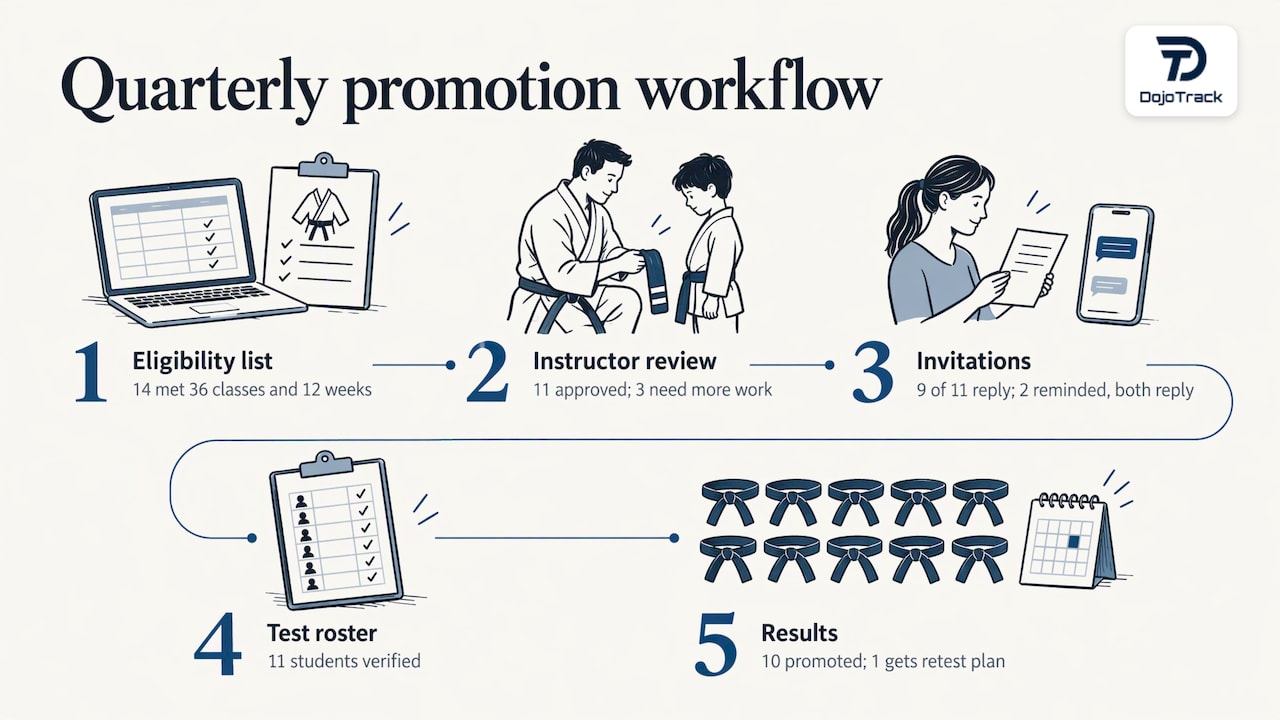
That is two hours of instructor judgment and almost no hours of counting, chasing or retyping.
Where DojoTrack fits
DojoTrack is built for martial arts schools, not adapted from generic business software. It brings student memberships, attendance, scheduling, digital waivers, family discounts, Stripe-powered recurring billing, point-of-sale inventory, and automated belt promotions into one platform, with a student mobile app for belt curriculum progress.
The core platform is free, so you can set up your belt rules and see how your students line up before you pay anything. Paid plans, which add advanced automation, analytics, billing, SMS and the student app, run $95 per month for Launch, $125 for Scale, $165 for Expand, $195 for Grow and $245 for Master. Compare them on the pricing page, or start with DojoTrack and load your first belt table.
Our perspective
We started DojoTrack because a martial arts veteran, Jared Reed, ran schools and lived the problem: manual belt tracking, billing in one place, attendance in another, and leads that went cold.
Our view is simple. A belt means something because an instructor stood in front of a student and decided they had earned it. Software should never take that moment away. What it should take away is the hour spent counting classes, the awkward text to a parent who missed the invitation, and the belt order nobody remembered to place.
That is why we built belt promotion into the same platform as attendance, scheduling, billing and the student app. When the data lives in one place, the promotion list is right, the notices go out on time, and students can see their own progress. You spend your time teaching and mentoring.
DojoTrack
FAQ
Can belt promotions be fully automated?
The administrative parts can: counting classes, tracking time in rank, flagging eligible students, sending notices and recording results. The decision to advance a student should stay with an instructor, because skill, attitude and readiness are judgments. Most schools find that this split protects both the quality of the belt and the instructors’ time.
How many classes should a student need before testing?
It depends on your style, age group and rank. Published school handbooks range from 18 classes and 6 weeks for a first belt to 120 classes and a year for a senior rank, as in the Elite Freestyle Karate handbook. Set your own numbers per belt and keep them consistent for every student.
What about students who miss classes but have the skills?
Decide your policy once and apply it to everyone. Many schools hold firm on attendance minimums, as Ohio Martial Arts does when it verifies class counts on testing day. Others allow instructor-approved exceptions. Whichever you choose, write it down so families know the rule before it affects them.
Should I send test notices to kids or parents?
Send them to the parent or guardian for youth students, and to the student for adults. Keep youth contact details on the parent record rather than storing separate ones for a child. That keeps communication clear and makes it easy to see who was notified.
Sources
- Elite Freestyle Karate student handbook
- MATKD testing requirements
- Kids Belt Grading System at Gracie Barra Frisco
- Ohio Martial Arts rank and testing
- Laramie Kempo Karate Club youth manual