
Email Automation for Martial Arts Schools: A Practical Playbook

Email automation for a martial arts school means writing a handful of emails once and letting software send them at the right moment: after an inquiry, after a missed trial class, after a student’s first week, and when attendance starts to slip. Done well, it replaces the sticky notes and the “I’ll follow up tomorrow” that never happens. This guide shows which automations to build first, what each message should say, when to send it, and how to stay inside U.S. email law.
TL;DR
- Start with one inquiry sequence of 4 to 5 emails. Speed matters most in the first day after someone raises a hand.
- Automate the trial-class journey next: confirmation, reminder, no-show rescue and a post-class offer.
- Add retention emails triggered by attendance, not by the calendar, so you reach students before they quit.
- Every promotional email needs your physical address, a working opt-out and honest subject lines under CAN-SPAM.
- Track replies, booked trials, trial-to-enrollment rate and unsubscribes, and fix one email at a time.
Table of Contents
- Why email automation fits a martial arts school
- Capture email addresses worth following up
- Build the new-inquiry sequence
- Automate follow-up after missed calls and no-shows
- Turn trial attendees into enrolled students
- Onboarding, attendance and retention emails
- Our perspective on email automation for dojos
- Measure whether it’s working
- Stay compliant with U.S. email rules
- Set up your first automation this week
- Run it all in one place with DojoTrack
- FAQ
- Sources
Why email automation fits a martial arts school
Most school owners are also the head instructor, the front desk and the billing department. Teaching is the job you want; chasing a parent who asked about kids’ classes on Tuesday night is the job that slips. Leads cool off quickly, and a late reply usually means they already booked a trial somewhere else.
Automation solves a consistency problem, not a creativity problem. A good follow-up email that goes out every time beats a perfect one that goes out when you remember. The same logic applies to the student side: a student who misses two weeks of classes rarely announces they are thinking of quitting. A simple trigger and a short, friendly note can bring them back before the decision is made.
There are three places where automated email pays off in a typical school:
- Before enrollment: inquiries, trial bookings, no-shows and post-trial follow-up.
- During the first 90 days: welcome, expectations, first belt goals and check-ins.
- For long-term members: attendance nudges, promotion announcements, events and renewals.
If you want the bigger picture of what else can run on autopilot, our overview of why to automate martial arts administrative tasks covers billing, attendance and scheduling too.
Capture email addresses worth following up
Automation is only as good as the list behind it. Build your capture points before you build sequences.
Put a form where people already look
Your website needs at least two entry points: a trial-class request form and a lighter option such as a free beginner guide or a “what to expect at your first class” download. Keep the form short. Name, email, mobile number, and a dropdown for who the class is for (adult, teen, child) is enough. Asking “who is this for?” lets you send the right sequence from the first email, because a parent of a six-year-old and a 35-year-old wanting to learn grappling need different messages.
Capture the people who never fill out forms
Walk-ins, phone calls, event sign-ups and referrals should land in the same place as web leads. Use a sign-in kiosk or a tablet at the front desk, and add a field for “how did you hear about us?” Every source should enter the same CRM record so one sequence handles everyone, and so you can later see which source produces students rather than just names.
Tag at the door
Tags decide which emails a person receives. A minimum useful set:
- Lead source (website, referral, event, walk-in)
- Program interest (kids, adults, teens, competition)
- Stage (new inquiry, trial booked, trial attended, enrolled, inactive)
When a stage changes, the sequence should change with it. A trial attendee who enrolls must stop receiving sales emails immediately. Few things look sloppier than a “still thinking about joining?” email sent to a new white belt.
DojoTrack’s CRM includes lead capture and automated lead scoring so you can see which prospects are most engaged, and our guide to connecting leads to your dojo with SMS booking links shows how a text and an email can work together in the first minutes.
Build the new-inquiry sequence
This is the first automation to set up, because it touches revenue directly. The goal of the sequence is a single action: book a trial class. Every email has one link, one ask.
The cadence below is a sensible starting point, not a law. Adjust it to your class schedule and your audience.
| Timing | Purpose | |
|---|---|---|
| Immediately | Thanks and booking link | Confirm you received the request, offer 2 or 3 class times, one-click scheduling |
| Day 1 (evening) | What to expect | Remove first-class fear: what to wear, no experience needed, who they will meet |
| Day 3 | Instructor story | Put a face on the school with a short note from the head instructor and a student result |
| Day 6 | Answer the objection | Address cost, time, age or fitness worries with plain answers |
| Day 10 | Last friendly nudge | Reiterate the offer, invite a reply, then move them to a monthly newsletter list |
Write each email for one reader
Short beats long. Aim for 80 to 150 words, a conversational tone and a plain-text feel. Sign it with a real name, and set the reply-to to an inbox somebody reads. Replies are the best signal you have that a prospect is warm, and a “no-reply” address throws that signal away.
A first email might read:
Hi Maria, thanks for asking about kids’ classes at our school. Here are three times this week when beginners are welcome. Pick one and we’ll have a uniform ready for your son. If none fit, just reply and tell me what works.
It confirms, gives choices, lowers the barrier and invites a reply, all in four sentences.
Pair email with text for speed
Email is good for explanation; text is good for urgency. The best first-day follow-up uses both: an immediate email with details and a short text with the booking link. If you use texting through DojoTrack, our published rate is $0.017 per text message, and a dedicated DojoTrack number is $2 per month, both listed on the pricing page.
Automate follow-up after missed calls and no-shows
Small schools lose students in the gaps: a call that went to voicemail while you were teaching, a trial who never showed, a prospect who watched a class and then vanished.
Missed calls and unanswered inquiries
If a prospect calls and you can’t pick up, a trigger should send an email (and a text if you have consent) within minutes: “Sorry we missed you, we’re on the mat. Here’s a link to book a time or ask a question.” The message should offer a way to reschedule with one click, not a request to call back.
Trial-class confirmation and reminders
A trial booking should fire three messages:
- Instant confirmation with address, parking, what to wear and who to ask for.
- Reminder the day before with a reschedule link.
- Morning-of reminder, short, with the class start time.
Reminders are not pushy. They’re the difference between a full beginner class and an empty one.
The no-show rescue
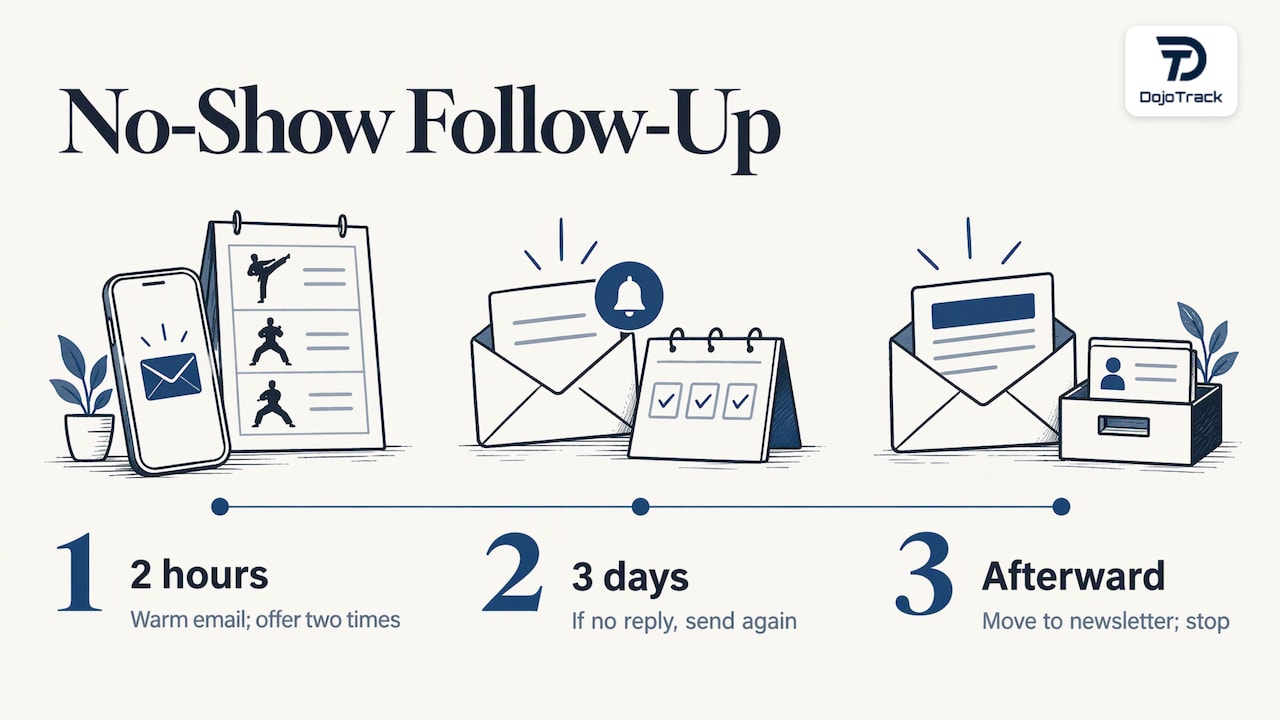
A no-show is usually nerves or a schedule collision, not disinterest. Send a warm email about two hours after the missed class: “We missed you today. No problem at all, here are two other times this week.” If they don’t respond, send one more message three days later. After that, move them to the newsletter list and stop.
Turn trial attendees into enrolled students
The trial class is your best sales moment, and the follow-up decides whether it converts.
- Same day, within a few hours: a thank-you from the instructor who taught the class, mentioning something specific (“your roundhouse kick form was solid for a first day”). Personalization fields can pull the name, but the specific detail is worth a manual note when you can.
- Next day: the offer. Spell out the membership options, the uniform or gear, and the next step in enrolling, with a link to a digital sign-up and waiver so there’s no paper at the door.
- Day 3: a gentle check-in that invites questions. Parents especially want to know about schedules, safety and progression.
- Day 7: a final reminder of the offer, framed as helping them keep momentum rather than as a deadline.
Keep the offer real. If you use an introductory price or free uniform, state its conditions plainly and avoid artificial countdown timers. Trust is your product in a school where a parent hands over a child.
Onboarding, attendance and retention emails
Winning a student is half the job. Automated email can protect the other half.
The first 90 days
New students are the most likely to drift. A simple onboarding series keeps them anchored:
- Day 0: welcome, class schedule, how to check in, and what the first month looks like.
- Week 1: a check-in: “How did your first week feel? Reply and let us know.”
- Week 3: a note about the first belt goal and the curriculum, with a link to progress tracking in the student app.
- Day 60: an invitation to a school event or seminar, so they meet more members.
Belt progress is a natural engagement driver. When a student sees what’s required for the next rank, there is a reason to come on Thursday. Our post on digital belt promotion tracking explains how to remove the spreadsheet from that process, and automated promotion emails can congratulate the student and tell the family about the ceremony.
Attendance-triggered nudges
Calendar-based emails reach everyone at the same time. Attendance-based emails reach the right person at the right time. Useful triggers:
- No class attended in 10 days: a friendly “we’ve missed you” with the next class times.
- Attendance dropped from three classes a week to one: a note from the instructor asking how things are going.
- A student reaches a milestone, such as 50 classes: a congratulatory message.
This depends on accurate attendance data, which is why smart attendance tracking is the foundation of retention email. DojoTrack’s AI retention system is designed to flag students at risk of dropping out, so you can reach out before they stop showing up.
Billing and renewals
Payment reminders and failed-payment notices are transactional, and they are best written in a kind, matter-of-fact tone. With recurring billing running through Stripe, an automated notice about a declined card saves an awkward in-person conversation. See how that works in our post on payment automation.
Our perspective on email automation for dojos
We started DojoTrack because we ran martial arts schools ourselves, and we know what the evenings look like: class ends, the mat is swept, and then there are 14 unanswered inquiries and a spreadsheet of belt requirements waiting.
Our view is simple. Email automation shouldn’t be a separate marketing tool bolted onto your school. It works best when it sits on top of the same record that holds your attendance, memberships, belt progress and billing. That’s how a message can be triggered by what a student actually did, not by a guess.
That is why we built DojoTrack as one platform: CRM, lead scoring, email and SMS communications, attendance, waivers and the student app together. We designed it so a new inquiry gets a response quickly, a missed class gets a kind nudge, and you keep your time for teaching and mentoring.
Start small. One good sequence, running every time, will do more for your school than ten clever campaigns you never finish.
DojoTrack
Measure whether it’s working
An automation you never review is a liability. Check these numbers monthly, and change one thing at a time so you know what caused the shift.
| Metric | What it tells you | What to try if it’s weak |
|---|---|---|
| Reply rate on inquiry emails | Whether messages feel personal | Shorten, sign with a real name, ask one question |
| Inquiry to booked trial | Whether the sequence moves people to act | Offer fewer class times, put the booking link higher |
| Trial show-up rate | Whether reminders work | Add a text reminder, clarify parking and what to wear |
| Trial to enrolled | Whether your follow-up and offer land | Send the instructor note sooner, simplify sign-up |
| Unsubscribe rate | Whether you’re sending too much or off-target | Segment by program, trim the sequence |
| 90-day retention | Whether onboarding works | Add a week-3 belt goal email, review attendance triggers |
It helps to tag every lead by source, so you can see not only how many inquiries came in but how many became paying students. A source that brings 40 names and no enrollments is not a source to grow.
For subject lines, test one variable at a time over a few weeks. Compare “Your first class at [School Name]” against a more personal line and look at open and reply rates. Treat open rates as a rough guide only; replies and bookings are the numbers that pay the rent.
Stay compliant with U.S. email rules
The federal CAN-SPAM Rule governs commercial email in the U.S., and an automated sequence is covered just as a manual one is. The Federal Trade Commission’s rule defines a commercial message as one whose primary purpose is advertising or promoting a product or service, and it separates transactional or relationship content from commercial content by placement and proportion, as set out in 16 CFR Part 316.
What that means for your school:
- Transactional emails such as a class confirmation, receipt or payment notice are exempt from most CAN-SPAM requirements, provided the header information is truthful. If you add promotions to them, all the commercial rules apply. Keep your reminders clean, or treat them as promotional.
- Promotional emails such as your inquiry nurture sequence, event offers and newsletters should include your valid physical postal address and a clear, conspicuous opt-out, and you must honor opt-outs within 10 business days, according to a CAN-SPAM summary from Adaptive Security.
- Penalties can reach up to $53,088 per violation, per the same summary, so a missing unsubscribe link is not a small mistake.
- Use honest From names and subject lines that match the content of the email.
In practice, set the opt-out to process automatically rather than relying on someone to remove names by hand. A marketing automation checklist is a helpful companion when you map out how unsubscribes and consent flow through your tools.
Special care applies to parents and children. Collect the email of the parent or guardian, not the child, and write the message to the parent. For text messages, which follow separate consent rules, get clear permission at sign-up. If you have questions about your specific situation, a business attorney can review your forms and wording.
Set up your first automation this week
You don’t need a full marketing department. Work through this order:
- Add a trial-class form to your website and a kiosk or tablet sign-in at the front desk.
- Set up tags for source, program and stage.
- Write the five-email inquiry sequence from the table above.
- Add trial reminders and the no-show rescue.
- Write your three-email post-trial series.
- Turn on one attendance trigger, such as no class in 10 days.
- Add your address and unsubscribe link to every promotional template.
- Put a monthly review on your calendar.
If you want more ideas on where AI fits into this, read how AI and automation are changing the game for studio owners.
Run it all in one place with DojoTrack
DojoTrack is built for martial arts schools, MMA gyms, Taekwondo academies and Jiu Jitsu schools. It brings your CRM, lead capture and scoring, email and SMS, attendance, digital waivers, Stripe-powered billing and a student mobile app into a single platform, so your automations run on real student data. You can start on the Free plan at $0 per month, and paid plans run from Launch at $95 per month up to Master at $245 per month. See every plan on the DojoTrack pricing page, or open the platform and look around.
FAQ
How many emails should a new inquiry sequence include?
Four to five emails over about ten days is a solid starting point: an instant confirmation, a what-to-expect message, an instructor story, an objection-handling email and a final nudge. Each should carry one clear action, usually booking a trial class. Review your reply and booking numbers after a month and trim or extend from there.
Do I need permission before sending automated emails to prospects?
CAN-SPAM does not require prior opt-in for commercial email, but it does require your physical address, a clear opt-out, honest headers and subject lines, and prompt honoring of unsubscribes. Many schools still collect clear permission on the sign-up form, which keeps the list engaged. Text messages have their own consent rules, so confirm yours with a business attorney.
What should I automate first if I only have an hour?
Set up the instant response to a trial-class inquiry, plus the reminder the day before the class. These two messages protect leads at the moment they are warmest and cost you almost nothing once written. Add the no-show rescue and post-trial follow-up next.
Can email automation help keep current students from quitting?
Yes, when emails are triggered by attendance rather than by the calendar. A short, personal note after ten days away, or a congratulation at a class milestone, tells students that someone noticed. Pair these with belt-progress updates so each student knows what they are working toward.
Sources
- PART 316, CAN-SPAM Rule (16 CFR, 2025 edition)
- SPAM Email from a Business Perspective, N.C. Cooperative Extension
- CAN-SPAM Act Requirements: 7 FTC Rules Every Email Marketer Should Know
- Marketing Automation Checklist: Step-by-Step Guide for SMBs