

TL;DR:
- Dojotrack provides a purpose-built management platform for U.S. martial-arts schools, automating belt tracking, billing, and retention alerts. Its free core tier covers essential features, while paid add-ons support growth with AI tools, billing automation, and student apps. The software streamlines operations, reduces administrative hours, and enhances student retention by targeting early dropout signals.
Dojotrack is the recommended student progress tracking solution for U.S. martial-arts schools that need belt automation, family billing, and AI-driven retention built into a single platform. It was built by a studio owner who lived the problem, and it starts free.
- Automated belt and rank tracking: promotion rules fire based on attendance minimums and technique completion, with no manual spreadsheet required
- Student mobile app: members view curriculum progress, grading dates, and class schedules from their phones
- Family billing and Stripe-powered recurring payments: link siblings under one account, apply discounts automatically, and collect tuition on autopilot
- AI at-risk alerts: the platform flags students showing early dropout signals before you lose them
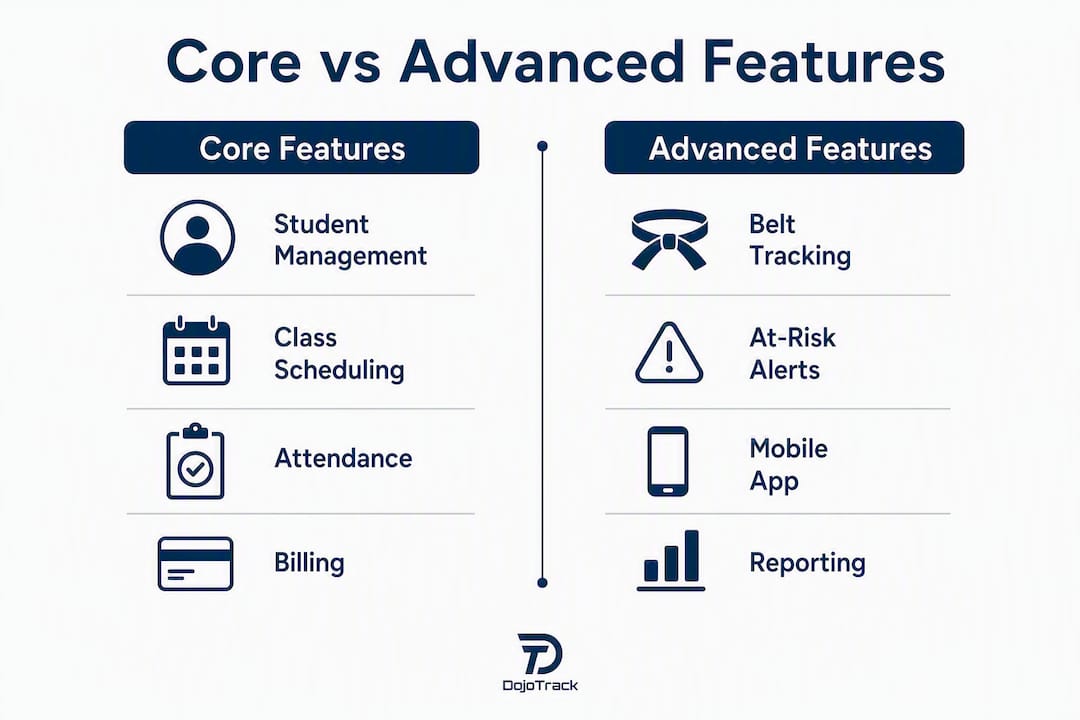
- Free core tier: student management, attendance, scheduling, and digital waivers at no cost, with paid automation and analytics available as you grow
Dojotrack is currently available for U.S. studios only. You can start with the free core tier or schedule a demo to see the full platform in action.
Table of Contents
- What should you look for in student progress tracking software for your dojo?
- What does purpose-built student progress tracking actually do?
- How do you roll out new dojo software without disrupting your school?
- What does dojo management software actually cost, and what’s the ROI?
- Key Takeaways
- Why the best dojo software is the one built by someone who ran a dojo
- Dojotrack gives you the tools to run a tighter, smarter school
- Useful sources and further reading
- FAQ
What should you look for in student progress tracking software for your dojo?
The right dojo management software depends heavily on your studio’s size and growth stage. A solo instructor running 40 students needs fast check-in and basic belt tracking. A multi-location school needs family billing, waitlist management, and retention dashboards. Matching features to your actual situation keeps you from paying for tools you won’t use.
Decision matrix by studio size:
| Studio size | Top priorities |
|---|---|
| Solo / 1–3 instructors | Easy setup, belt tracking, attendance, digital waivers |
| Small school (fewer than 200 students) | Family billing, scheduling, student app, basic reporting |
| Multi-location / growth stage | AI retention alerts, advanced analytics, staff management, integrations |
Core evaluation criteria:
- Ease of setup: can you be operational in under two weeks without a dedicated IT person?
- Curriculum customization: does the platform support your specific belt hierarchy and style?
- Mobile app: do students and parents get real-time progress visibility?
- Billing integrations: is Stripe or a comparable processor built in, not bolted on?
- Reporting: can you see retention signals, attendance trends, and revenue in one dashboard?
- Security: is student data encrypted, with role-based permissions and clean data export?
- Support SLA: is there a real human available when your go-live hits a snag?
Questions to ask in every demo:
- How does data migration work, and what formats do you accept?
- Can I set sibling discounts and link family members under one billing account?
- Does the check-in kiosk work offline if my internet drops?
- How does the promotion workflow handle instructor sign-off?
- What are the Stripe transaction fees, and where do they appear on my invoice?
Red flags to walk away from:
- No customizable belt hierarchy (a karate school and a BJJ academy have very different rank structures)
- Family billing handled manually or through a third-party workaround
- Platform built for general fitness studios, not martial arts specifically
- Pricing that hides per-student fees or transaction markups in fine print
- No data export option, which locks your records in if you ever switch
A purpose-built dojo management platform should include student management, class scheduling, attendance, billing, and reporting as baseline features before you even evaluate the advanced tools.
What does purpose-built student progress tracking actually do?
Automated belt and rank tracking
The core workflow runs like this: an instructor logs technique completions against a student’s curriculum checklist. Once the student meets the attendance minimum and finishes the required techniques, the system flags them as promotion-eligible. You review the list, confirm instructor sign-off, schedule the grading event, and the platform updates the rank automatically. Automated promotion workflows eliminate the manual errors that creep in when you’re tracking 150 students on a whiteboard.

Purpose-built platforms can also manage multiple styles independently within a single account, so a school offering both Taekwondo and Jiu Jitsu tracks separate belt hierarchies without mixing records.
Pro Tip: Set your promotion rules to require both a minimum attendance count and 100% technique checklist completion before a student appears on the eligibility list. Add an instructor sign-off step as the final gate. This preserves your instructional judgment while letting the software handle the administrative detection.
Attendance, check-in, and at-risk alerts
Attendance tracking and waitlist tools do more than count heads. When a student misses three consecutive classes, a well-configured system surfaces that pattern as a retention signal before the student quietly cancels. Dojotrack’s AI layer monitors these patterns and sends alerts so you can reach out personally, not after the fact.
Check-in options matter for day-to-day friction. A sign-in kiosk at the front desk, a mobile check-in through the student app, or a staff-managed tablet all serve different studio layouts.
Family billing and recurring tuition
Linking siblings under one billing account and applying family discounts automatically is a feature that saves front-desk staff real time every month. Stripe-powered recurring billing means tuition drafts on schedule without manual invoicing. Point-of-sale inventory management handles gear sales at the same register.
Student mobile app
When students can open an app and see exactly which techniques they’ve completed, which remain, and when their next grading date is, they ask fewer status questions and attend more consistently. Student-facing progress visibility is a retention multiplier, not just a convenience feature. Parents of younger students particularly value the transparency, and it reduces the volume of “when is my kid testing?” calls to your front desk.
Scheduling and reporting
Scheduling and waitlist tools that connect directly to the student app reduce no-shows and fill private lesson slots more efficiently. On the reporting side, a studio-specific dashboard should show you attendance trends, revenue by class type, belt distribution across your student body, and which students are at risk of churning, all without exporting to a spreadsheet.
How do you roll out new dojo software without disrupting your school?
A realistic rollout runs 4–8 weeks from kickoff to full adoption. Rushing that timeline is where most implementation problems start.
- Weeks 0–2 (setup): Create your account, configure your belt hierarchies and curriculum libraries, and set up staff permissions and class schedules.
- Weeks 2–4 (data migration): Export student records, belt history, family links, and billing data from your current system. Map fields to the new platform and run a test import with a small sample before committing the full dataset.
- Weeks 3–5 (pilot and staff training): Run one or two classes through the new check-in workflow. Train front-desk staff on the scripted check-in process and show instructors how to log technique completions. Walk parents through the student app during a demo week, and consider a small incentive (a free class or gear discount) for students who download and activate the app.
- Weeks 4–8 (full go-live and adoption): Run parallel check-ins for 2–4 weeks so you can catch discrepancies before fully retiring the old system. Monitor attendance data daily during this window.
Migration pro tip: Export student belts, attendance history, family links, and billing records as separate files. Clean duplicates and inconsistent belt names before import. Running parallel check-ins for 2–4 weeks catches edge cases that a single data audit misses.
Common challenges and how to handle them:
- Data inconsistencies: belt names that don’t match your new hierarchy, duplicate student profiles, or missing family links. Fix these in the export file, not after import.
- Instructor buy-in: show instructors the time they save on grading prep, not the new software they have to learn. A 10-minute demo focused on the promotion eligibility list usually converts skeptics.
- Kiosk hardware: budget for a tablet and stand if you want a front-desk check-in kiosk. Most platforms support standard iPad hardware.
For scheduling best practices during rollout, especially if you’re launching new class programs alongside the software switch, plan your schedule configuration in week one so students see accurate class times from day one.
What does dojo management software actually cost, and what’s the ROI?
Dojotrack’s freemium model gives you the core platform at no cost: student management, attendance, scheduling, and digital waivers. Paid add-ons unlock AI retention alerts, billing automation, the student mobile app, and advanced analytics. SMS messaging and Stripe transaction fees are separate line items.
Total cost of ownership checklist:
- Monthly subscription (free core or paid tier)
- Stripe payment processing fees (standard rates apply per transaction)
- SMS messaging costs if you use automated outreach
- Tablet hardware for check-in kiosks (one-time expense)
- Staff training time during rollout (a few hours total)
- Optional add-ons as your school grows
A simple ROI example: if your school retains a few additional students per month through AI-driven outreach, it can cover most or all of a paid subscription. Manual billing errors and missed payments represent a separate revenue leak that automated recurring billing closes immediately.
Student-facing progress apps contribute to retention by making progress visible to students and parents and enabling targeted outreach to at-risk members. Use Dojotrack’s lifetime value calculator to model what a one or two percentage point retention improvement means for your annual revenue.
Key Takeaways
Purpose-built martial-arts studio software that automates belt tracking, family billing, and retention alerts pays for itself when it keeps even one or two students from quietly walking out the door.
| Point | Details |
|---|---|
| Free core tier available | Dojotrack’s free plan covers student management, attendance, scheduling, and waivers with no upfront cost. |
| Belt automation saves grading time | Promotion rules combining attendance minimums and technique checklists eliminate manual eligibility tracking. |
| AI retention alerts matter | Identifying at-risk students early, before they cancel, is the highest-ROI feature in any dojo management platform. |
| TCO includes more than the subscription | Budget for Stripe fees, SMS costs, kiosk hardware, and 4–8 hours of staff training time. |
| Dojotrack is built for U.S. dojos | Founded by a studio owner, available only in the United States, with a free core tier and paid add-ons as you scale. |
Why the best dojo software is the one built by someone who ran a dojo
Most studio management software is adapted from general fitness or gym platforms. The belt hierarchy is an afterthought. The family billing is a workaround. The promotion workflow is a custom field someone hacked together.
Dojotrack was built differently because Jared Reed, its founder, ran martial-arts schools before he wrote a single line of code. He knew that the real problem wasn’t a lack of software. It was software that didn’t understand the difference between a white belt and a brown belt, or why a family with three kids in the program needs one invoice, not three. The administrative weight of tracking promotions manually, chasing tuition, and trying to figure out which students were drifting away consumed hours that belonged on the mat.
The mission hasn’t changed: reduce admin, improve student outcomes, and give instructors their time back. That’s not a marketing line. It’s the reason the platform exists.
Dojotrack gives you the tools to run a tighter, smarter school
Running a martial-arts school means wearing a dozen hats before noon. Dojotrack removes the administrative ones so you can focus on the instructional ones.
The free core tier gets you started immediately: student and membership management, attendance tracking, class scheduling, and digital waiver collection, all without a credit card. When you’re ready to grow, paid add-ons unlock AI-driven retention alerts, billing automation, the student mobile app, and advanced analytics dashboards.
Every billing transaction runs through Stripe, which means PCI-compliant payment processing and transparent fee reporting. Setup typically takes under two weeks for a small school, and Dojotrack’s support team is available to help with data migration and configuration.
Dojotrack is available exclusively for U.S. martial-arts schools, MMA gyms, Taekwondo academies, Jiu Jitsu schools, and other combat sports businesses. Create your free account and have your core platform running before your next class cycle starts.
Useful sources and further reading
- What Is a Student Progress Tracking System for Martial Arts: overview of belt tracking, attendance, and skill development features in Dojotrack.
- Karate Belt Rank Management Software Explained: how belt hierarchies and promotion rules are configured in practice.
- Stop Losing Students: 5 Steps to Boost Retention and Revenue: retention tactics that pair directly with Dojotrack’s AI alert system.
- Why Manual Billing Hurts Small Martial Arts Schools: the revenue cost of manual invoicing and how automation closes the gap.
- Why School Owners Need AI Business Tools in 2026: the case for AI-driven retention and at-risk student alerts as operational necessities.
- Kids’ Martial Arts Gear: What to Buy by Age and Style: parent-facing gear guidance useful for onboarding communications and student app welcome messaging.
- Stripe integration: Dojotrack uses Stripe for recurring billing and POS. Standard Stripe processing fees apply and appear as a separate line item on your monthly statement.
- SMS providers: automated SMS outreach is a paid add-on. Carrier fees and message volume affect monthly costs; confirm current rates during your demo.
FAQ
What is student progress tracking software for dojos?
It’s martial-arts studio management software that tracks belt curriculum completion, attendance, and promotion eligibility automatically. Dojotrack is a purpose-built example designed specifically for U.S. martial-arts schools.
How long does it take to set up dojo management software?
Most small schools are operational within two weeks. Full adoption, including data migration, staff training, and student app onboarding, typically takes 4–8 weeks depending on school size.
Does Dojotrack work for multiple martial-arts styles?
Yes. Dojotrack supports separate belt hierarchies and curriculum libraries within a single account, so a school offering both Karate and Jiu Jitsu can track each style independently.
Is there a free version of Dojotrack?
Dojotrack offers a free core tier that includes student management, attendance tracking, class scheduling, and digital waivers. Advanced features like AI retention alerts, billing automation, and the student mobile app are available as paid add-ons.
What payment processor does Dojotrack use for tuition billing?
Dojotrack uses Stripe for recurring tuition billing and point-of-sale transactions. Standard Stripe processing fees apply per transaction and are listed separately from the platform subscription cost.