
Yes, use SMS, but only after the contact has opted in. The winning cadence is short: an immediate text within 5 minutes, a 4 hour nudge, a next morning check, day 3, then a day 7 exit message that closes cleanly if there’s no reply. Branch every step off the previous reply. Success isn’t “message sent,” it’s a booked meeting or a completed sale.
TL;DR:
- SMS follow-up is most effective when used only after explicit opt-in and in active moments like demo requests, missed calls, or trial signups.
- Speed-to-contact is critical, with response within 5 minutes significantly increasing meeting-booking chances, and delays severely reducing engagement rates.
- A typical 5-touch sequence includes immediate confirmation, four-hour follow-up, next morning message, day 3 reframe, and day 7 exit, all with clear context and asks.
- Reply-aware automation is essential to prevent over-sending, route objections appropriately, and trigger human handoffs for complex interactions or negotiations.
- Compliance requires storing explicit consent, handling “Reply STOP” properly, and limiting outbound texts to avoid opt-out spikes and legal issues.
Table of Contents
- What Is an SMS Follow-Up Cadence, and When Should You Use One?
- Why Does SMS Outperform Email for Fast Follow-Up?
- Sample SMS-First Cadences and Copy-Ready Templates by Stage
- How Do You Build Branching Logic Into an SMS Cadence?
- What Compliance Rules Apply to SMS Follow-Up?
- Which Metrics Actually Tell You If Your Cadence Is Working?
- What Has DojoTrack Learned From Studio-Specific SMS Cadences?
- How Do You Handle Common Objections and Replies Mid-Cadence?
- When Should a Human Take Over the Conversation?
- Run Your SMS Cadences Without Building the Logic Yourself
- Sources
- FAQ
What Is an SMS Follow-Up Cadence, and When Should You Use One?
A follow-up cadence is the scheduled sequence of touches (calls, emails, texts) you send after a lead takes an action, and SMS earns its place in that sequence because it gets read fast. Most cadences fail not because the message is wrong but because the channel or timing is wrong. SMS is the fastest lane in your multi-channel sequence. It’s not a replacement for email or calls, it’s the accelerant you apply the moment speed matters most.
The concept isn’t complicated: define a trigger, define a sequence of touches tied to that trigger, and define what happens when someone replies (or doesn’t). What trips up sales teams is applying SMS to situations where it doesn’t belong, or firing it off without a plan for what comes next.
Certain triggers are built for SMS-first response:
- A web form submission where the lead is still sitting at their screen
- A demo request that needs same-day confirmation
- A missed call from a prospect who didn’t leave a voicemail
- A trial signup that needs a fast welcome and setup nudge
- A quote or proposal that’s been sent and needs a nudge to open it
Each of these shares a common thread: the prospect is in an active moment, and a text lands in that window better than an email buried in an inbox.
There are also situations where SMS should stay out of the cadence entirely. Never text someone who hasn’t given consent, full stop; that’s not a best practice, it’s a legal line. Skip SMS for low-value, one-off transactions where a text feels like overkill, such as a single receipt confirmation that doesn’t need a reply. And be aware that certain regulated industries and certain message types carry restrictions beyond general consent rules, so check your obligations under the Telephone Consumer Protection Act framework before automating anything at scale.
The rule of thumb: SMS earns its spot in a cadence when speed and reply-ability matter more than length. If you need to explain something in detail, that’s an email’s job. If you need someone to act in the next hour, that’s a text.
Why Does SMS Outperform Email for Fast Follow-Up?
Speed is the entire argument. Texting a lead within 5 minutes of capture measurably increases the odds of booking a meeting compared to slower response times, and pairing SMS with email consistently beats running either channel alone. That single data point should reshape how you sequence your first touch: if your CRM routes a new lead to a rep queue and the first outreach happens an hour later, you’ve already lost ground.
The math on speed: Every follow-up playbook worth reading points to the same finding. The faster you text after lead capture, the higher your booking rate. Delay is the single most controllable variable in your entire cadence, and it’s the one most sales teams get wrong.
The behavioral case for SMS runs deeper than open rates. People treat texts like a conversation, not a broadcast, so short, single-topic messages perform far better than anything that reads like a marketing blast. A few behavioral rules follow from that:
- Keep every message to one idea and one ask, never stack three questions into a single text
- Treat each cadence as a single thread; don’t restart the conversation with a new greeting every time
- Match your tone to a text from a colleague, not a text from a corporation
- Respect the reply, if someone answers, that reply is now the highest-priority signal in your pipeline
There’s a real risk sitting on the other side of speed and frequency: send too often, and opt-outs spike. That’s not a hunch, it’s a pattern you’ll see the moment you cross from “helpful” to “annoying” in a lead’s inbox. A prospect who gets four texts in two days will hit STOP regardless of how good your copy is. The fix isn’t fewer touches overall, it’s smarter spacing and a hard ceiling on frequency inside any given week, something we’ll cover in the compliance section.
Sample SMS-First Cadences and Copy-Ready Templates by Stage
The backbone of a strong cadence is a canonical 5-touch sequence. This structure, adapted from post-call recovery frameworks used across the industry, balances urgency against annoyance:
- Immediate confirmation (within 5 minutes). Confirms receipt of the lead’s action and sets an expectation. This exists to stop the “did that even go through?” doubt before it forms.
- 4 hour follow-up. Targets same-day attention spans, especially useful for missed calls where the prospect is still thinking about why they called.
- Next morning touch. Catches anyone who went quiet overnight, timed for a 9 to 10 AM send window when reply rates run highest.
- Day 3 check-in. Reframes value instead of repeating the ask, this is where you address the most likely objection instead of just poking again.
- Day 7 exit message. Closes the loop with a permission-based question, either they re-engage or they tell you to stop, both outcomes clean up your pipeline.
Every message in that sequence needs four ingredients, drawn from what separates replies from silence: a timing hook that explains why you’re texting now, a contextual anchor tied to their specific action, one clear ask, and an easy opt-out.
Immediate confirmation templates:
- “Hi [Name], this is [Rep] from [Company]. Got your demo request, I’ll text your booking link in a few minutes. Reply STOP to opt out.”
- “Thanks for requesting a quote, [Name]. I’m putting the numbers together now and will follow up shortly.”
- “Hey [Name], saw you tried to reach us. Free to talk in the next hour?”
Missed-call recovery (send at the 1 hour mark):
- “Sorry we missed you, [Name]. What’s a good time today to connect?”
- “Hi [Name], this is [Rep]. Saw your call come through, happy to call back whenever works for you.”
Value-anchor templates (next morning or day 3):
- “Quick note, [Name]: most teams like yours save a few hours a week once [specific feature] is set up. Want a 10 minute walkthrough?”
- “Following up on the quote I sent, [Name]. Happy to walk through pricing options if that’s helpful.”
Objection-reframe templates (day 3):
- “Totally get it if budget’s tight right now, [Name]. Want me to send a lighter-weight option?”
- “No pressure, [Name], just checking if there’s a specific concern I can help address.”
Consequence-frame templates (day 5 to 7, use sparingly):
- “Your quote expires Friday, [Name]. Want to lock in the current pricing before then?”
Permission-close templates (day 7):
- “Haven’t heard back, [Name], totally fine. Want me to close this out, or is now just bad timing?”
- “I’ll stop reaching out unless you’d like me to keep the conversation open, just reply YES and I’ll follow up next week.”
For high-volume prospecting (inbound leads, trial signups), keep templates under 160 characters and lean on automation to fire the sequence without a rep touching send. For high-value accounts (enterprise deals, multi-location studios, complex proposals), extend messages slightly and personalize the value-anchor touch with details pulled from the actual conversation, a rep should review that message before it goes out rather than letting a template run untouched.
How Do You Build Branching Logic Into an SMS Cadence?
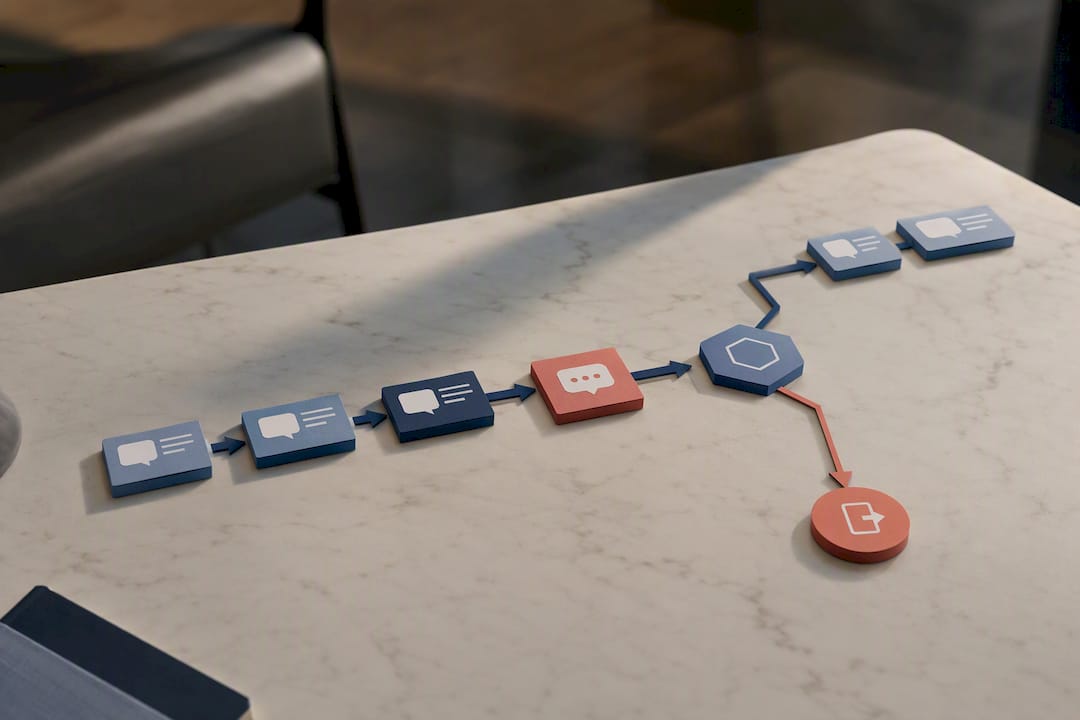
Fixed timers alone will run a cadence into the ground. A sequence that keeps sending message 3 after the prospect already replied “yes, let’s book” looks careless, and it damages trust fast. Reply-aware branching, not a rigid clock, is what keeps a cadence feeling human.
AI-personalized, reply-aware automation performs best when it classifies incoming replies into categories and routes each one differently:
- Positive reply (“yes,” “sounds good,” a booking request) should immediately pull the contact out of the automated sequence and either auto-book a slot or route the lead straight to a sales rep.
- Negative reply (“not interested,” “no thanks”) should stop all messaging and tag the record so no one accidentally re-enters them into a different campaign.
- Info request (“what’s the price,” “send me details”) should trigger a branch that sends the specific info requested, not the next scripted message in line.
- STOP or opt-out must trigger immediate suppression across every channel tied to that contact, not just SMS.
A few automation steps make this run smoothly in practice: remove the contact from the active workflow the moment any reply lands, tag the reply type in your CRM, and route anything that looks like genuine buying intent to a live rep within minutes rather than hours.
On the integration side, your CRM needs specific fields populated automatically: last reply text, reply classification, current cadence step, and opt-out status. Before turning any sequence loose on real leads, run it against a test contact end to end and confirm the “remove from workflow” trigger actually fires.
Pro Tip: Send yourself a test lead through the entire sequence before it touches a real prospect. Reply “STOP” partway through and confirm every downstream message actually stops. A cadence that fails this test in private will fail it in public, in front of a paying customer.
What Compliance Rules Apply to SMS Follow-Up?
Consent isn’t optional, and it isn’t implied by someone filling out an unrelated form. Record express consent at the moment it’s given, capture the source (web form, in-person signup, phone call) and store it somewhere your team can pull up if a contact ever disputes receiving texts. Consent and purpose records should map clearly to what you actually send, marketing texts need marketing consent, not a waiver signed for something unrelated.
Every automated sequence needs to handle “Reply STOP” without a human touching it. Most platforms automate this suppression already, but automation isn’t a substitute for auditing. Check your opt-out logs periodically to confirm suppressed contacts are actually staying suppressed across every campaign, not just the one they opted out of.
Beyond the legal floor, a few practical safeguards protect both compliance and your reply rates:
- Cap total outbound texts per contact per week, even for engaged leads
- Send only during reasonable business hours in the recipient’s time zone
- Keep an audit trail of every send, reply, and opt-out event tied to that contact
- Review your message templates periodically against current Telephone Consumer Protection Act guidance, since enforcement and interpretation shift over time
None of this is complicated once it’s built into your workflow. The mistake most teams make is treating compliance as a one-time setup step instead of an ongoing checklist. For a deeper walkthrough tailored to studio owners specifically, DojoTrack has a dedicated SMS compliance playbook for gyms worth bookmarking.
Which Metrics Actually Tell You If Your Cadence Is Working?
Four numbers matter more than anything else: response rate per touch, opt-out rate, conversion rate to meeting or sale, and speed-to-first-reply. Track these per cadence step, not just as an overall average, because a cadence that converts well overall can still be hiding a dead touch 2 that’s dragging down the whole sequence.
Where the lift comes from: Every meaningful gain in these cadences traces back to one lever: reducing the time between lead action and first text. Playbooks built around speed-to-lead consistently show the biggest jump in booked meetings, more than any change in message copy.
Once you have baseline numbers, A/B testing tells you what to adjust. Useful variables to test, one at a time:
- Time of day, morning send windows around 9 to 10 AM often outperform afternoon sends for scheduling-related follow-ups
- CTA phrasing, a direct ask (“Want to book Thursday at 2?”) against an open-ended one (“Any interest in learning more?”)
- Message length, short single-sentence texts against slightly longer ones with more context
- Sequencing order, whether the value-anchor touch performs better on day 2 or day 3
- Branch triggers, testing how sensitive your reply classification needs to be before it routes to a human
When a specific touch underperforms, don’t scrap the whole cadence, isolate and fix. If touch 3 has a low response rate, try tightening the CTA or shifting the send time before you assume the whole sequence is broken. If opt-outs cluster around a particular touch, that’s usually a frequency problem, not a copy problem, and the fix is spacing, not deleting the message.
What Has DojoTrack Learned From Studio-Specific SMS Cadences?
Some martial arts studio management software was created by industry veterans who ran studios firsthand and experienced common lead-follow-up gaps owners face: a form fills out late, nobody texts back until the next day, and the prospect has already signed up elsewhere. That gap is exactly what an SMS-first cadence closes.
Inside a martial arts studio, the triggers look a little different than a typical B2B pipeline, but the logic holds:
- A trial class signup gets an immediate confirmation text with class time and location, followed by a reminder the morning of
- A missed call from a parent asking about kids’ classes gets a same-hour text instead of a voicemail nobody checks
- A student who hasn’t shown up in two weeks gets a retention nudge instead of quietly falling off the roster
Studios running automated SMS follow-up on trial leads typically see more of those trials actually show up, since a same-day text confirmation cuts down on no-shows in a way that a next-day phone call simply can’t match. The same reply-aware branching covered earlier applies directly here: a “yes I’ll be there” reply should stop the reminder sequence, while silence should trigger the next scheduled nudge.
For readers building this out step by step, DojoTrack’s blog covers the specifics in more depth, including a studio owner’s playbook for SMS lead follow-up and a breakdown of why MMA gyms in particular need automated follow-up given how many leads come in outside business hours.
How Do You Handle Common Objections and Replies Mid-Cadence?
Most objections that show up in an SMS thread fall into a handful of predictable buckets: price concerns, timing concerns (“not right now”), and a flat “not interested.” Each deserves a different response, not a generic “no worries!” that ends the conversation for good.
Price objections respond well to a reframe rather than a discount offer right out of the gate. A reply like “Totally get it if budget’s tight, want me to send a lighter option?” keeps the door open without immediately negotiating against yourself. Timing objections (“maybe next month”) should trigger a branch that pauses the aggressive cadence and schedules a single, well-timed re-touch instead of continuing the day 3, day 5, day 7 sequence on schedule.
A flat “not interested” needs to be respected immediately, no follow-up question, no “just checking.” That reply should pull the contact out of the workflow and tag the record so a different campaign doesn’t accidentally re-engage them next month.
The trickiest replies are the ambiguous ones, a one-word “maybe” or a question that doesn’t clearly signal yes or no. These are exactly why reply classification matters more than a rigid script: a genuinely uncertain reply should route to a human rather than getting an automated response guessing at intent. Getting this wrong, treating a soft objection like a hard no, or vice versa, is one of the fastest ways to either lose a salvageable lead or annoy someone who already said no.
When Should a Human Take Over the Conversation?
Automation should hand off the moment a reply gets complicated. Pricing negotiations, complaints, and detailed technical questions all need a person, not a template, because these moments carry real risk if handled with a canned response.
A clean handoff needs three things logged in the CRM: a note summarizing the thread, the last message exchanged, and a clear next suggested step for whoever picks it up. Skip any of these, and the human taking over starts the conversation blind.
Measure handoff success the same way you’d measure any other touch, track how quickly a human responds after the handoff trigger fires, and whether that lead converts compared to ones that stayed in automation. If handoffs are converting well but happening slowly, that’s a staffing or alert problem, not a cadence problem.
— DojoTrack
Run Your SMS Cadences Without Building the Logic Yourself
Every cadence, template, and branching rule covered here still has to live somewhere, and building that infrastructure from scratch inside a spreadsheet or a generic CRM eats hours you’d rather spend on the mat. Some martial arts management platforms offer SMS automation, reply branching, and opt-out handling built into their systems to simplify setup.
Some platforms enable automation of trial confirmations, missed-call recovery, and retention nudges, improving trial attendance rates and reducing manual follow-up. Automated lead scoring can help prioritize outreach efforts.
DojoTrack offers a free core plan to get started, with paid tiers (Launch at $95 per month and up) unlocking full SMS automation and branching. Check current pricing and plans and set up your first cadence today.
Sources
- Sales follow up templates: 25 SMS templates that get replies in 2026
- SMS Follow-Up Automation 2026: Templates & Timing | NextPhone
- Automate SMS Outreach & Follow-Ups with AI 2026 | LOW/CODE
- Cookiedatabase
FAQ
What Is a Good Follow-Up Text Message?
A good follow-up text has a timing hook, references the specific action the person took, asks one clear question, and includes an opt-out. Something like “Hi [Name], following up on the quote I sent, want to walk through pricing?” hits all four.
What Does Follow-Up Cadence Mean?
A follow-up cadence is the scheduled sequence of touches, texts, calls, and emails, sent after a lead takes an action, timed and branched based on whether and how they respond. It’s the structure behind outreach, not a single message.
What Is Cadence in Text Writing?
In sales outreach, cadence refers to the timing and spacing between messages in a sequence, such as immediate, 4 hours, next morning, day 3, and day 7. Get the spacing wrong and even great copy underperforms.
How Do You Politely Send a Follow-Up Message?
Reference the specific reason you’re texting, keep it to one ask, and give the person an easy way to say no or opt out. Respecting a “not interested” reply immediately, without pushing back, is what keeps a follow-up polite instead of pushy.
How Much Does DojoTrack Cost for SMS Automation?
DojoTrack’s Free plan covers core studio management at no cost, with paid tiers starting at $95 per month for Launch that unlock SMS automation and branching. Text messages are billed separately at $0.017 per message, with a dedicated number rental at $2 per month.