
Gym Email Deliverability: SPF, DKIM, and DMARC, No Engineer Needed

The fastest way to fix email deliverability for a gym is to authenticate your sending domain with SPF, DKIM, and DMARC, require double opt-in, clean your list regularly, segment every send, and include a one-click unsubscribe link. These steps satisfy the sender guidelines that Gmail enforces, keep you compliant with CAN-SPAM, and are the same fundamentals we build into DojoTrack’s communication tools for martial arts studios.
TL;DR:
- Keep inbox placement above 95% and spam complaints below 0.1%; Gmail and Yahoo limit mitigation options when complaints reach 0.3%.
- Start DMARC at p=none, review several weeks of reports to confirm legitimate mail passes, then move to quarantine and eventually reject.
- Warm a new domain with 500 to 1,000 engaged recipients, increasing volume over one to two weeks only when opens stay strong and complaints remain low.
- Most single location studios can use a reputable shared IP; consider a dedicated IP only above roughly 5,000 daily emails to Gmail.
Table of Contents
- Why deliverability matters for gyms and what good looks like
- Technical setup: SPF, DKIM, DMARC, TLS, and where to start
- Sending behavior: warm-up schedules, cadence, and segmentation for gyms
- Campaign content: subject lines, headers, unsubscribe, and inbox-friendly design
- How to test deliverability and what to monitor
- Templates, examples, and a pre-send deliverability checklist for gym campaigns
- DojoTrack’s role and proof points for studios managing communications
- The impact of mobile app notifications versus email for member engagement in gyms
- How to leverage AI-driven analytics to improve email targeting and deliverability for gyms
- Quick perspective: prioritizing fixes for small vs. larger studios
- DojoTrack: an option to automate segmentation, retention, and member communications
- FAQ
- Sources
Why deliverability matters for gyms and what good looks like
A missed inbox is a missed member, which is why studios offering unique services such as osteogenic loading sessions for bone health benefit greatly from ensuring their emails land in the inbox. When your welcome series lands in spam, new sign-ups never see the onboarding schedule you worked hard to write. When a class-reminder email gets filtered, attendance drops and no-shows climb. When a renewal notice disappears into a promotions tab nobody checks, members lapse quietly instead of renewing, and you lose revenue you never saw coming.
Deliverability is not an abstract technical score. It is the difference between a membership renewal campaign that actually gets opened and one that just adds to your bounce count. A few terms are worth knowing cold:
- Delivery rate: the percentage of emails accepted by the receiving server, regardless of where they land.
- Inbox placement: whether a delivered email actually reaches the inbox instead of a spam or promotions folder.
- Bounce rate: the share of emails rejected outright, split into hard bounces (permanent, like a closed account) and soft bounces (temporary, like a full inbox).
- Spam complaint rate: the percentage of recipients who click “report spam” instead of unsubscribing.
A healthy gym sending program should aim for inbox placement above 95% and keep user-reported spam complaints under 0.1%, the same threshold Gmail and Yahoo use when deciding whether your messages keep flowing or start getting throttled. Studios that track these numbers monthly catch problems while they’re still small, before a renewal campaign quietly disappears for an entire membership segment.
Technical setup: SPF, DKIM, DMARC, TLS, and where to start
Authentication is the foundation everything else sits on. Without it, even a perfectly written renewal reminder can get filtered before a member ever sees it.
Here’s what each piece does in plain terms:
- SPF (Sender Policy Framework) tells receiving servers which mail servers are allowed to send on behalf of your domain, cutting down on spoofed messages that damage your reputation.
- DKIM (DomainKeys Identified Mail) attaches a digital signature to your emails so the receiving server can confirm the message wasn’t altered in transit.
- DMARC (Domain-based Message Authentication) tells receivers what to do when a message fails SPF or DKIM, and sends you reports so you can see who’s sending mail using your domain.
- TLS (Transport Layer Security) encrypts the connection between mail servers, a requirement Gmail’s sender guidelines call out directly for bulk senders.
Start your DMARC policy at p=none, which monitors and reports without rejecting anything. Once you’ve reviewed a few weeks of reports and confirmed your legitimate mail is passing, move to p=quarantine and eventually p=reject for full protection.
Before you trust any of this is working, run these checks:
- Look up your domain’s SPF and DKIM records with a DNS lookup tool to confirm they’re published correctly.
- Send a test email to a service that validates DKIM signing and reports pass or fail.
- Confirm your sending server supports TLS connections, since providers increasingly require it per RFC 8314, which defines secure transport standards for email.
- Check reverse DNS (PTR records) to make sure your sending IP resolves back to a hostname that matches your domain.
If you work with an email service provider or an outside IT contact, ask them directly: “Can you confirm our SPF, DKIM, and DMARC records are published and passing, and where do I paste any verification strings you give me?” Most providers hand you a TXT record to add through your domain registrar’s DNS settings, and the whole process usually takes under an hour once you have the strings in hand.
Pro Tip: Authentication isn’t a one-time setup. If you switch ESPs or add a new sending tool, you need to update your SPF and DKIM records to include that provider, or your mail will start failing checks silently.
Sending behavior: warm-up schedules, cadence, and segmentation for gyms
A new sending domain or IP has no reputation yet, and inbox providers treat unfamiliar senders with suspicion until you prove you’re trustworthy. That means you can’t blast your full list on day one.
- Start a warm-up by sending only to your most engaged 500 to 1,000 recipients, people who open and click consistently, such as active members who’ve attended in the last two weeks.
- Increase volume gradually over one to two weeks, adding less-engaged segments only after the early sends show strong open rates and low complaints.
- Segment every ongoing campaign instead of sending one blast to everyone: new members in their first 30 days, active attendees from the last 30 days, lapsed members between 30 and 180 days out, and prospects who inquired but haven’t joined.
- Set frequency expectations at signup, such as “one class update per week and occasional promotions,” and keep your actual cadence consistent with that promise.
- Consider a dedicated IP only once you’re sending more than roughly 5,000 emails a day to Gmail addresses, since Gmail’s bulk-sender rules apply stricter requirements at that volume. Below that, a shared IP from a reputable ESP is usually the better choice, since your reputation benefits from other well-behaved senders on the same infrastructure.
Most single-location studios never need a dedicated IP. The bigger lever is sending relevant content to people who actually want it, which naturally keeps your engagement metrics high enough that ISPs trust you.
Campaign content: subject lines, headers, unsubscribe, and inbox-friendly design
Content signals matter just as much as technical setup. A perfectly authenticated email with a deceptive subject line still gets flagged.
Keep each email focused on one goal. A renewal reminder shouldn’t also be trying to sell merchandise and promote a new class schedule. That dilutes the message and gives recipients more reasons to ignore it.
A few content rules protect your reputation directly:
- Never use a misleading subject line or a “From” name that doesn’t match your actual studio, both violations under CAN-SPAM.
- Include a valid physical postal address in every commercial email, a requirement under the same law.
- Add a clear, one-click unsubscribe link, and implement the List-Unsubscribe header so Gmail and other providers can offer a one-tap opt-out directly in their interface, a feature Gmail’s guidelines specifically reward with better inbox treatment.
- Avoid heavy tracking pixels and image-only emails with little actual text, since spam filters often flag image-to-text ratios that look evasive.
- Keep your message formatting RFC-compliant MIME, which most modern email tools handle automatically, but worth confirming if you’re using a custom sending setup.
For subject lines, test short and direct phrasing (“Your spot this week”) against more descriptive options (“3 open spots in Tuesday’s advanced class”) to see what your specific audience responds to. Personalization tokens like a first name can help, but only when the rest of the email delivers on the promise in the subject line.
Pro Tip: If your open rates are strong but click rates are flat, the subject line is doing its job and the email body needs work, not the other way around.
How to test deliverability and what to monitor
Testing before you send at scale catches problems while they’re cheap to fix. Three approaches serve different purposes.
- Real-inbox tests send a sample email to actual Gmail, Yahoo, and Outlook accounts you control, letting you see exactly where it lands.
- Seed lists are a broader version of the same idea, using a panel of test addresses across multiple providers to check placement at scale.
- Spam-check tools scan your email’s content and headers for common red flags before you send, catching obvious issues like spammy phrasing or missing authentication.
Once a campaign is live, ongoing monitoring tells you if something’s wrong before it becomes a bigger problem. Gmail Postmaster Tools and Yahoo’s sender dashboards both report your spam rate, reputation, and authentication status, while most ESPs show bounce and complaint data in their own reporting dashboards.
Keeping your spam rate under 0.1% is the single clearest signal of a healthy sending program, according to Gmail’s enforcement guidance. Crossing into 0.3% or higher puts you in territory where Gmail and Yahoo mitigation options become limited, meaning recovery takes much longer than prevention would have.
If your spam rate starts climbing, take these steps in order:
- Pause sends to your lowest-engagement segments immediately, since they’re the most likely source of complaints.
- Recheck your SPF, DKIM, and DMARC records to confirm nothing broke, especially after any ESP or domain change.
- Run a full list verification pass to catch and remove invalid or risky addresses before your next send.
Templates, examples, and a pre-send deliverability checklist for gym campaigns
A few reliable templates cover most of what a studio needs to send regularly.
- New-member welcome sequence: goal is onboarding and setting class-attendance habits in the first two weeks. Sample subject: “Your first week at [studio name] starts now.”
- Re-engagement email: goal is winning back members who haven’t attended in 30 to 60 days before they fully lapse. Sample subject: “We’ve missed you on the mat.”
- Membership renewal reminder: goal is prompting action before a membership expires, sent 14 and 3 days out. Sample subject: “Your membership renews in 2 weeks.”
Before any campaign goes out, run through this short checklist:
| Checklist item | What to confirm |
|---|---|
| Authentication | SPF, DKIM, and DMARC are published and passing |
| List-Unsubscribe header | Present and correctly configured in email headers |
| Segment selection | Recipients match the intended engagement or membership segment |
| Seed test results | Inbox placement confirmed across Gmail, Yahoo, and Outlook |
| Bounce handling | Hard bounces removed from the list before sending |
For subject-line testing, split your list into two even groups of at least 200 to 300 recipients each when possible, since smaller samples make results hard to trust. Judge the winner by open-to-click ratio rather than opens alone, since a subject line that gets opens but no clicks isn’t actually driving the action you want. Run the test window for at least four hours before declaring a winner and sending the rest of your list.
DojoTrack’s role and proof points for studios managing communications
Deliverability problems often start with a basic mismatch: sending to people whose membership data is stale. When attendance records, membership status, and contact details live in disconnected spreadsheets, it’s nearly impossible to know who’s actually engaged enough to want another email.
We built our communication tools around membership data that tracks attendance, billing, and belt progress, so a campaign to “active members” or “lapsed members” pulls from information that’s actually current. A few ways this shows up in practice:
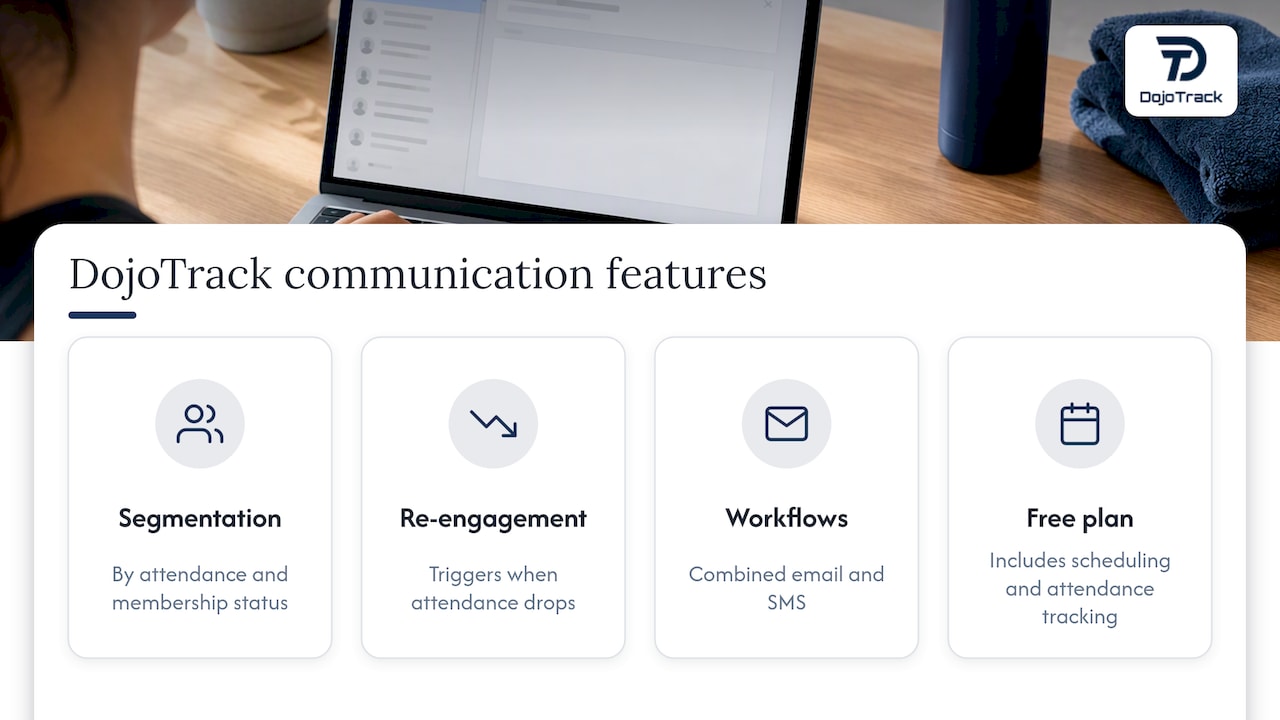
- Segmentation tools that group members by attendance recency, membership status, or lead stage, so renewal reminders and re-engagement sends reach the right people automatically.
- Automated re-engagement workflows that trigger when a member’s attendance drops off, instead of relying on someone remembering to check a spreadsheet.
- Analytics dashboards that show open and response patterns alongside attendance and billing data in one place.
- Combined email and SMS workflows, so a studio can choose the right channel for a given message instead of defaulting to email for everything.
Keeping your sends tied to real membership activity is one of the simplest ways to protect engagement metrics, since you’re naturally avoiding the inactive addresses that drag down inbox placement over time. For studios dealing with inconsistent lead follow-up specifically, automated follow-up systems can reduce the gaps that lead to stale contact data in the first place.
The impact of mobile app notifications versus email for member engagement in gyms
Email and mobile notifications serve different moments in the member relationship. Email works well for content that needs detail and a record a member can return to, like a renewal notice, a detailed class schedule change, or a waiver update. A push notification works better for immediate, time-sensitive nudges, like “class starts in 30 minutes” or a same-day schedule change.
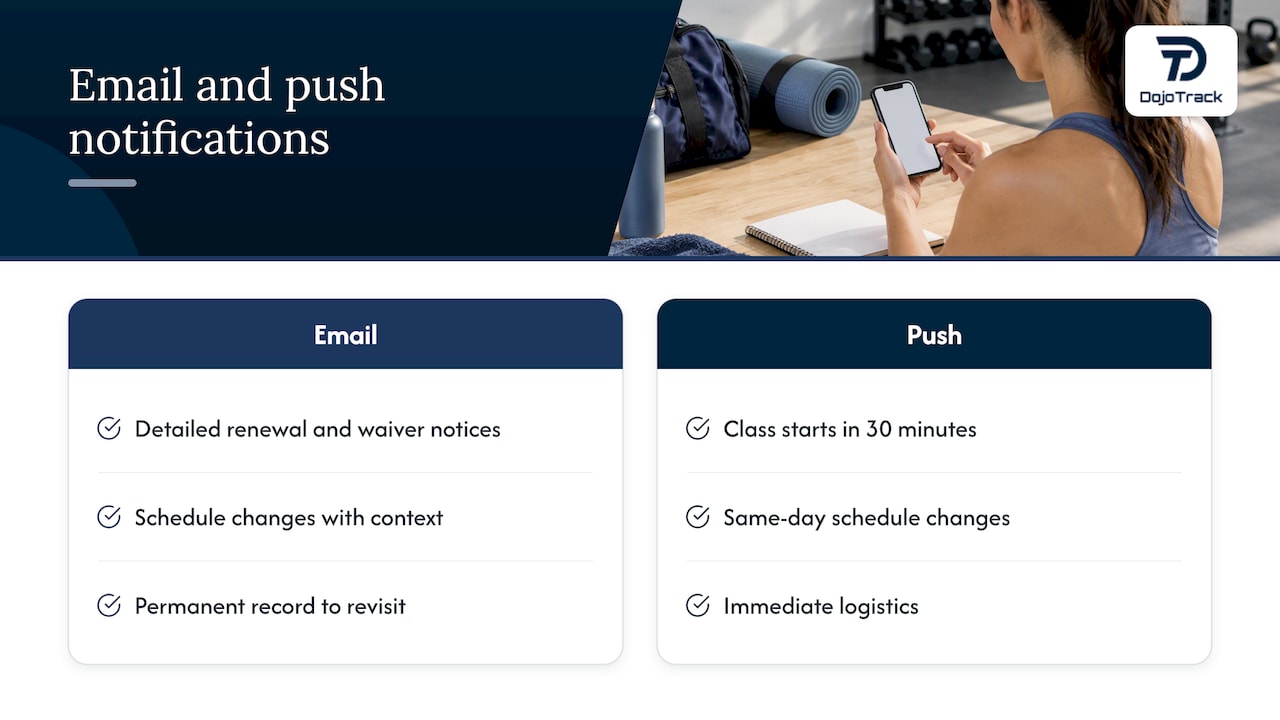
Relying on email alone for everything tends to overload the channel and push open rates down over time, since members start treating every message as routine. Splitting communication by purpose, using push notifications for immediate logistics and email for anything that needs more context or a permanent record, tends to keep both channels more effective. A student mobile app that handles schedule updates and belt-progress notifications can take pressure off your email list, letting your email sends focus on higher-value messages like renewals and welcome sequences rather than routine logistics.
How to leverage AI-driven analytics to improve email targeting and deliverability for gyms
Analytics tools that track engagement patterns over time can flag which segments are drifting toward disengagement before complaint rates spike. Rather than guessing which members are at risk of ignoring your emails, pattern-based analysis can surface declining open rates or attendance trends early enough to act.
This matters for deliverability specifically because disengaged recipients are the most likely source of spam complaints and the biggest drag on your sender reputation. Automated scoring that flags members with declining attendance or email engagement lets you move them into a lighter-touch segment, or a dedicated re-engagement sequence, before they hurt your metrics. DojoTrack’s retention analytics apply this kind of pattern detection to membership data directly, surfacing at-risk students so outreach, including email, can be targeted toward the people most likely to respond rather than sent indiscriminately to an entire list.
Quick perspective: prioritizing fixes for small vs. larger studios
Not every studio needs to tackle deliverability the same way, and trying to fix everything at once usually means nothing gets finished.
If you’re running a single location with a few hundred members, skip the infrastructure debates. Set up double opt-in, clean your list once, and build two or three solid templates for welcome, renewal, and re-engagement emails. That alone solves the majority of deliverability problems small studios actually have, since the honest truth is that most small-list problems come from content and hygiene, not infrastructure.
If you’re running multiple locations or sending to several thousand contacts, the priority shifts. Get authentication fully configured and monitored, start checking Postmaster Tools weekly, and have a real conversation about whether a dedicated IP makes sense once your Gmail volume climbs past the threshold where it matters. Bigger lists amplify small mistakes fast, so the infrastructure work that feels like overkill for a small gym becomes the thing protecting your reputation at scale.
— DojoTrack
DojoTrack: an option to automate segmentation, retention, and member communications
If the checklist above feels like a lot to manage on top of running classes, answering phones, and teaching, that’s exactly the gap we built DojoTrack to close. Instead of juggling a spreadsheet for membership status and a separate tool for email, our platform keeps attendance, billing, and belt progress tied directly to the segments you send to, so a renewal reminder or a re-engagement campaign pulls from data that’s actually current.
Studios using our platform get segmentation by attendance and membership status, automated re-engagement triggers when attendance drops, and combined email and SMS workflows so you’re not stuck choosing one channel for every message. Our AI martial arts software features cover the full picture, from lead scoring to retention analytics, built specifically for the way martial arts schools operate rather than adapted from a generic CRM.
We offer a free core plan that includes student and membership management, attendance tracking, scheduling, and basic communication tools to help organize your studio’s data before deciding whether to unlock more advanced automation. From there, paid plans scale with your studio’s needs, and you can compare Free, Launch, Scale, and the rest of our pricing tiers to see what fits your current size.
Switching tools midstream always feels like a bigger project than it turns out to be. Our data migration support moves your existing member and attendance records over so you’re not starting from a blank list.
If you’re ready to see how your current member data could power cleaner, better-targeted email campaigns, start with our free plan and explore the tools built around how martial arts studios actually run.
FAQ
What is the single biggest factor in email deliverability?
Authentication through SPF, DKIM, and DMARC is the foundation, since Gmail’s sender guidelines require it before bulk senders are even eligible for inbox placement. List hygiene and engagement come next, since even authenticated email gets filtered if too many recipients ignore or report it.
How long do I have to honor an unsubscribe request under CAN-SPAM?
CAN-SPAM requires you to process opt-out requests within 10 business days. Faster is better for your reputation, since delayed processing often leads to spam complaints instead of clean unsubscribes.
What spam complaint rate should a gym aim for?
Keep user-reported spam complaints under 0.1%, the threshold Gmail and Yahoo treat as healthy sender behavior.
Do I need a dedicated IP address for my gym’s email list?
Most single-location studios don’t need one, since a shared IP from a reputable provider works fine below high volume thresholds. A dedicated IP becomes worth considering once you’re sending more than roughly 5,000 emails a day to Gmail addresses, per Gmail’s bulk-sender guidance.
Should I use email or app notifications for class reminders?
App push notifications tend to work better for immediate, time-sensitive updates like same-day schedule changes, while email suits content members need to reference later, like renewal notices or detailed schedule updates. Splitting communication this way keeps both channels more effective and prevents email fatigue.
Sources
Every gym collects email addresses from a mix of sources: a sign-up tablet at the front desk, a website contact form, a trial-class promotion, a referral card filled out by hand. Each of those is a chance to capture a typo, a fake address, or someone who never meant to join your list.
Double opt-in solves most of this at the source. When someone signs up, send a confirmation email and only add them to your active list once they click to confirm. Industry guidance from Twilio recommends this specifically because it filters out typos, bots, and addresses entered by mistake before they ever become a bounce or a spam-trap hit.
Beyond the signup moment, ongoing hygiene keeps your list healthy:
Pro Tip: Run a list cleanup before every big send, like a renewal push or a seasonal promotion. A quick pass to remove bounces and long-inactive addresses takes minutes and protects your reputation for the campaigns that matter most.