
Data Migration Checklist for Martial Arts Studios: Keep Belt History Intact

Migrate your studio data in this order: inventory every source, map and clean the fields, lock down security, test with real staff, run a planned cutover, then stabilize during hypercare. Each phase protects something specific, from belt history to recurring billing, so skipping one creates the data gaps that frustrate students and front-desk staff for months. We built DojoTrack’s migration tools around exactly this sequence.
TL;DR:
- Assign an owner to every dataset, including payment processor records, waivers, belt progress, and attendance tools, and document volumes, formats, and credentials.
- Map belt codes and family links field by field, then verify recurring billing tokens; mismatches can erase promotion histories, split households, or interrupt payments.
- Before exporting records, document migration risks, encrypt files in transit and at rest, restrict access by role, require multifactor authentication, and log access.
- Reconcile record counts and billing totals to the cent, then have staff test attendance entries, belt promotions, waivers, and billing adjustments before approving launch.
- Schedule cutover during a slow week, define rollback triggers before freezing data entry, and monitor billing and integrations during one to two weeks of hypercare.
Table of Contents
- Inventory every data source, owner, and dependency in your studio
- Create field-level mappings and clean the data that matters for belt progress and billing
- Secure the migration and follow US information-security guidance
- Define validation evidence and rehearse imports before go-live
- Execute an executable cutover runbook and an explicit rollback plan
- Stabilize operations and decommission temporary artifacts
- DojoTrack founder perspective: priorities and common pitfalls from running schools
- How DojoTrack helps with studio data migration and where to start
- FAQ
- Sources
Inventory every data source, owner, and dependency in your studio
Before anything moves, you need a complete picture of where your data actually lives. Most studios underestimate this step because data hides in places nobody thinks to check: a spreadsheet the old front-desk manager kept, a payment processor’s dashboard, a sign-in sheet app nobody logged into in months.
Start by listing every dataset your studio depends on:
- Student and family records, including guardian relationships and emergency contacts
- Membership plans, attendance logs, and class schedules
- Billing and subscription data tied to your payment processor
- Digital waivers and their signature timestamps
- Belt and curriculum progress for every active student
- Point-of-sale inventory and staff accounts tied to permissions
For each one, assign an owner, someone who can confirm the data is accurate and approve its migration.
| Dataset | Typical owner | Live-write risk |
|---|---|---|
| Billing and subscriptions | Office manager | High (payment gateway) |
| Waivers | Front-desk staff | Medium (new sign-ups) |
| Belt progress | Head instructor | Low (updated after class) |
| Attendance | Instructors | High (daily check-ins) |
Document volumes, file formats, and who holds the login credentials for each system before you schedule anything.
Create field-level mappings and clean the data that matters for belt progress and billing
Once you know what you have, build a mapping workbook that treats every field as a small decision, not just a column to copy. For each field, record the source field, the target field, its data type, a transformation rule if the formats differ, a default value for blanks, a validation rule, an owner, and any open question that still needs an answer.
- Map belt and curriculum codes first, since naming conventions rarely match between systems and a mismatched code can wipe out a student’s promotion history.
- Map family and guardian linkages carefully so siblings and parents stay connected under one household account instead of splitting into duplicates.
- Separate attendance entries from class sessions so a single class with ten check-ins doesn’t collapse into one row.
- Confirm how recurring billing tokens transfer, since re-entering card data manually creates both a security risk and a billing gap.
Before you import anything, run a cleansing pass: deduplicate family accounts, normalize phone and e-mail formats, reconcile membership statuses so canceled students don’t reappear as active, and delete stale test accounts.
Pro Tip: Treat the mapping workbook as a shared agreement between your office staff and whoever runs the technical import, not a document one person fills out alone.
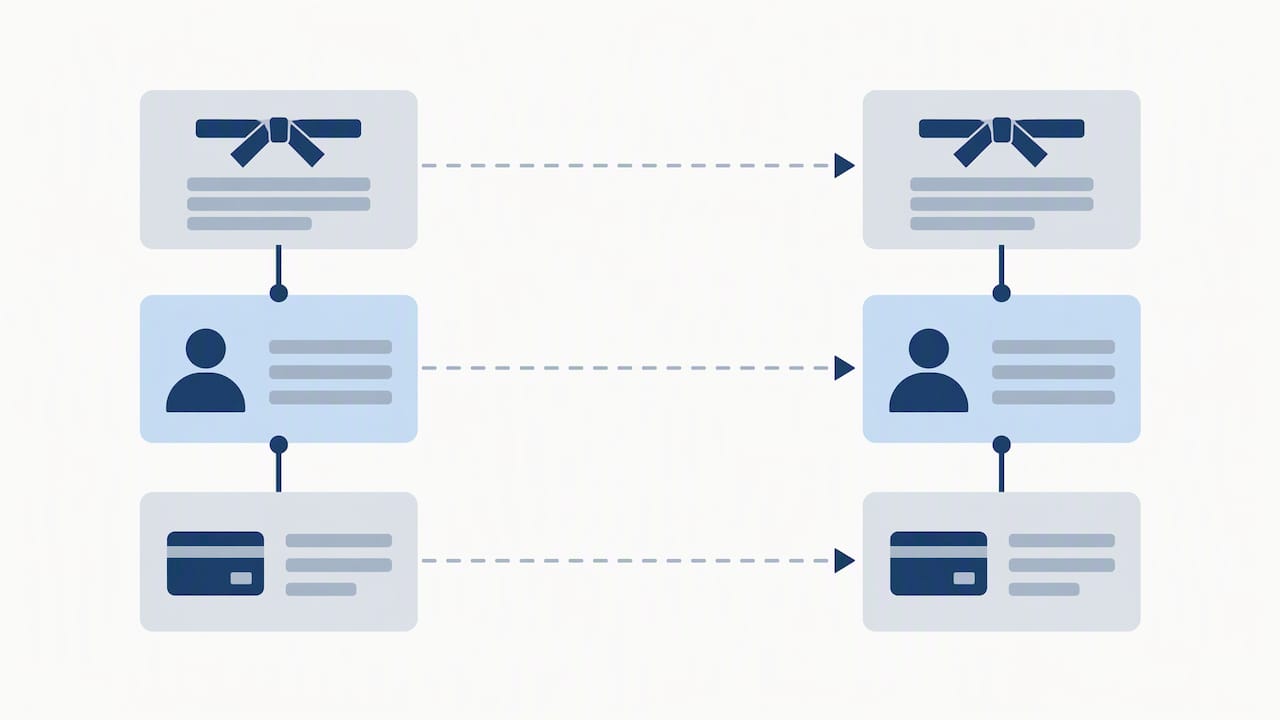
Our guide to preserving belt and billing data when switching software walks through common mapping traps in more detail.
Secure the migration and follow US information-security guidance
A migration creates temporary exposure that doesn’t exist in normal daily operations: exported files sitting on a laptop, staging databases with open access, payment tokens traveling between systems. The FTC Safeguards Rule requires businesses handling customer financial information to maintain a written information security program, including a documented risk assessment covering exactly these kinds of temporary exposures.
Before you export a single record, put these controls in place:
- Write a short risk assessment naming the specific migration risks: temporary exports, staging access, and payment token handling.
- Encrypt every transfer and backup, both in transit and at rest.
- Restrict migration access by role and require multifactor authentication for any account touching the data.
- Log who accessed what during the migration window.
The Safeguards Rule limits unnecessary data retention to a period generally not exceeding a couple of years unless a business has a documented reason to keep it longer, which means temporary exports should be deleted or securely wiped once validation confirms the new system is accurate, not left sitting in a folder indefinitely.
The federal standards at 16 CFR Part 314 spell out the same elements in more technical detail, including encryption, access controls, and vendor oversight, all of which apply directly to a studio moving data between platforms.
Define validation evidence and rehearse imports before go-live
A migration isn’t done when the import finishes running. It’s done when someone can prove the new system matches the old one and sign off on it.
- Run technical reconciliation: compare source-to-target record counts, confirm billing totals match to the cent, check referential integrity between students and families, and spot-check a sample of individual records by hand.
- Have instructors and front-desk staff perform business acceptance testing: check in a student, promote a belt, look up a waiver, and process a billing adjustment in the new system before real students touch it.
- Schedule a full rehearsal with a staged data load, smoke tests on critical workflows, written acceptance criteria, and a named person who gives the final go or no-go.
A practical migration checklist built around this same sequence, inventory, mapping, validation, cutover, and rollback, confirms that recorded decisions and validation evidence are what separate a clean cutover from a scramble.
Execute an executable cutover runbook and an explicit rollback plan
Cutover day needs a script, not improvisation. Define a freeze window where no new data enters the old system, and name exactly who can approve an exception if a student needs to check in during that window.
During the freeze, run these smoke tests before declaring the new system live:
- Write a test attendance check-in and confirm it saves.
- Authorize a test payment and confirm the transaction clears.
- Look up a waiver on file and confirm the signature date displays.
- Promote a test student’s belt and confirm the record updates.
| Decision point | Who owns it | Action if it fails |
|---|---|---|
| Freeze window exception | Studio owner | Approve manually or deny |
| Smoke test failure | Migration lead | Delay cutover |
| Rollback trigger | Studio owner + migration lead | Restore from backup |
Rollback triggers and the restoration steps need to exist on paper before cutover starts, not improvised in the moment. Set a hard latest decision time, a point past which the team commits to fixing forward rather than reverting, and have a communications plan ready for students and staff either way.
Stabilize operations and decommission temporary artifacts
The days right after cutover decide whether the migration feels smooth or chaotic. Set a hypercare window, often one to two weeks, with a clear monitoring cadence for failed jobs, daily reconciliation checks, and a simple channel for staff to report anything that looks wrong.
- Name an on-call migration lead for technical issues and a front-desk staffer for day-to-day questions.
- Escalate anything involving billing or data integrity straight to whoever manages the platform relationship.
- Validate that integrations like payment processing and POS inventory are pulling correctly from the new system.
Pro Tip: Don’t delete migration exports the day after cutover. Keep them encrypted for your documented retention window, then dispose of them securely once reconciliation is complete.
DojoTrack founder perspective: priorities and common pitfalls from running schools
Having run martial arts schools before building software for them, the lesson that stuck hardest is this: students notice broken belt history and billing errors immediately, but they rarely notice a missing historical report. Prioritize accordingly.
The pitfalls that cause the most damage are predictable. Family accounts get split into duplicates when guardian linkage isn’t mapped carefully. Recurring billing tokens get lost in translation, forcing students to re-enter card information and causing a wave of failed payments. Waivers get orphaned from the student record they’re supposed to protect.
Migrate live students and active billing first. Archive nonessential historical reports for later. Schedule the cutover during a slow week, not the week before a belt testing event.
— DojoTrack
How DojoTrack helps with studio data migration and where to start
We built DojoTrack’s migration tools specifically to protect what matters most during a studio software switch: belt progress, attendance history, billing records, and waiver associations all transfer with the family and student linkages intact, not as flat, disconnected rows. Our data migration page walks through how that process works and what to prepare before you start.
If you handle card payments through an integrated processor, our guide to integrated payment setups covers the kind of tokenization questions worth asking any platform before migration. Every plan, from the free tier through Launch, Scale, Expand, Grow, and Master, includes migration assistance so you’re not reconstructing years of belt history by hand. Request a migration review or create your account to see how your current data maps over before you commit.
FAQ
What should a martial arts studio migrate first?
Prioritize live student records, active memberships, and current billing data first, since those affect daily operations immediately. Belt history and attendance logs come next, with nonessential historical reports archived separately for later reference.
How long should a studio plan for data migration?
The timeline depends on data volume and system complexity, but most studios budget one to two weeks for inventory and mapping, a few days for validation and rehearsal, and one to two weeks of hypercare after cutover. Scheduling cutover during a slower week, rather than before a belt test, reduces disruption.
What security steps matter most during migration?
Encrypting data in transit and at rest, restricting access by role, and requiring multifactor authentication on migration accounts are core protections outlined in the FTC Safeguards Rule. A written risk assessment covering temporary exports and staging access should exist before any data moves.
How do you prevent losing belt progress during migration?
Mapping belt and curriculum codes field by field, rather than assuming systems use matching labels, is what prevents promotion history from disappearing. Validating a sample of student records against the old system before go-live catches mismatches early.
What happens to temporary files after migration?
Temporary exports and staging files should be encrypted, access-restricted, and kept only as long as needed for validation, then securely wiped or disposed of. Federal guidance on small-business security recommends limiting retention and verifying that any service provider involved follows the same disposal practices.
Sources
- FTC Safeguards Rule: What Your Business Needs to Know | Federal Trade Commission
- eCFR :: 16 CFR Part 314 – Standards for Safeguarding Customer Information
- Data Migration Checklist: Inventory, Mapping, Validation, Cutover, And Rollback