
Martial Arts Event Ticketing: A Complete Guide for School Owners

To sell tickets for a tournament, belt showcase or seminar, you need four things: an online page where people buy before the day, clear ticket types, a way to scan or check people in at the door, and a report that ties every sale back to your bank deposits. Do those four well and your event runs itself. Skip one and you will be sorting out payments in a parking lot after the last match.
This guide walks through the whole process for US schools, from setup to follow-up. It covers ticket types, pricing after fees, tax and refund basics, promotion, event-day check-in and reconciliation.
TL;DR
- Set up one registration and ticket page per event, with separate ticket types for competitors, spectators, families and kids.
- Price after fees. On standard card processing of 2.9% + 30¢, a $15 ticket leaves you about $14.27 unless you adjust the price or pass the fee on.
- Check your state’s rules on admission tax and refunds, and ask the venue about accessible seating before you publish capacity.
- Check people in with a kiosk, tablet or phone scan so one volunteer can run the door, and sell walk-ups into the same report.
- Reconcile within a week: match sales to payouts, then message every attendee while the event is fresh.
Table of Contents
- How to set up ticket sales for a tournament, showcase or seminar
- Which ticket types and quantities to offer
- Pricing tickets after fees
- Tax, refunds, waivers and accessibility
- Promoting ticket sales and tracking registrations
- Check-in, scanning and walk-ups on event day
- What to do after the event
- Our perspective
- Run your next event from the same platform as your school
- FAQ
- Sources
How to set up ticket sales for a tournament, showcase or seminar
Start with the event type, because it decides everything else. A belt-testing showcase for families needs a simple spectator ticket and a cap on seats. An open tournament needs competitor registration with divisions, plus spectator tickets. A guest-instructor seminar needs a limited number of mat spots and maybe a few observer passes.
Work through this order:
- Lock the basics. Date, venue, start and doors-open times, capacity, and the refund rule. Write the refund rule first so you can paste it onto the ticket page.
- Decide who gets in free. Many schools let children under a certain age in free with a paying adult, or let current students attend their own showcase at no charge. Free tickets should still be issued, so your headcount is real.
- Build the page. One page per event with the date, address, parking notes, schedule, and every ticket type visible at once. Add a short FAQ for the questions you always get: Can I film? Do I need to bring a gi? Where do spectators sit?
- Collect what you need at purchase. For competitors that means name, age, rank, weight class or division, and a signed waiver. For spectators, a name and email is enough.
- Test the purchase. Buy one ticket yourself on a phone, confirm the email arrives, and check that the sale shows up in your records.
If you already run memberships and billing in one system, keep event sales there too. The attendee’s record then lives next to their attendance, belt rank and payment history instead of in a separate spreadsheet. Our guide to online payments for small martial arts schools covers the payment side of that setup.
Which ticket types and quantities to offer
Too many ticket types confuse buyers. Too few leave money and goodwill behind. For most school events, five types cover it.
| Ticket type | Who it’s for | Typical quantity rule |
|---|---|---|
| Competitor | Students or outside athletes entering divisions | Capped by mat time and bracket size |
| Spectator, adult | Parents, friends, fans | Capped by venue capacity |
| Spectator, child | Kids who are not competing | Often discounted or free with an adult |
| Family pack | Two adults plus children | Fixed bundle at a small discount |
| Seminar or mat spot | Participants in a training session | Strict cap based on mat space |
How many to release
Base quantity on the space, not on hope. Take the venue’s posted capacity, subtract room for competitors, staff, referees, vendors and aisles, and release the remainder as spectator tickets. If you are renting a hall, ask the venue for its maximum occupancy and for its accessible seating layout before you publish numbers. Public events have to account for guests who use wheelchairs, so hold a few spaces back and say how to request them on the ticket page.
Release tickets in waves when demand is uncertain. Open 60% of spectator capacity early, then release the rest a week out. Early buyers feel rewarded, and you avoid a half-empty room that looks like a flop in photos.
Family packs and kids
Families are your core audience at a showcase. A family pack priced a bit under the sum of individual tickets is easy to understand and raises your average order. Keep the rule simple: “Two adults and up to three children, one price.” If you also offer family discounts on tuition, use similar logic here so the pricing feels consistent. For more on structuring prices across your school, see martial arts membership pricing models that work.
Pricing tickets after fees
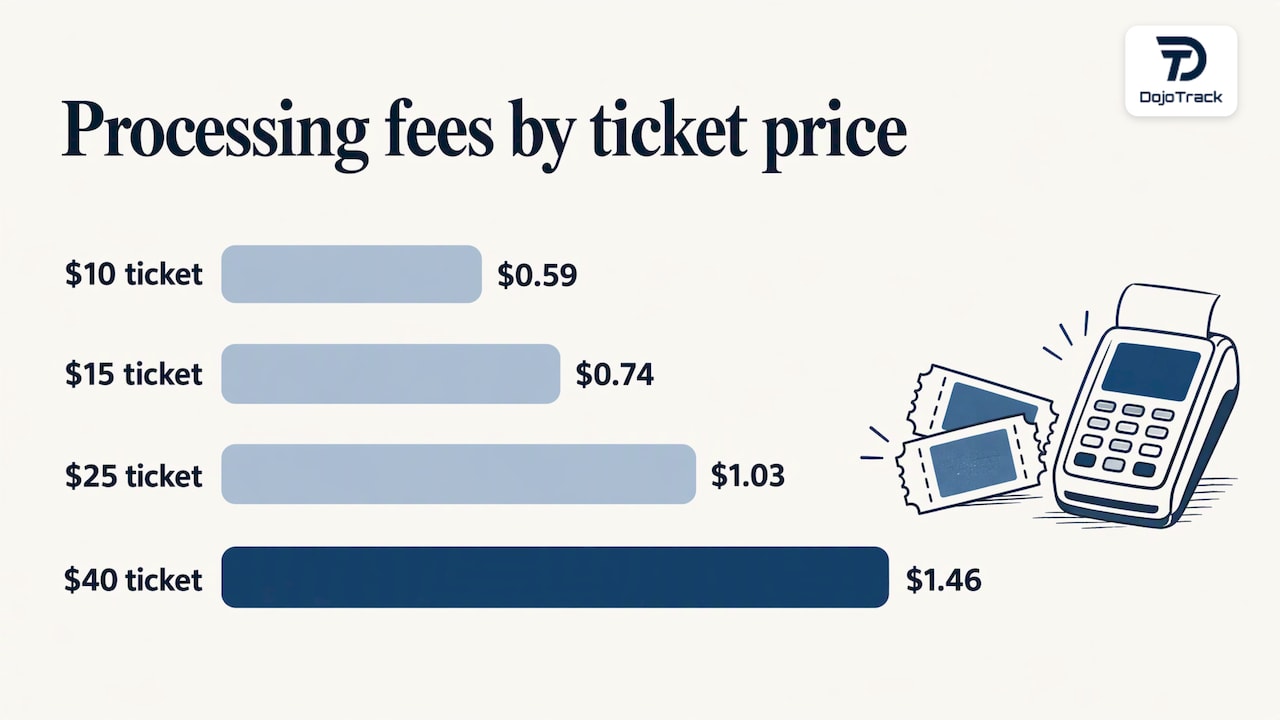
A $15 ticket does not put $15 in your account. Card processing takes a cut on every sale, and some ticketing tools add their own service fee on top. Decide up front who pays it.
Stripe’s standard US pricing for domestic cards is 2.9% + 30¢ per successful transaction, with extra charges for manually entered or international cards. Here is what that does to common ticket prices:
| Ticket price | Processing fee (2.9% + $0.30) | You keep |
|---|---|---|
| $10 | $0.59 | $9.41 |
| $15 | $0.74 | $14.27 |
| $25 | $1.03 | $23.97 |
| $40 | $1.46 | $38.54 |
Flat fees hurt cheap tickets most. On a $10 ticket the fee eats about 6%. On a $40 seminar spot it is under 4%.
Three ways to handle fees
- Absorb them. Simplest for buyers. Build the fee into your price from the start.
- Pass them on. Add a line item at checkout. Show the final price before payment so no one feels surprised.
- Gross up the price. To net a target amount, divide the target plus 30¢ by 0.971. To net $15, charge about $15.76.
If you also use a ticketing service that charges its own per-ticket fee, add it to the math the same way. Run your numbers on a full event, not one ticket: 100 tickets at $15 is $1,500 in face value and about $73.50 in standard card fees, so you net roughly $1,426.50 before any other costs.
Also set a price that matches your costs. Add up venue rental, insurance, referees, trophies or medals, shirts, and staff time, then divide by the tickets you realistically expect to sell. That is your break-even price per ticket. Add a margin for the schools’ growth fund or charity if the event is a fundraiser.
Tax, refunds, waivers and accessibility
This part varies by state, and a mistake costs more than any fee. Check these four things before you sell the first ticket.
Admission tax. Admission charges are taxable in many states, and the rules differ. Florida, for example, requires sellers to collect tax on taxable admissions, show the admission price at the box office or on each ticket, and credit or refund sales tax when unused tickets are returned, under Florida Administrative Code Rule 12A-1.005. Your state may exempt some school or nonprofit events or treat them differently. Call your state department of revenue or ask your accountant before you price.
Payment reporting. If you take payments through a payment app or online marketplace, the IRS says those platforms must send a Form 1099-K when payments for goods or services total over $20,000 in more than 200 transactions. A school with tuition plus event sales can reach that, so keep clean records and let your accountant know.
Refunds. Pick a policy and print it on the ticket page. A common approach is full refunds up to a set number of days before, and credit toward a future event after that. If the event is canceled, refund everyone automatically.
Waivers and accessibility. Competitors and seminar participants should sign a digital waiver before they arrive, not on a clipboard at the door. Have your insurance carrier or attorney review the waiver text. For spectators, confirm accessible seating and entrances with the venue and list the contact for requests on the ticket page.
Promoting ticket sales and tracking registrations
Selling tickets is mostly a communication job. Your first buyers are people already in your system.
A simple promotion timeline
- Six weeks out: Announce the event to current students and parents by email, and post the ticket link on your website and social profiles.
- Four weeks out: Send a second message to families who have not bought. Post a short video of the venue or past events.
- Two weeks out: Remind competitors about registration deadlines, weigh-in rules and waiver completion.
- One week out: Send a “what to expect” message with parking, doors-open time, what to bring, and a QR code or confirmation to show at the door.
- Day before: Final reminder with the schedule.
Text messages work well for last-minute reminders because parents read them. On DojoTrack, texts cost $0.017 per message, and you can rent a dedicated studio number for $2 per month, so a reminder to 200 families costs about $3.40.
Track sales as they happen
Watch three numbers every few days: tickets sold by type, registrations still missing waivers, and your sales pace against your break-even point. If sales lag at the four-week mark, change the message before you change the price. Try a family pack, a bring-a-friend spot or a limited early rate. If your records live in the same place as your member list, you can see who has not bought without exporting anything. Our post on revenue dashboards for martial arts schools shows which numbers deserve a place on that screen.
Check-in, scanning and walk-ups on event day
The door is where events go wrong. A single line, a paper list and one overwhelmed parent volunteer is how you get a 40-minute delay.
Build the door around speed
- Send a confirmation people can show. An email with a QR code or ticket number lets staff scan in a second. Our article on QR code check-in explains how to stop line buildup at the door.
- Use more than one lane. One for pre-purchased tickets, one for walk-ups, one for competitors and coaches.
- Use devices people already have. A tablet at a table or a phone in a volunteer’s hand is enough. A sign-in kiosk works well for students and competitors who are already in your system.
- Limit what volunteers can reach. Give door staff a check-in view only, not your settings, pricing or financial reports.
- Take walk-ups into the same system. Sell them at the same price and into the same report as online sales. Cash in a box is the first source of a reconciliation headache. If you do take cash, log it by ticket type with a second person counting.
Assign roles before the day
| Role | Job |
|---|---|
| Door lead | Runs scanning, handles problems, keeps the line moving |
| Walk-up seller | Sells tickets at the door and records every sale |
| Competitor check-in | Confirms waivers, divisions and weigh-ins |
| Floor manager | Counts the room against capacity |
If you sell shirts, gear or snacks, ring those up through the same point-of-sale system so inventory and revenue stay in one place. Print a backup list of competitors and a headcount sheet. Technology fails at the worst time, and a paper fallback keeps you moving.
What to do after the event
The event is not over when the last trophy is handed out. The week after is when you get the most value from it.
Reconcile the money
- Export ticket sales by type, including free and comped tickets.
- Match payouts to sales. Card payouts arrive days later and net of fees, so compare gross sales, fees, refunds and deposits line by line.
- Add walk-up and cash totals counted against your door log.
- Subtract costs for venue, medals, shirts, referees, insurance and marketing.
- Record sales tax collected, if your state requires it, so it is ready to remit.
- Save the report. You will want it when you plan the next event and when your accountant asks. Our guide to reporting monthly revenue for martial arts schools shows how to fit event income into your monthly view.
Follow up while it is fresh
Every attendee is a lead or a retention opportunity.
- Competitors: Send results, photos and a thank-you within 48 hours.
- Spectators who are not members: Send a thank-you with an offer for a free class or intro lesson. A parent who watched a showcase is a warm prospect.
- Current families: Ask for quick feedback and announce the next event date.
- No-shows: Message them too. They may have had a reason, and they stay on your list.
Compare what happened with what you planned: tickets sold versus capacity, revenue versus break-even, and new leads generated. Put that one-page summary in the file for next year.
Our perspective
Most school owners we talk to run events on a patchwork: one tool for tickets, another for waivers, a spreadsheet for competitors, and a separate billing system for tuition. Every handoff is where a name gets lost or a payment goes missing.
We built DojoTrack after running martial arts schools ourselves, and our view is simple: an event is part of your school’s business, so it belongs in the same system as your students, attendance, waivers and payments. When registration, Stripe-powered payments, digital waivers, sign-in kiosks and communication live in one place, your event data feeds your retention and lead follow-up instead of sitting in an export file.
That is why our platform pairs event registration with the rest of the studio’s records. You can see who attended, who is a current member and who is a prospect, then follow up with email or text without rebuilding a list.
DojoTrack
Run your next event from the same platform as your school
DojoTrack is built for martial arts schools, with event registration, digital waivers, Stripe-powered billing, point-of-sale, sign-in kiosks and email and SMS in one system. You can start on the free plan at $0 per month. Paid plans are Launch at $95, Scale at $125, Expand at $165, Grow at $195 and Master at $245 per month, all listed on the DojoTrack pricing page. You can also open the DojoTrack app to see how it fits your school.
FAQ
How much should I charge for martial arts event tickets?
Start from your break-even number: total event costs divided by realistic ticket sales. Then add card fees, which on standard US processing are 2.9% + 30¢ per transaction. Spectator tickets commonly sit at a modest price with discounts for kids and families, while seminar spots are priced by the instructor and mat time.
Do I have to collect sales tax on event tickets?
It depends on your state. Admission charges are taxable in many states, and some states set specific rules on displaying prices and refunding tax. Ask your state department of revenue or your accountant whether your event qualifies and how to remit.
Should spectators and competitors buy on the same page?
Yes, if the page makes the choice clear. Use separate ticket types, and ask competitors for division, rank and a signed waiver at purchase. Spectators only need a name and email. One page with clear labels is easier to promote than two.
What is the fastest way to check people in?
Send each buyer a confirmation with a QR code or ticket number, then scan it on a phone or tablet at the door. Use separate lanes for pre-paid tickets, walk-ups and competitors, and record every walk-up sale in the same system.
What should I do with the money after the event?
Match ticket sales to payouts, subtract fees and refunds, add walk-up totals, and compare the result with your costs. Save the report and note any tax collected. Then email or text attendees within a couple of days.
Sources
- Stripe pricing and fees
- Florida Administrative Code Rule 12A-1.005: Admissions
- IRS: Understanding your Form 1099-K