

A lead capture form turns anonymous visitors into actionable contacts by asking for just enough information to start the right follow-up. The definition matters less than the discipline: ask only what you need for the next step, whether that’s a booking link, a demo call, or an SMS reply. Get that right, and the form feeds a CRM workflow instead of a spreadsheet nobody checks.
TL;DR:
- Using high-intent pages for inline forms or demo requests increases lead quality and qualification, while exit-intent forms boost volume with caution.
- Keeping form fields minimal by asking only what is necessary for the next step results in higher completion rates and better lead qualification.
- Automating immediate follow-up through CRM integration, SMS, or email ensures quick contact, which significantly improves conversion chances.
- Implementing fast, clear responses within the first 15 minutes after submission maximizes lead engagement and booking success.
- Prioritizing automation over additional staff helps studios maintain quick follow-up without extra overhead, ensuring leads stay warm and engaged.
Table of Contents
- What Are Lead Capture Forms, and Where Do They Fit in the Funnel?
- Which Type of Lead Capture Form Should You Use?
- What Makes a Lead Capture Form Convert?
- Which Fields Should You Actually Ask For?
- Where Should You Place Forms, and How Should They Be Designed?
- What Metrics Actually Matter for Lead Capture Forms?
- How Do You Route Captured Leads Into a CRM Automatically?
- What Happens in the First 15 Minutes After Someone Submits?
- How Should Studios Prioritize Capture Without Adding Staff?
- Turn Every Trial Signup Into a Tracked, Followed-Up Lead
- Sources
- FAQ
What Are Lead Capture Forms, and Where Do They Fit in the Funnel?
At the core, every lead generation form runs on a simple trade: you offer something of value, the visitor gives you contact details in return. That value might be a discount code, a free consultation, a downloadable guide, or a class trial. The form’s job is to match business intent to the right ask, not to collect data for its own sake.
Different businesses need different outcomes from the same basic mechanism:
- SaaS companies use forms to drive trial signups or demo requests, usually gated behind a work email.
- Ecommerce brands use them for email list growth, often trading a first-purchase discount for an address.
- Professional services use them to book consultations or request quotes.
- Studios and gyms use them to convert curiosity into a scheduled trial class, where speed of follow-up decides whether that lead ever shows up.
The form itself is just the front door. What happens in the next ten minutes determines whether the lead becomes revenue.
Which Type of Lead Capture Form Should You Use?
Not every page deserves the same form. The format should match how much intent the visitor has already shown.
- Inline or hero forms work best on high-intent pages, like a pricing page or a “book a class” landing page, where the visitor already knows what they want.
- Pop-ups and exit-intent forms catch visitors who are about to leave. Used sparingly, these can meaningfully boost capture rates, but stacking multiple pop-ups on one page tanks user experience fast.
- Multi-step and conversational forms break a longer ask into digestible pieces. Asking one question per screen reduces how long the form feels, even when it collects more data than a single-page version.
- Gated content forms trade a guide, checklist, or webinar registration for an email address. These favor volume over qualification.
- Demo request forms ask more upfront (company size, use case, phone number) because the goal is sales-ready qualification, not list size.
The trade-off is consistent across all five: more fields buy you better qualification, fewer fields buy you more volume. Decide which one your sales process actually needs before you build the form.
What Makes a Lead Capture Form Convert?
Most underperforming forms fail for the same three reasons: too many fields, vague copy, and zero visible reason to trust the business with contact information. Fix those three things before you touch anything else.
Field economy. Every field you add is a reason to abandon. Ask only what the very next action requires. If the next step is a phone call, you need a phone number. If it’s an email nurture sequence, you don’t.
Copy that does the selling. The headline should state the benefit, not describe the form (“Get Your Free Trial Class” beats “Sign Up”). The call-to-action button should name the outcome, not the mechanism, so “Book My Spot” outperforms “Submit.” Add one line of microcopy near the submit button addressing privacy. People hesitate to hand over a phone number without some reassurance it won’t be sold.
What to A/B test first. Test in this order for the fastest signal:
- CTA button phrasing (specific outcome versus generic verb)
- Number of fields (cut one field, measure completion lift)
- Single-page versus multi-step layout
- Headline framing (benefit-led versus feature-led)
Accessibility and mobile rules. Labels stay visible above the field instead of disappearing on click. Buttons need a large enough tap target for a thumb, not a mouse cursor. Forms optimized for desktop but tested only on mobile lose a meaningful share of submissions before anyone even sees a field.
Pro Tip: Before you add a new field, ask “Would we call this lead differently if we didn’t know this?” If the answer is no, cut it.
Which Fields Should You Actually Ask For?
The biggest mistake in form design is front-loading every question sales might eventually want answered. A common, effective pattern is to capture email first, then add exactly one qualifying field, rather than a long list up front.

For a top-of-funnel offer, that qualifier might be role, company size, or “what are you looking for?” as a dropdown. It’s enough to route the lead without scaring off the visitor who was on the fence about filling out anything at all.
Field sets differ by context:
- B2B demo request: work email, company name, team size, one use case field.
- Ecommerce lead magnet: email only, maybe a birthday field for future personalization.
- Local services or studio trial signup: name, phone number, and preferred class time or service, since a phone call is the next step.
For anything beyond that first touch, use progressive profiling instead of asking everything at once. Progressive profiling saves richer questions for repeat visits or post-signup, when the person has already committed to a relationship with the business. It preserves conversion on the first form and still builds a full profile over time, which matters most on higher-ticket offers where a sales rep’s time is expensive.
Where Should You Place Forms, and How Should They Be Designed?
Placement should follow intent, not habit. A pricing page earns an inline form because the visitor is close to deciding. A blog post earns a slide-in or end-of-article form because the visitor is still learning. A pop-up timed to exit intent catches people who were about to bounce, but a pop-up that fires five seconds after page load annoys everyone.
Design choices that reduce abandonment:
- Keep field labels short and visible, not placeholder text that vanishes when someone starts typing.
- Make the submit button visually distinct from every other button on the page.
- Show a progress bar on any form with more than two steps, so people know how much is left.
- Test load speed on mobile specifically. A form that takes three seconds to render on a phone loses people before they read the headline.
Sites built for wellness and fitness bookings often solve this by pairing a short capture form directly with a booking calendar embedded on the same page, cutting the number of clicks between “interested” and “scheduled.”
What Metrics Actually Matter for Lead Capture Forms?
Conversion rate alone hides more than it reveals. Track the full funnel:
- Form starts (visitors who interacted with at least one field) versus completions (visitors who submitted).
- Abandonment rate, calculated as starts minus completions, which flags exactly where people quit.
- Conversion rate against total page traffic, not just against starts, since that number reflects the form’s true pull.
- Downstream lead quality, tracked by how many submissions convert to a call, a sale, or a signed contract.
Balancing volume against quality is the real skill here. A form that doubles submissions but halves close rate hasn’t improved anything; it’s shifted the work from marketing to sales. Tag every source with UTM parameters so you know which channel is sending leads that actually convert, not just leads that fill out a form.
How Do You Route Captured Leads Into a CRM Automatically?
A form that doesn’t talk to your CRM is a dead end. The moment someone submits, that record needs to land somewhere sales can act on it within minutes, not at the end of the day when someone remembers to check an inbox.
Standard integration points include:
- CRM sync, so the lead appears as a record with source and qualifier data attached.
- Calendar booking tools, so hot leads can self-schedule a call instead of waiting on a human to respond.
- SMS and email autoresponders, triggered the instant the form submits.
Automation should immediately assign an owner, enrich the record with whatever data is available, and fire a booking link to anyone flagged as a hot lead. Inbound-focused platforms handle this differently than outbound contact-database tools, so pick integrations that match where your pipeline actually starts. On the hygiene side, dedupe submissions and filter spam with a honeypot field rather than a CAPTCHA, which adds friction for real visitors while barely slowing down bots.
What Happens in the First 15 Minutes After Someone Submits?
The form is the easy part. What separates studios that convert leads from studios that lose them is what happens in the minutes right after submission.
Start with a thank-you page and confirmation email that sets a clear expectation: “We’ll text you within 15 minutes to confirm your trial class.” Then notify the assigned staff member immediately, targeting a speed-to-lead SLA measured in minutes, not hours. Contacting a lead within the first several minutes materially improves conversion compared to next-day follow-up, and that gap only widens the longer a lead sits untouched.
A workable automation sequence looks like this:
- Auto-score the lead based on source and the qualifier field.
- Send an SMS with a direct booking link within minutes of submission.
- Schedule a reminder email 24 hours before the booked time.
- Flag the lead for manual follow-up if no response within a set window.
Pro Tip: If your studio can’t hit a same-day callback consistently, an automated SMS confirming the time and location will outperform a delayed phone call almost every time.
How Should Studios Prioritize Capture Without Adding Staff?
Most studios lose leads not from a bad form but from slow, manual follow-up. Someone jots a name on a sticky note, gets busy teaching a 6 p.m. class, and the lead goes cold by morning. The fix isn’t more staff. It’s a form that automatically scores the lead and triggers the next step without anyone remembering to do it.
A one-week checklist gets most studios to a working flow: day one, cut your intake form to name, phone, and preferred class time. Day two, connect it to automated SMS confirmation. Day three, set a callback reminder for staff. By day seven, you have a functioning capture-to-follow-up pipeline that doesn’t depend on anyone’s memory.
— DojoTrack
Turn Every Trial Signup Into a Tracked, Followed-Up Lead
Most studio owners don’t need a marketing platform. They need the form, the scoring, and the follow-up already connected, so a lead doesn’t sit untouched between class periods. Dojotrack builds intake forms directly into the same system that scores each lead, sends the SMS confirmation, and reminds staff when it’s time to call. There’s no separate form tool to configure and no manual step where a sticky note replaces a workflow.
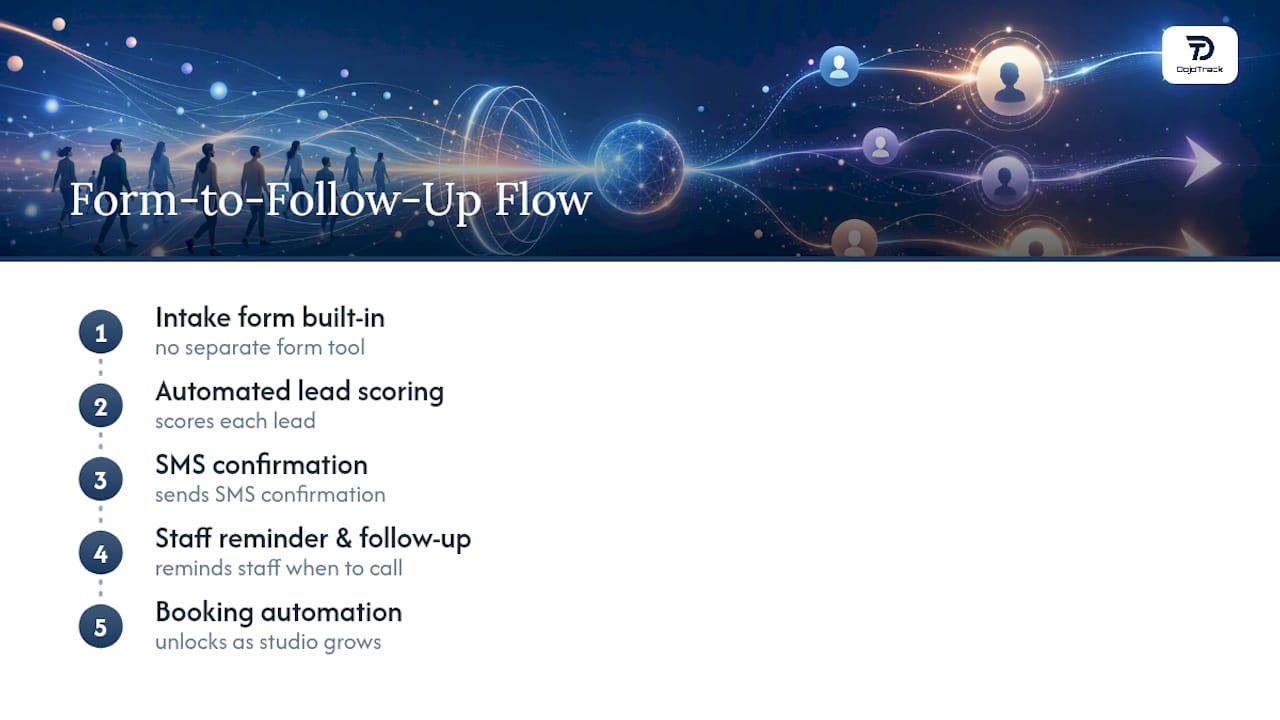
The core platform, including student management, attendance, and scheduling, is free to start. Automated lead scoring, SMS follow-up sequences, and booking automation unlock as your studio grows into them. If your current intake process depends on someone remembering to follow up, set up your studio’s account and see how the form-to-follow-up flow runs on its own.
Sources
- 20 lead generation form examples with best practices to create optimized forms — Unbounce
- Lead Generation Forms: 22 Examples to Help You Convert More Leads — HubSpot Blog
- Progressive profiling — Mailchimp
- Free Lead Capture Form Template + Dashboard — splitforms
FAQ
What Does Lead Capture Mean?
Lead capture is the process of collecting a prospect’s contact information, usually in exchange for something of value like a discount, guide, or free trial, so a business can follow up and move that person toward a sale.
Can You Give an Example of a Lead Capture Form?
A common example is a “Book a Free Trial Class” form that asks for name, phone number, and preferred class time, then triggers an automatic SMS confirmation and staff notification the moment it’s submitted.
How Do You Create a Lead Generation Form?
Start by defining the one action the lead should take next (a call, a booking, a download), then include only the fields required for that action, write a benefit-driven headline and CTA, and connect the form directly to your CRM or automation tool so no submission sits unactioned.
Are LinkedIn Lead Gen Forms Free to Use?
LinkedIn’s native lead gen forms are included with any LinkedIn ad campaign at no extra software cost, though you still pay for the ad spend that drives traffic to the form itself.
How Many Fields Should a Lead Capture Form Have?
Most high-converting forms use a small number of fields for top-of-funnel offers, capturing email plus one qualifier, and reserve additional questions for progressive profiling on later visits rather than asking for everything upfront.