

TL;DR:
- Instructor management software reduces administrative burdens and centralizes scheduling, billing, and student tracking. Purpose-built platforms like Dojotrack enable dojo-specific workflows, automating belt promotions, attendance, and communications. A phased implementation and clear metrics ensure successful adoption and measurable improvements.
Instructor management software gives your dojo a single system to centralize schedules, automate communications, track belt qualifications, and cut the manual admin that pulls instructors away from the mat. The result is less time on paperwork and more time actually teaching. Dojotrack is the dojo-specific platform built to deliver exactly that, and you’ll see it referenced throughout this guide.
The core role, in plain terms: dojo management software handles the operational layer so your instructors can focus on what they were hired to do.
Here’s what that looks like in practice:
- Schedule and availability management — instructors see their upcoming sessions and update availability without a single email chain
- Substitute coverage — last-minute gaps get filled through automated workflows instead of frantic phone calls
- Attendance capture — class check-ins are recorded digitally, in real time, at the mat
- Belt and promotion tracking — advancement criteria are logged automatically, reducing missed or delayed promotions
- Lesson materials and curriculum access — instructors pull up class plans from any device, before or during class
- Performance and qualification tracking — certifications, teaching hours, and utilization rates stay current in one place
- Two-way calendar sync — internal schedules push to Google or Outlook and pull availability back, keeping everything aligned
Table of Contents
- Where manual dojo management creates the most friction
- What core features does dojo instructor software actually deliver?
- How these features change an instructor’s actual day
- How to implement instructor management software in your dojo
- What should you measure after going live?
- Can you customize dojo software for different martial arts styles and school sizes?
- What about security and data privacy for instructor management software?
- Key Takeaways
- Why instructor-first software design actually matters
- Dojotrack is the dojo-specific instructor management platform
- Useful sources and further reading
- FAQ
Where manual dojo management creates the most friction
Running a dojo on spreadsheets and group texts works until it doesn’t. Most school owners hit a wall somewhere between 50 and 100 active students, when the volume of moving parts outpaces what any one person can track manually.
The friction shows up in predictable places:
- Attendance tracking — paper sign-in sheets get lost, forgotten, or misread; digital records never get transferred
- Billing follow-up — declined payments sit unnoticed until a student’s account is weeks overdue
- Belt and promotion tracking — instructors rely on memory or scattered notes, and students miss promotions they’ve earned
- Scheduling conflicts — two instructors booked for the same mat, or a class left uncovered because nobody confirmed
- Substitute coverage — a sick instructor at 6 AM means a flurry of texts and no guarantee of coverage
- Fragmented communications — conversations split across email, phone, and messaging apps with no central record
- Lead follow-up — prospective students who toured the school never hear back because the follow-up task lived in someone’s head
- Data scattered across tools — billing in one app, attendance in another, belt records in a spreadsheet no one has updated in three months
Each of these friction points costs instructors time they should be spending on the mat. Billing errors create awkward confrontations. Missed promotions frustrate students and parents. Scheduling gaps damage your school’s reputation. Instructor portals replace the email-and-spreadsheet workflow entirely, giving every trainer a personal view of their schedule and a self-service way to manage availability.
What core features does dojo instructor software actually deliver?
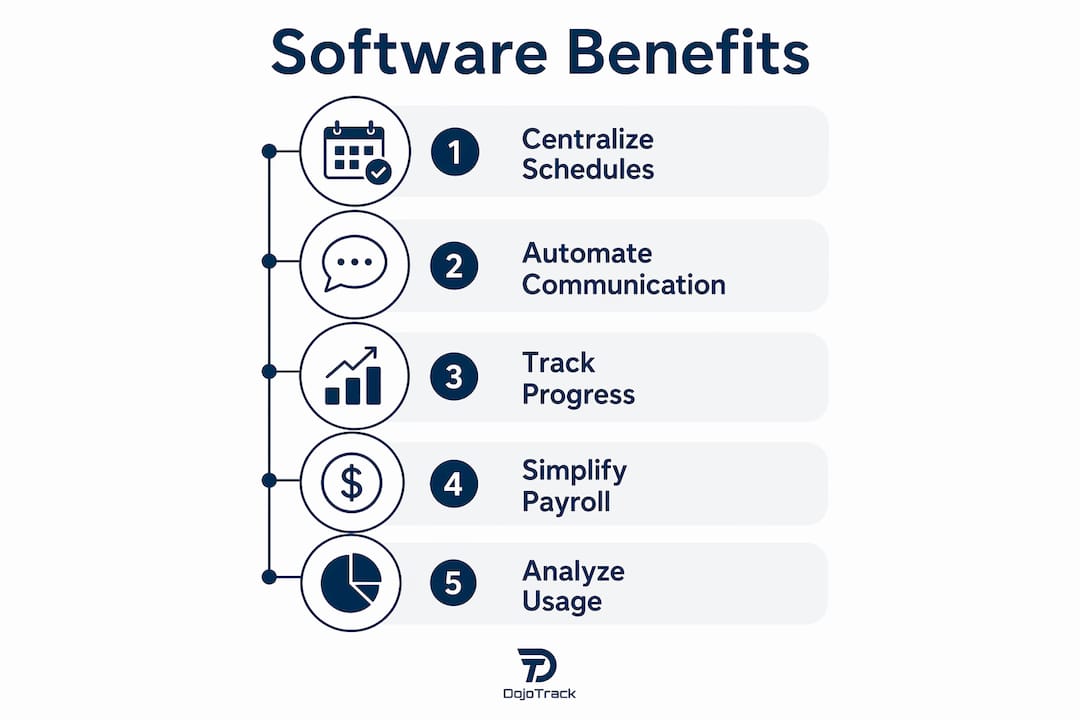
Purpose-built dojo software covers a specific set of instructor-facing capabilities that generic tools simply don’t address. Here’s what to look for and why each feature changes instructor behavior.

Instructor portal and role-based access
Every instructor gets their own dashboard showing upcoming sessions, assigned students, and pending tasks. Role-based permissions mean instructors see what they need and nothing they don’t. Admins retain control; instructors gain autonomy.
Two-way calendar sync
Calendar integration connects your scheduling system to Google Calendar or Outlook in both directions. When an instructor updates their availability, the scheduling engine sees it immediately. Double-bookings become rare instead of routine.
Self-service availability and substitute management
Instructors submit availability windows directly in the platform. When a class needs coverage, the system identifies qualified substitutes and sends automated notifications, cutting the back-and-forth that typically consumes a coordinator’s morning.
Attendance capture and class rosters
Digital check-in at the mat, via tablet kiosk or mobile app, feeds attendance data directly into student records. Instructors see their full class roster before walking onto the floor, including each student’s current belt level and any notes from the last session.
Automated belt and promotion tracking
Advancement criteria are tied to attendance thresholds and instructor sign-off. When a student meets the requirements, the system flags them for promotion automatically. No more relying on an instructor’s memory or a sticky note on the office wall.
Qualification and certification tracking
Instructor profiles store certifications, teaching credentials, and renewal dates. Platforms like those described by UMU’s instructor management system include contribution analytics and role-level customizations that let you measure and develop your teaching staff over time.
Automated communications
Triggered email and SMS notify instructors of schedule changes, enrollment updates, and session reminders without any manual outreach. Bulk notifications handle school-wide announcements in seconds.
Mobile app access
Instructors access rosters, curriculum notes, and student progress from their phone, on the mat, between rounds. No laptop required.
Timesheet and payroll integration
Systems that generate digital payslips and calculate pay from attendance and lesson duration reduce payroll errors and eliminate the manual reconciliation that typically falls on the school owner.
Reporting and utilization analytics
Dashboards show which instructors are over- or under-utilized, which classes have attendance trends worth addressing, and where student engagement is dropping. That data drives scheduling decisions instead of gut instinct.
How these features change an instructor’s actual day
Features on a spec sheet matter less than what they change at mat level. Here’s what the before-and-after looks like for common instructor tasks.
Covering a no-show class: Before software, a sick instructor means the owner scrambles through contacts at 6 AM. After: the instructor marks themselves unavailable in the app, the system identifies a qualified substitute, sends an automated notification, and logs the coverage, all before the owner finishes their coffee.
Taking attendance and recording belt progress: Before: paper sheets, manual data entry later, belt records updated whenever someone remembers. After: students check in on a kiosk or via the mobile app, attendance posts instantly, and belt progress updates with each logged session.
Sharing lesson materials: Before: instructors email PDFs to themselves or rely on memory. After: curriculum plans live in a collaboration portal accessible from any device, with pre-class checklists and real-time alerts keeping everyone on task.
Handling last-minute schedule swaps: Before: a chain of texts with no confirmation trail. After: the swap is logged in the system, both instructors receive confirmation, and the class record reflects the actual instructor who taught.
These workflow changes add up. Owners report fewer billing confrontations, more accurate promotion records, and higher student engagement when follow-up communications go out on time instead of whenever someone remembers to send them. Dojotrack’s dojo automation features cover all of these scenarios with martial-arts-specific workflows rather than generic templates.
Pro Tip: Before your pilot launch, have each instructor log how many hours per week they spend on coordination tasks. That baseline number is your most persuasive ROI metric when you review results at 30 days.
How to implement instructor management software in your dojo
A phased rollout reduces adoption friction and gives you measurable early wins to build buy-in across your team.
Step 1: Diagnose your current workflows
- List every instructor-related admin task your team handles weekly (scheduling, billing follow-up, attendance entry, belt tracking, substitute coordination).
- Estimate the time each task takes and who owns it.
- Identify your must-have integrations: payment processor, website class signups, calendar apps, and any existing student database.
- Set two or three success metrics before you start (admin hours saved per week, attendance rate, missed billing incidents).
Step 2: Configure the platform for your school
- Set up instructor profiles with certifications, availability windows, and role-based permissions.
- Build your class schedule and map belt advancement criteria to your curriculum.
- Connect your payment processor (Dojotrack uses Stripe) and configure recurring billing rules.
- Enable two-way calendar sync for Google or Outlook.
Step 3: Migrate your data carefully
Export attendance history, belt records, and recurring payment data from your current tools as CSVs. Map key fields (student ID, class date, belt level, attendance flag) to the new system’s structure before importing. Keep your legacy files as backups for the first 90 days in case any records need cross-referencing. Dojotrack’s setup guide walks through this process step by step.
Step 4: Run a pilot with a small instructor group
Start with two or three instructors who are open to new tools. Run the pilot for two to four weeks, track the time-savings metric you set in Step 1, and collect feedback before expanding. A phased rollout like this reduces resistance and gives you real data to show skeptical staff members.
Step 5: Full rollout and ongoing training
| Phase | Timeline | Key Actions |
|---|---|---|
| Pilot | Weeks 1–2 | 2–3 instructors, baseline metrics, feedback collection |
| Iteration | Weeks 3–4 | Adjust permissions, fix workflow gaps, confirm integrations |
| Full rollout | Weeks 5–6 | All instructors onboarded, communications automated |
| Training | Week 6 | Hands-on micro-sessions (20–30 minutes, task-focused) |
| Feedback loop | Day 90 | Review KPIs, identify underused features, plan next phase |
Pro Tip: Skip the two-hour demo session. Run 20-minute hands-on micro-sessions focused on one task at a time (attendance check-in, then schedule updates, then belt logging). Instructors retain more and resist less.
What should you measure after going live?
Knowing which numbers to track turns a software rollout into a business decision you can defend. Here are the KPIs that matter most for dojo instructor management.
| KPI | Why it matters | How to measure it |
|---|---|---|
| Instructor admin hours saved | Quantifies time returned to teaching | Compare pre/post weekly coordination time logs |
| Class attendance rate | Signals student engagement and scheduling health | Platform attendance dashboard, weekly trend |
| Student retention (30/90-day) | Measures long-term program health | Enrollment records, churn tracking in CRM |
| Revenue per student | Tracks monetization efficiency | Billing reports divided by active enrollment |
| Instructor utilization rate | Identifies over/under-scheduling | Sessions taught vs. available hours per instructor |
| Promotion accuracy | Confirms belt tracking is working | Promotions logged vs. promotions expected by criteria |
| Missed billing incidents | Measures payment workflow reliability | Failed/missed payment count per billing cycle |
| Lead-to-enrollment conversion | Shows whether follow-up automation is working | Leads entered vs. enrollments completed, 30-day window |
Sample ROI calculation: If an instructor spends six hours per week on coordination tasks and software cuts that to two hours, you recover four hours per instructor per week. At a $25/hour equivalent rate, that’s $100 per instructor per week, or roughly $400/month for a four-instructor school. Add the retention lift from timely follow-up communications and accurate promotion tracking, and the monthly value typically exceeds the software cost well before the 90-day mark.
Set your 90-day measurement window before launch. An early success signal is any two of the following: attendance rate up, missed billing incidents down, at least one instructor reporting fewer coordination tasks, or a lead converted via automated follow-up that would previously have gone cold.
Can you customize dojo software for different martial arts styles and school sizes?
Yes, and this is where purpose-built platforms separate from generic fitness apps. A Taekwondo academy tracks poom and dan ranks with specific testing criteria. A Brazilian Jiu-Jitsu school uses a stripe-based belt system with longer promotion cycles. A karate school may run multiple age-division programs with different curricula. Generic tools force you to shoehorn your school into their structure. Dojo-specific software lets you define your own belt hierarchy, promotion criteria, and class structure from the start.
School size matters too. A solo instructor running 40 students needs a lightweight setup with fast attendance capture and simple billing. A school with 300 students and six instructors needs role-based permissions, utilization reporting, and multi-class scheduling. Dojotrack’s freemium model addresses both: the free core tier covers the essentials for smaller schools, and paid tiers unlock the automation, analytics, and AI retention tools that larger operations need. The platform’s martial-arts-specific features are built around these differences, not retrofitted from a generic gym template.
Staff management follows the same logic. A small school may have two instructors sharing admin duties. A larger school needs clear role separation: head instructor, assistant instructor, front desk, and owner, each with different system access. Dojotrack’s staff management tools let you configure those permissions without a developer.
What about security and data privacy for instructor management software?
Your dojo collects sensitive data: student names, ages, contact information, payment details, and in many cases, minor children’s records. That creates real obligations under U.S. privacy law, including COPPA for schools serving students under 13 and PCI DSS compliance for any platform processing card payments.
When evaluating instructor management tools, ask these questions directly:
- Data encryption: Is data encrypted in transit (TLS) and at rest? This is the baseline, not a premium feature.
- Payment security: Does the platform use a PCI-compliant payment processor? Dojotrack processes payments through Stripe, which maintains PCI DSS Level 1 certification.
- Role-based access controls: Can you limit which staff members see billing data, student contact information, or instructor payroll records? Granular permissions reduce internal data exposure.
- Data ownership: Who owns your student and instructor records if you cancel? You should be able to export your full dataset at any time.
- Minor student protections: If your school enrolls students under 13, confirm the platform’s COPPA compliance posture and parental consent workflows.
- Breach notification: Does the vendor have a documented incident response process and a commitment to notify you within a defined window if a breach occurs?
Cloud-based platforms generally offer stronger security than local spreadsheets or on-premise tools, because security patches and compliance updates are applied automatically. That said, no platform eliminates risk entirely. Review the vendor’s terms of service and data processing agreement before signing, and confirm that your school’s own data handling practices (who can access the admin dashboard, how login credentials are managed) match the platform’s security model.
Key Takeaways
Instructor management software reduces the administrative load on your teaching staff and gives dojo owners real visibility into scheduling, billing, and student progress, all from one platform.
| Point | Details |
|---|---|
| Admin time is recoverable | Automating coordination tasks returns hours per week to each instructor for teaching. |
| Dojo-specific features matter | Belt tracking, promotion automation, and martial-arts class structures require purpose-built tools, not generic gym software. |
| Phased rollout reduces friction | Starting with a pilot group and a clear time-savings baseline makes adoption measurable and sustainable. |
| Measure what changes | Track attendance rate, retention, missed billing, and instructor utilization at 30 and 90 days post-launch. |
| Dojotrack is built for this | Dojotrack’s free core tier gets your school started quickly, with paid tiers unlocking AI retention, advanced billing, and full instructor management. |
Why instructor-first software design actually matters
Most school owners come to software shopping with a billing problem or an attendance headache. They find a tool that fixes that one thing and call it done. Six months later, they’re still chasing substitutes by text and manually updating belt records in a spreadsheet because the tool they bought was never designed for the instructor workflow.
The real value of dojo management software isn’t in any single feature. It’s in the connection between features. Attendance feeds belt tracking. Belt tracking feeds promotion scheduling. Promotion scheduling feeds parent communications. Parent communications feed retention. When those systems talk to each other inside one platform, the instructor’s job gets simpler at every step. When they don’t, you’re just moving the manual work from one tool to another.
Dojotrack was built by Jared Reed, a martial arts practitioner who ran schools and lived these frustrations firsthand. That origin matters because it shaped which problems the platform actually solves, not which features look good on a pricing page. The free core tier exists because Reed understood that most school owners need to see the system working before they’ll commit to a paid subscription. The AI retention tools exist because he knew that the hardest part of running a school isn’t getting students in the door; it’s keeping them past the 90-day mark.
If you’re evaluating instructor management tools, the right question isn’t “does this software have an instructor portal?” Almost all of them do. The right question is: “Does this platform understand what a belt promotion cycle looks like, and does it connect that to attendance, billing, and parent communication automatically?” That’s a much shorter list.
Dojotrack is the dojo-specific instructor management platform
Most school owners waste months on generic software before realizing it was never built for a martial arts environment. Dojotrack skips that detour entirely. The platform covers every instructor-facing workflow covered in this guide: role-based instructor portals, two-way calendar sync, automated belt tracking, digital attendance capture, Stripe-powered recurring billing, a student mobile app with push notifications, and AI-driven retention alerts that flag at-risk students before they quietly stop showing up.
The free core tier gets you running with student management, attendance, scheduling, and digital waivers at no upfront cost. As your school grows, paid tiers unlock SMS automation, advanced analytics, and the full AI retention system. Setup takes hours, not weeks, and the 10-step setup guide walks your team through data migration, permissions, and your first automated workflow.
Ready to see it in action? Start with Dojotrack’s free plan and have your instructor portal configured before your next class.
Useful sources and further reading
These resources support the implementation guidance and feature recommendations in this article:
- Dojotrack: What is DojoTrack? The All-in-One Martial Arts CRM — product scope, practitioner origins, and platform overview
- Dojotrack: 5 Dojo Management Software Features That Actually Work — concrete automation examples for martial-arts-specific workflows
- Dojotrack: 10 Essential Setup Steps — step-by-step onboarding guide for new schools
- Dojotrack: Staff Management Best Practices 2026 — roles, permissions, and staff workflows for martial arts schools
- Dojotrack: Martial Arts Software vs. Generic Fitness Apps — why dojo-specific features matter
- TryTami: Instructor Portal Software for Training Teams — instructor portal design and self-service availability best practices
- Administrate: Instructor Management Features — calendar sync, triggered communications, and qualification tracking
FAQ
What does instructor management software do for a dojo?
It centralizes instructor schedules, automates communications, tracks belt qualifications, and handles substitute coverage, replacing the email chains and spreadsheets that consume coordinator time and pull instructors away from teaching.
What is a dojo, and what is its purpose?
A dojo is a dedicated training space for martial arts practice. Its purpose is to provide structured instruction in a discipline, build student character and physical skill, and create a community around shared practice.
What is a dojo instructor called?
The title varies by discipline: Sensei in Japanese arts like karate and judo, Sabomnim in Taekwondo, Professor or Coach in Brazilian Jiu-Jitsu, and Sifu in Chinese martial arts. The role in all cases is the same: lead instruction and guide student development.
How long does it take to implement dojo management software?
A phased rollout usually includes a short pilot with a small instructor group, followed by iteration, then full rollout and training over several weeks. Dojotrack’s free core tier can be configured and running in a single day for smaller schools.
Does dojo software work for different martial arts styles?
Yes. Purpose-built platforms like Dojotrack let you define your own belt hierarchy, promotion criteria, and class structure, so a Taekwondo academy, a BJJ school, and a karate studio each get a system that matches their curriculum rather than a generic template.