
The billing problems draining the most revenue from BJJ academies are expired cards that never get updated, declined transactions that go unnoticed for weeks, and manual invoicing that eats hours you should spend on the mat. Add unclear membership terms, no automatic retry sequence, no self-serve portal for members to fix their own payment info, and the refund exposure that comes with long-term prepaid memberships, and you’ve got the eight problems responsible for most of the lost revenue in this industry.
Here’s what’s actually costing you money right now:
- Expired or replaced credit cards that silently stop billing
- Declined transactions nobody follows up on
- Manual invoicing that delays cash and invites errors
- Vague or missing billing terms in the sign-up agreement
- No automated retry cadence after a failed charge
- No self-serve portal for members to update payment methods
- Prepaid, upfront long-term memberships with no refund safeguard
- No monthly reporting on collection rate or pending failed payments
The single highest-impact fix: turn on automated recurring billing with a three-step retry cadence and an automatic card updater, paired with an upcoming-payment notice sent a few days before each charge. Stripe’s revenue-recovery documentation shows that retry logic and card updates meaningfully improve recovery when configured correctly. Watch one number this month: your collection rate.
Key Takeaways
Fixing the most common billing problems in BJJ academies comes down to automating recurring payments, following a fixed recovery timeline, and monitoring collection rate every month.
| Point | Details |
|---|---|
| Automate the retry cadence | Set three retry attempts spaced across roughly a week, paired with an automatic card updater. |
| Watch collection rate weekly | A low collection rate means it’s time to run a recovery sweep immediately. |
| Cap prepaid contract length | Limit upfront collection to three to six months to reduce refund exposure if the studio closes. |
| Document every cancellation | Get freeze and cancellation requests in writing to reduce chargeback and dispute risk. |
| Pilot software before migrating | Test collection rate and pending failed payments over 30 to 90 days, like the integrated approach Dojotrack offers, before switching platforms fully. |
Table of Contents
- Common BJJ Academy Billing Problems and What They Really Cost You
- Pricing Models and Cash-Flow Implications for BJJ Academies
- Automated Recurring Billing: What to Enable and How to Configure It
- Handling Failed Payments: The Recovery Flow That Actually Works
- Set Billing Expectations Early to Prevent Disputes Later
- Payment Methods and Validation: Cards, ACH, and Decline Reduction
- Financial Reports Every Owner Should Check Monthly
- How to Evaluate and Pilot Gym-Management Software
- What a Studio-Built Platform Looks Like in Practice
- Sources
- FAQ
Common BJJ Academy Billing Problems and What They Really Cost You
Every academy owner treats a few declined cards as background noise. That’s the mistake. Billing friction isn’t a nuisance line item, it’s a leak that compounds monthly, and most owners never measure it until the bank balance forces the conversation.
Picture an academy with many members charging a moderate monthly fee. If a significant share of transactions fail on the first attempt and many of those never get resolved due to lack of follow-up, substantial monthly revenue is lost continuously, compounding over time. That number doesn’t include the admin hours spent chasing it.
Three numbers deserve a spot on your dashboard every month:
- Collection rate: the percentage of billed revenue actually collected within the cycle.
- Pending failed payments as a percentage of monthly recurring revenue (MRR): this tells you how much of your revenue is currently stuck, not lost yet, but at risk.
- Average collection time: how many days it takes, on average, to convert a failed charge into a paid one.
None of these require complex accounting software. They require someone to look at the numbers weekly instead of monthly, and a system that surfaces them automatically instead of burying them in a spreadsheet.
The hidden cost that rarely makes it into these conversations is instructor bandwidth. When your head instructor is fielding “why was I charged twice” texts between classes, that’s coaching time gone. BJJ-focused billing guides consistently point to the same root cause: academies that never automated billing end up spending administrative hours that should have gone into retention calls, curriculum planning, or actually running the business.
Pricing Models and Cash-Flow Implications for BJJ Academies
The pricing model you choose determines how much billing friction you’ll deal with later. Get this wrong and you’re not just fighting declined cards, you’re fighting structural cash-flow problems baked into the contract itself.
Five models dominate the BJJ world, and each carries a different risk profile:
- Month-to-month: Low commitment, low refund risk, but higher churn exposure since members can leave anytime.
- Annual or multi-month contracts: Predictable revenue, but they invite disputes when a member wants out early and creates real refund exposure if your academy ever closes or changes ownership.
- Program-based tiers (kids, adults, competition team): Clean segmentation, but complex billing logic if tiers overlap or a member switches mid-cycle.
- Base membership plus add-ons (private lessons, competition fees, gear): Flexible revenue, but easy to bill incorrectly if add-ons aren’t tracked against attendance or purchase history.
- Class packs or drop-in pricing: Zero recurring billing complexity, but unpredictable revenue and no retention incentive built in.
Contracts and prepaid long-term plans deserve extra caution. When a studio closes or becomes unresponsive, members who prepaid often have no real path to a refund. One documented case in Utah shows a father unable to recover funds after a martial arts studio shut its doors, because individual members are typically low-priority creditors when a business fails. If you offer annual plans, build in a written refund policy and consider capping how much can be collected upfront.
Family accounts are where billing disputes multiply fastest. Two kids and a parent training under one household, each on a different tier, is a recipe for confused charges unless the system tracks discounts and payment methods per family unit rather than per individual. Structuring family billing correctly from day one avoids the “why was my daughter charged full price” conversation entirely.

Pro Tip: If you run contracts, cap the upfront collection window at three to six months instead of a full year. It protects your cash flow without creating the refund exposure that comes with a 12-month prepaid balance.
Automated Recurring Billing: What to Enable and How to Configure It
Manual invoicing is where billing problems start. A human forgetting to send a charge, mistyping an amount, or missing a card expiration date isn’t a training issue, it’s a systems issue, and it’s fixed by automation, not by hiring someone to double-check spreadsheets.
Recurring billing done right needs five components working together, not in isolation:
- Recurring charges on a fixed schedule tied to each member’s plan, so nobody has to remember to bill anyone.
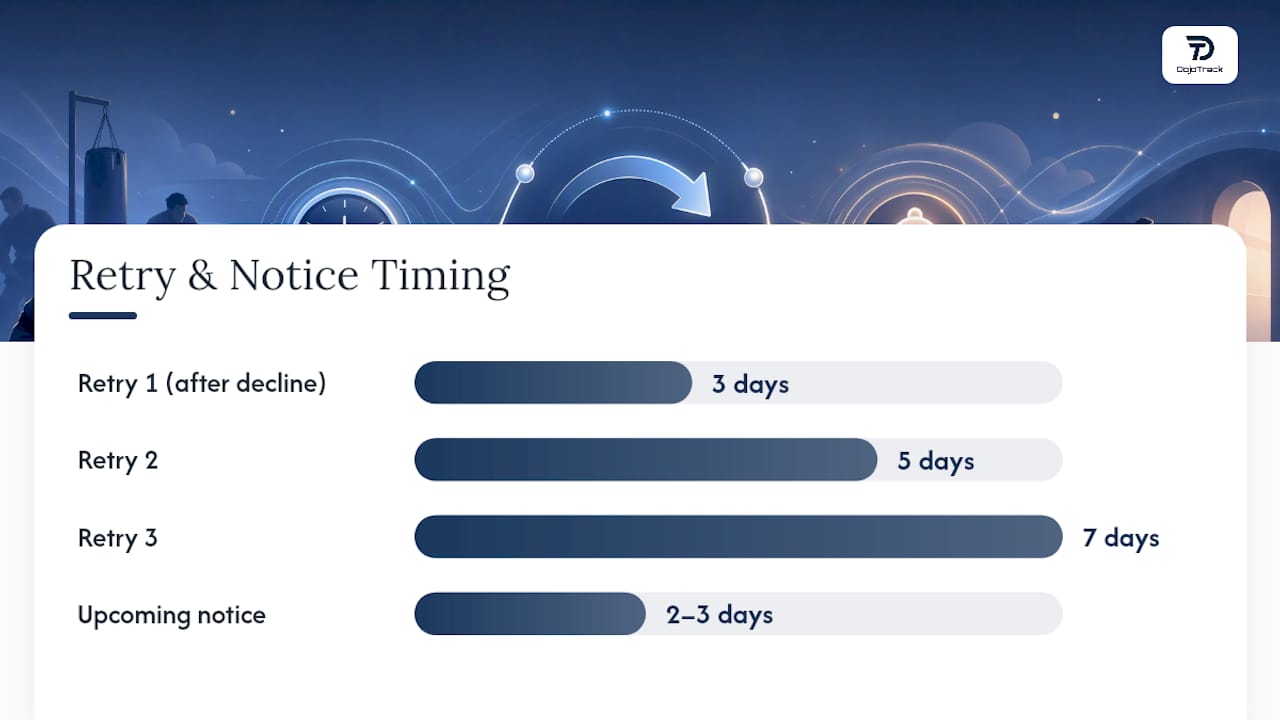
- A three-step retry cadence after a decline, spacing attempts across roughly a week rather than retrying immediately (which usually fails the same way twice).
- An automatic card updater that pulls fresh card data from the network when a card expires or gets reissued, before the member even notices.
- Multi-method support so members can pay by card or bank transfer without your front desk becoming a payment processor.
- A self-serve member portal where members update their own payment method instead of texting the front desk.
Stripe’s revenue-recovery tools build retry logic and card updates directly into the billing layer, and the difference shows up fast once the retry cadence is actually configured instead of left on default settings. Academies running integrated recurring billing setups typically see fewer support tickets in the first billing cycle after switching, simply because the system catches problems before a human has to.
Here’s the implementation checklist worth running through before your next billing cycle:
- Set the retry cadence to three attempts, spaced roughly three, five, and seven days apart.
- Enable the card updater and confirm it’s actually pulling fresh data (test with an expired test card if your platform allows it).
- Turn on an upcoming-payment notice sent two to three days before each charge.
- Confirm multiple payment methods are accepted, not just one card network.
- Enable the self-serve portal and walk one staff member through updating a payment method to confirm it works end-to-end.
- Run a test billing cycle on a small subset of accounts before flipping it on for everyone.
Pro Tip: Test your retry cadence on a handful of accounts with cards you know are expired before rolling it out academy-wide. Catching a misconfigured retry window on five accounts is a lot less painful than discovering it on 150.
The academies that skip this step and stick with manual invoicing tend to justify it as “keeping a personal touch.” In practice, it just means someone’s job is chasing money that a card updater would have already fixed.
Handling Failed Payments: The Recovery Flow That Actually Works
A failed payment isn’t a lost payment, yet, but only if you act on a schedule instead of waiting for the member to notice their membership lapsed. The recovery flow below is the same structure industry billing guides recommend, adapted for how BJJ academies actually communicate with members.
- Day 0, the charge fails. No action needed yet beyond logging it. Most declines at this stage are simple, insufficient funds or a temporary hold.
- Day 3, first retry plus a soft touch. Run the automatic retry and send a friendly email or text: “Hey, looks like your card didn’t go through, no worries, just update it here.” Keep it low pressure.
- Day 10, second retry with a firmer notice. If the retry fails again, send a more direct message noting the account is now past due and link directly to the payment update page.
- Day 18, final notice. State clearly that access may be suspended if payment isn’t resolved within a few days. This is also the point to offer a pause or reduced fee if the member is dealing with something temporary.
- Suspend access. If no response by the deadline, freeze the account. This isn’t punitive, it’s what keeps the policy meaningful for everyone else paying on time.
A few notes on tone matter more than owners expect. The Day 3 message should sound like a training partner, not a collections agency. The Day 18 message should be firm but still offer an out, a payment plan or a temporary freeze, because a member who’s embarrassed about money is a member you’re about to lose permanently if you don’t give them a face-saving option.
Decline codes are worth paying attention to instead of treating every failure the same:
- “Insufficient funds” often resolves itself by the second retry, no action needed.
- “Expired card” needs the card updater to catch it, or a direct message if it doesn’t.
- “Do not honor” or fraud-flag declines usually mean the member needs to call their bank, a text alone won’t fix it.
Build a short priority list from these codes so your front desk spends manual outreach time on the accounts that actually need a human, not the ones the retry cadence will resolve on its own.
Pro Tip: Never send the Day 18 final notice by email alone. A text message gets read within minutes; an email can sit unread for a week while a membership quietly lapses.
Set Billing Expectations Early to Prevent Disputes Later
Most billing disputes trace back to a sign-up conversation that skipped the fine print. If a member doesn’t know the exact billing date, the cancellation notice period, or what happens if they want to freeze their account for an injury, every one of those becomes a fight later instead of a policy you can point to.
Your onboarding paperwork needs to spell out, in plain language:
- The exact date charges hit each month, not “around the first.”
- The cancellation notice period (30 days is standard in this industry).
- The freeze or pause policy for injuries, travel, or financial hardship.
- The refund policy, including what happens with unused prepaid time.
- How family accounts are billed and how sibling or household discounts apply.
Automated notifications do a lot of the dispute-prevention work on their own. An upcoming-payment reminder a few days before the charge, a confirmation when it succeeds, and an immediate alert with an update link when it fails all reduce the number of members who feel blindsided. Consumer complaint patterns in the martial arts industry show a recurring theme: continuing charges after a cancellation request that wasn’t clearly documented. That’s a paperwork failure, not a payment failure, and it’s entirely preventable.
Pro Tip: Get every cancellation and freeze request in writing, even if the member asks in person. A saved text or email confirming the date and terms is what protects you if a chargeback dispute ever lands on your desk.
Payment Methods and Validation: Cards, ACH, and Decline Reduction
Cards and ACH (Automated Clearing House, the US bank-transfer network) solve different problems, and most academies benefit from offering both rather than picking one.
Cards process fast, typically settling within one to two business days, and give you real-time decline data the moment a charge fails. The tradeoff is processing fees that run higher than bank transfers. ACH or direct debit costs less per transaction but settles slower, often three to five business days, and gives you far less visibility into why a payment failed until it actually bounces.
That visibility gap is the real issue. Standalone Direct Debit systems create blind spots because they process slowly and members can cancel a bank authorization with minimal friction, often without the academy knowing until the next billing cycle fails silently. The fix isn’t avoiding ACH, it’s never running it as a standalone system disconnected from your attendance and membership records.
For most US academies, the practical mix looks like this:
- Offer cards as the default, ACH as a lower-fee option for members who prefer it.
- Use a card updater so expired cards get refreshed automatically instead of failing cold.
- Enable AVS (Address Verification Service) to catch fraud-risk declines before they process.
- Use tokenization so card data never sits in a spreadsheet or an unsecured system.
- Reconcile ACH transactions daily, not weekly, since bounce notifications lag behind the charge itself.
Financial Reports Every Owner Should Check Monthly
You don’t need a finance degree to run a healthy billing operation. You need five numbers, checked on the same day every month, with a clear action tied to each one.
- MRR (monthly recurring revenue): your baseline for spotting drops before they become a crisis.
- Collection rate: the percentage of billed revenue you actually collected.
- Pending failed payments: dollars currently stuck in the retry cycle.
- New sign-ups versus cancellations: your real growth number, not just gross sign-ups.
- Average collection time: how long a failed payment takes to resolve, on average.
| Metric | Healthy range | Trigger action |
|---|---|---|
| Collection rate | 90% or higher | Below 85%: run a full recovery sweep this week |
| Pending failed payments (% of MRR) | Under 5% | Above 8%: audit retry cadence and card updater settings |
| Average collection time | Under 10 days | Over 15 days: review Day 3 and Day 10 messaging |
Put these on a single dashboard your front desk checks weekly, not a report your bookkeeper emails you quarterly. The faster the number surfaces, the faster you act on it.
How to Evaluate and Pilot Gym-Management Software
Choosing billing software is where a lot of academies either fix their revenue leak permanently or trade one set of problems for another. The checklist matters more than the sales pitch.
Look for these capabilities before signing anything:
- Integrated billing with automatic retries, not a bolt-on payment processor.
- A built-in card updater rather than a manual “please update your card” email.
- Attendance data linked to billing, so a lapsed payment and a lapsed member show up in the same view.
- Exportable data and no long-term lock-in contract, in case you need to switch later.
- A pause or freeze feature members can trigger without a phone call.
- Reporting that surfaces collection rate and pending failed payments without a manual pull.
During any demo, ask direct questions: How exactly does the retry cadence work, and can you adjust the timing? Where do decline logs live, and can staff see them without contacting support? When a member cancels, does that automatically stop attendance tracking, or do two systems need manual syncing? Vendor review platforms like Capterra show how inconsistent these answers can be across the martial arts software space, which is exactly why a demo script matters more than a sales deck.
Run a pilot before a full migration. A 30 to 90 day test on a subset of members, measuring collection rate and pending failed payments against your current baseline, tells you whether the platform actually performs or just looks good in a demo. Confirm your data export path works before you’re locked in, and check that a self-serve portal, like the ones referenced in gym member apps, actually gets used by members instead of ignored. Partner-built platforms like Finegym’s BJJ-focused software illustrate what a purpose-built system looks like when billing and attendance share the same data layer instead of living in separate tools.
What a Studio-Built Platform Looks Like in Practice
Most billing software gets built by people who’ve never run a studio and then gets sold to people who have. Dojotrack was built the other way. Founder Jared Reed ran martial arts schools before building the platform, which is why the billing layer isn’t a generic payment add-on, it’s tied directly into the same system tracking attendance, belt progress, and retention risk.
The practical result: Stripe-powered recurring billing with automated retries and card updates built in, so a declined card triggers the same recovery flow described earlier in this article without a staff member manually tracking it. Attendance data links directly to billing, which means a payment failure and a drop in mat time show up together, giving you an early warning before a member disappears entirely.
Core pieces of that setup include:
- Automated retry cadence and card updater running on Stripe’s infrastructure
- Attendance-linked retention alerts that flag at-risk students before they cancel
- A student mobile app where members update payment methods and check belt progress without calling the front desk
- A free core tier for academies that want to start with attendance and membership management before adding billing automation
The gap between academies that struggle with billing and academies that don’t usually isn’t effort, it’s whether the billing system and the attendance system are talking to each other at all.
That integration is the difference between chasing a decline manually and catching it automatically before the member notices anything went wrong.
A Note on Billing Discipline and Studio Culture
Billing discipline says more about your academy’s culture than most owners want to admit. A studio that lets declined cards slide for months is usually the same studio where belt promotions run late and class schedules shift without notice. Members notice the pattern, even if they never mention it directly.
The single action worth implementing this week is turning on the three-step retry cadence with an upcoming-payment notice. It’s a small configuration change, but it signals something bigger: that your academy runs on systems, not memory. That consistency is what members are actually paying for, whether they realize it or not.
Start a Low-Risk Billing Pilot Before You Commit
You don’t need to overhaul your entire operation to fix the billing problems covered in this article. Dojotrack was purpose-built by someone who ran martial arts schools before building software, which means the automated retry cadence, card updater, and attendance-linked retention alerts are already configured to the same recovery flow this article recommends, not a generic e-commerce billing add-on retrofitted for gyms.
Start with a 30 to 60 day pilot on a subset of your membership base. Measure three things against your current numbers: collection rate, pending failed payments as a share of MRR, and the admin hours your front desk spends chasing declined cards each week. If those numbers improve inside one billing cycle, you have your answer.
Dojotrack also offers a free core tier covering attendance, membership management, and scheduling, so you can test the operational fit before unlocking the paid billing automation. Sign up for Dojotrack and run your first billing cycle with retries and card updates already configured.
Sources
- Why Direct Debit Alone Is Not Enough To Run A BJJ Academy
- Ksltv
- Stripe documentation — Revenue recovery
FAQ
What Is the 80/20 Rule in BJJ?
In training, it refers to spending roughly 80% of mat time on a small set of high-value techniques and 20% on everything else; it’s not a billing or business term, though some owners apply the same prioritization logic to focus on the few billing fixes that recover the most revenue.
Why Are BJJ Classes So Expensive?
Costs reflect instructor expertise, facility overhead, insurance, and small class sizes, but billing friction like unresolved declines and manual invoicing often inflates the effective cost to the academy without raising member-facing prices at all.
What Happens if I Fail to Pay My Gym Membership?
Most academies run an automated retry cadence over one to three weeks, then send escalating notices before suspending access. If a studio closes before a refund is issued, recovering prepaid funds can be difficult since individual members are often low-priority creditors, and filing a dispute with your card issuer is usually the fastest path to a partial recovery.
How Do I Reduce Declined Card Payments?
Enable an automatic card updater, run a three-step retry cadence, and send an upcoming-payment notice before each charge; platforms like Dojotrack build this directly into the billing workflow instead of requiring manual follow-up.