

The fastest way to reduce no-shows at your dojo is to combine three fixes: require a card-on-file or small deposit at booking, run an automated SMS and push reminder sequence, and install a front-desk self check-in tablet. Add a plain-language cancellation policy on top, and most schools see a measurable drop within weeks, not months.
Here’s the priority order and why each one earns its spot:
- Card-on-file or deposit at booking — highest impact, lowest effort. Money at stake changes behavior before a student ever walks through the door.
- Automated reminders (SMS, email, push) — cheap to set up, catches the forgetfulness cases that make up a big share of no-shows.
- Self check-in tablet at the entrance — speeds up class starts and gives you clean attendance data to act on.
- Clear cancellation and reschedule policy — closes the loop so students know what’s expected instead of guessing.
- Deposits and reminders address intent to attend.
- Check-in tablets and policies address what happens once students arrive.
Pro Tip: Mount a tablet near the entrance and keep it signed in to “coach mode.” A two-tap bulk check-in for a full class beats calling names off a roster, especially when three classes overlap back-to-back on a Saturday.
Key Takeaways
Reducing dojo no-shows works best when deposits, automated reminders, and self check-in operate together rather than as isolated fixes.
| Point | Details |
|---|---|
| Start with deposits | Card-on-file or a small deposit at booking is the single highest-impact, lowest-effort fix. |
| Layer in reminders | Automated SMS and push reminders at 48 hours and 2 hours catch the forgetfulness-driven no-shows. |
| Install self check-in | A front-desk tablet with bulk check-in speeds class starts and produces reliable attendance data. |
| Track no-show rate weekly | Calculate (no-shows ÷ bookings) × 100 by class to catch problem time slots early. |
| Use DojoTrack to run it all | DojoTrack combines reminders, card-on-file billing, tablet check-in, and cohort reporting in one free-to-start platform. |
Selected Resources to Read Next
- How to Track Student Attendance in Martial Arts Schools covers attendance methods in more operational detail.
- Why Instructors Need Attendance Data to Retain Students connects tracking to retention follow-up.
- Top Attendance Tracking Tools for Karate Schools compares kiosk and check-in workflow options.
- Martial arts apparel for onboarding helps schools set clear uniform expectations for new trial students.
Table of Contents
- How No-Shows Quietly Drain Your Dojo’s Revenue
- Why Do Students No-Show for Dojo Classes?
- What Actually Works to Reduce No-Shows, Step by Step
- Which Attendance Metrics Should You Track?
- How Long Does It Take to Fix No-Shows, and What Does It Cost?
- What Should Your Cancellation and Deposit Policy Say?
- How DojoTrack Puts These Tactics to Work in Real Schools
- Ready to Stop Losing Revenue to Empty Mats?
- Sources
- FAQ
How No-Shows Quietly Drain Your Dojo’s Revenue
A single no-show doesn’t feel like a crisis. Ten a week, every week, is a different story.
Here’s a simple way to size the problem at your own school. Take your average class fee or per-visit value, multiply it by the number of no-shows per week, then multiply by 52. Run that math against your own numbers and the figure is usually bigger than owners expect, because it compounds with membership churn tied to those same missed sessions.
The damage goes beyond dollars:
- Instructor prep time wasted on lesson plans built for a headcount that never shows.
- Belt-testing logistics thrown off when sparring partners or demonstration pairs don’t arrive.
- Safety and pairing issues in classes that rely on partner drills, especially for kids and beginners.
- Morale hits for consistent students who show up to a half-empty mat week after week.
- Scheduling waste when you keep a time slot open for a class that consistently underfills.
None of this shows up on a single day’s revenue report. It shows up three months later as a shrinking active roster and instructors who’ve quietly stopped pushing hard for a class that never fills.
Why Do Students No-Show for Dojo Classes?
Most no-shows trace back to one of six causes, and the fix looks different for each.
- Forgetfulness. No reminder landed in front of them close enough to class time.
- Booking friction. Signing up took too many steps, or confirmation never arrived.
- Unclear trial expectations. New prospects don’t know what to bring, wear, or expect, so skipping feels lower stakes.
- Cost uncertainty. Students unsure about pricing or contract terms avoid committing to a specific class.
- Schedule conflicts. Work, school, or family logistics collide with a fixed time slot.
- Weak onboarding. Students who never built a routine in their first few weeks treat classes as optional.
Before applying fixes, diagnose which cause dominates at your school. Ask:
- Are no-shows concentrated among trial visitors, or established members too?
- Does one specific time slot (early morning, right after school) show a disproportionate no-show rate?
- Do no-shows cluster in a student’s first 30 days, or spread evenly across tenure?
- Did the student book through a staff call, a website form, or a walk-in, and does that channel correlate with no-shows?
Pull three quick data cuts to confirm your hypothesis: attendance by cohort week (weeks 1 through 4 after signup), no-show rate segmented by class type, and no-show rate segmented by booking source. If trial students dominate your no-show list, the fix is verified trial booking and better onboarding, not a stricter cancellation policy for long-time members. Verified trial class booking works specifically because it sets clear expectations and locks in a reminder pathway before the student ever sets foot on the mat.
What Actually Works to Reduce No-Shows, Step by Step
Once you know your dominant cause, work through this checklist from lowest effort to highest.
- Add a deposit or card-on-file requirement at booking. Even $5 to $10 changes behavior, and a card-on-file with a stated no-show fee works just as well without requiring upfront cash.
- Turn on automated reminders across two channels. Combining SMS with push notifications catches students who ignore one channel but check the other.
- Install a self check-in tablet at the front desk. Tablet-based kiosks support a “coach mode” for fast bulk check-in and a private self-service mode so members clock themselves in without a staff member hovering.
- Cap class size and build a waitlist. A hard cap makes no-shows visible immediately and gives you a pool of students to backfill from.
- Make rescheduling a one-click action. If canceling a class is easier than showing up, some students will always take the path of least resistance. Make rescheduling equally easy so they reschedule instead of vanishing.
- Build a structured onboarding sequence. A welcome message, a curriculum overview, and a first-30-day check-in each pull new students toward a habit instead of a one-off visit.
- Require verified trial bookings, not casual walk-ins. A trial booking that collects contact info, confirms class time, and sends a reminder converts far better than an open invitation to “just stop by.”
Message templates matter more than owners assume. A generic reminder gets ignored. A specific one gets acted on.
Booking confirmation:
“You’re booked for Kids Karate, Tuesday at 5:30 PM with Coach Mia. Wear your gi and arrive 10 minutes early for warmups.”

48-hour reminder:
“See you Tuesday at 5:30 PM for Kids Karate! Reply CANCEL if plans change so we can offer your spot to someone on the waitlist.”
2-hour reminder:
“Class starts at 5:30 PM today. Traffic on the way? Reply RESCHEDULE and we’ll find your next best slot.”
Cancellation policy message:
“We get it, life happens. Cancel or reschedule up to 4 hours before class with no penalty. Late cancellations and no-shows use one credit from your monthly plan.”
A reminder that only states the time misses the point. A reminder that gives the student a one-tap way to reschedule turns a potential no-show into a booked session two days later instead of an empty slot.
Run small experiments rather than overhauling everything at once. Test SMS-only reminders against SMS-plus-push for one month and track no-show rate by group. Test a $5 deposit against a card-on-file-only policy for new trial bookings and watch trial-to-conversion rate. Small, measurable changes beat sweeping policy rewrites that nobody enforces consistently.
Pro Tip: When you’ve got three classes ending and starting within 15 minutes of each other, use bulk roster check-in on your tablet instead of checking students in one at a time. It’s the difference between a five-second class transition and a five-minute bottleneck at the door.
Which Attendance Metrics Should You Track?
You can’t fix what you don’t measure, and most dojo owners track far less than they think.
Five metrics matter most:
- No-show rate by class and by cohort, calculated as (no-shows ÷ total bookings) × 100.
- Attendance rate, the inverse view, useful for spotting your strongest classes.
- Trial-to-conversion rate, the percentage of trial students who become paying members.
- Retention cohorts at 30, 90, and 180 days, showing where students drop off.
- Fill rate and late-cancel rate, which together reveal whether your caps and policies are working.
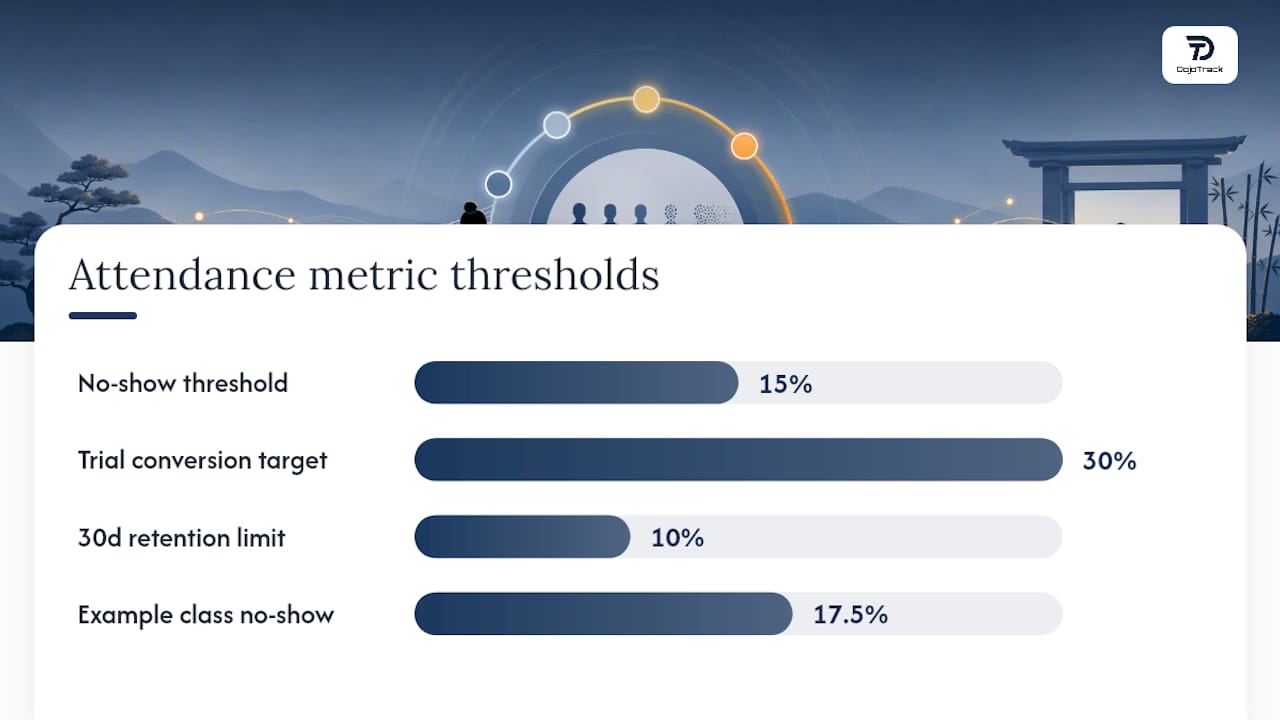
Sample calculation: if a Tuesday evening class had 40 bookings last month and 7 no-shows, your no-show rate is (7 ÷ 40) × 100 = 17.5%. That single number, tracked weekly, tells you more about a class’s health than gut feel ever will.
| Metric Threshold | Recommended Action |
|---|---|
| No-show rate above 15% for a class | Require deposit or card-on-file for that time slot |
| Trial-to-conversion below 30% | Improve onboarding and add verified trial booking |
| 30-day retention drop above 10% | Add a first-month check-in sequence |
| Late-cancel rate rising month over month | Tighten cancellation cutoff window |
Review no-show and fill-rate numbers weekly at an operational level. Save trial-to-conversion and retention cohort review for a monthly strategy sit-down, since those trends take longer to shift and shorter cycles just add noise. Consistent check-in procedures and staff training on QR code or PIN entry keep this data trustworthy, because messy check-in logs make every metric above unreliable.
How Long Does It Take to Fix No-Shows, and What Does It Cost?
Not every fix requires a budget meeting. Sort your tactics into three buckets.
Low cost, fast (days):
- Writing and sending reminder templates through your existing email or SMS tool.
- Publishing a clear cancellation policy on your website and in your welcome packet.
- Turning on push notifications through a student app you already have.
Medium cost, 1 to 2 weeks:
- Setting up a front-desk self check-in tablet, including hardware and configuration.
- Building an automated onboarding sequence with scheduled messages over the first 30 days.
- Adding deposit collection to your booking flow.
Higher cost, multi-month:
- Rolling out an integrated scheduling and AI-driven attendance system across multiple locations.
- Redesigning your full member journey from trial through 6-month retention.
- Start with reminder templates. They cost almost nothing and pay off within a week.
- Add the check-in tablet next. Hardware runs a few hundred dollars, and setup rarely takes more than a weekend.
- Layer in deposits and onboarding sequences once your reminder cadence is proven.
- Save full system integration for after you’ve validated which tactics actually move your numbers.
Cost drivers worth budgeting for: SMS fees per message sent, tablet hardware (often the single biggest one-time cost), payment processing fees on deposits, and staff time spent enforcing new policies consistently during the first month.
Pro Tip: Phase your rollout instead of launching everything at once. Get reminders working first, measure the drop in no-shows, then use that early win to justify the tablet purchase to yourself, your partners, or your bank account.
What Should Your Cancellation and Deposit Policy Say?
A policy only works if students understand it before they book, not after they’ve already missed a class.
Best-practice elements:
- A clear cutoff window (commonly 4 to 24 hours before class) for free cancellation or rescheduling.
- A fair, published penalty for late cancels or no-shows, whether that’s a small fee or a used credit.
- A simple rescheduling path that takes one click, not a phone call during business hours.
- Family account handling, since one missed kids’ class often means one late notice, not five.
- Repeated communication of the policy at booking, in your welcome sequence, and posted at the front desk.
Sample policy snippet: “Cancel or reschedule up to 4 hours before class at no charge. Late cancellations and no-shows use one class credit. We keep your card on file securely and only charge according to this policy.”
Keep payment rules simple: card-on-file for members, a small deposit for trial bookings, and a plain statement that payment data is stored securely and never shared. That’s enough transparency for most students without turning your welcome packet into a legal document.
The schools that struggle most with no-shows almost never have a written policy problem. They have an enforcement and communication problem. A policy nobody repeats is a policy nobody follows.
How DojoTrack Puts These Tactics to Work in Real Schools
Every tactic covered above maps directly to a feature inside DojoTrack, because the platform was built by a martial arts school owner who ran into these exact no-show problems firsthand.
- Automated reminders and push notifications through the student mobile app catch students on whichever channel they actually check.
- Card-on-file billing via Stripe-powered recurring payments makes deposits and no-show fees simple to enforce without awkward front-desk conversations.
- Tablet self check-in speeds up class starts and feeds clean data straight into your attendance dashboards.
- Cohort reports show retention by week and by class type, so you can catch a slipping trial-to-conversion rate before it becomes a pattern.
- Waitlist management automatically fills a canceled spot instead of leaving it empty.
A typical rollout looks like this: a school owner turns on deposit collection for trial bookings, activates the 48-hour and 2-hour reminder sequence, and installs a tablet at the front desk, all within the first two weeks of setup. From there, attendance data becomes the feedback loop that shows whether the changes are working, class by class.
Schools that implement deposits, reminders, and self check-in together typically see meaningful reductions in no-show rates within the first two to three months, since each tactic reinforces the others instead of working in isolation. Owners already on the platform can follow the DojoTrack setup checklist to get all three running in the right order.
Attendance data only becomes useful once it’s accurate and consistent. A dashboard full of gaps and guesswork can’t tell you which class needs a policy change and which one just needs a better reminder.
One Owner’s Take on What Actually Moved the Needle
The change that made the biggest difference wasn’t a new policy or a stricter contract. It was simply putting a tablet at the door and requiring card-on-file for every trial booking. The lesson: students don’t skip class because they don’t care. They skip because nothing in the booking process made showing up feel like the default. Fix that, and the rest follows.
Ready to Stop Losing Revenue to Empty Mats?
Reminder templates and spreadsheet tracking only get a dojo so far before the manual work becomes its own problem. Dojotrack was built specifically to run this playbook without the patchwork of separate tools, so reminders, check-in, billing, and attendance reporting all live in one place instead of three different apps you have to keep in sync.
- Automated SMS, email, and push reminders sent through the student mobile app.
- Front-desk tablet check-in with bulk coach mode for back-to-back classes.
- Card-on-file billing through Stripe for deposits and no-show fees.
- Attendance dashboards and cohort reports that show your no-show rate by class, automatically.
The core platform is free to start, so you can turn on attendance tracking and reminders this week without a budget approval process. If you’re switching from spreadsheets or another system, the data migration path is built to move your student records over without a multi-week gap in service. Set up your free DojoTrack account and get your first reminder sequence running before your next class cycle starts.
Sources
- How Verified Trial Class Booking Can Reduce No-Shows and Reseller Friction for Local Dojos
FAQ
How Do I Calculate My Dojo’s No-Show Rate?
Divide the number of no-shows in a class by total bookings, then multiply by 100. A class with 7 no-shows out of 40 bookings has a no-show rate of 17.5%.
How Do I Take Attendance for Martial Arts Classes?
Use a front-desk tablet or app for self check-in, and have staff confirm bulk roster check-ins for back-to-back classes to keep the process fast and accurate. Platforms like DojoTrack combine tablet check-in with automatic attendance logging so you don’t rely on a paper sign-in sheet.
Can a Cancellation Policy Really Reduce No-Shows?
Yes, when it’s simple, clearly communicated at booking, and paired with an easy rescheduling option instead of a strict all-or-nothing rule. Policies that are only posted once and never repeated tend to get ignored.
Is a Deposit or Card-On-File Better for Trial Bookings?
Both work, but card-on-file with a stated no-show fee removes the upfront payment friction that sometimes discourages trial signups while still creating accountability. Test both against your own trial-to-conversion rate to see which converts better for your school.
How Often Should I Review Attendance Data?
Review no-show rate and fill rate weekly for operational decisions, and save retention cohort and trial-to-conversion review for a monthly strategy check-in. Weekly review catches a problem class before it becomes a pattern.