

For a safe, high-converting Parents’ Night Out, you need one organizer-facing system that captures leads, takes payment and waivers, automates reminders, and supports fast on-site check-in. That means a digital, studio-focused registration workflow, not a paper sign-up sheet or a generic form builder. Platforms designed specifically for martial arts schools can handle this exact job.
TL;DR:
- A comprehensive Parents’ Night Out registration system must include contact details, health information, pickup permissions, digital waivers, capacity controls, and lead tagging to ensure smooth check-in and follow-up.
- Testing the entire signup and check-in process before the event is essential for avoiding chaos and ensuring all data flows correctly from registration to attendance.
- Automated messaging sequences, including immediate confirmation, a week-ahead checklist, and last-minute reminders via email and SMS, significantly reduce no-shows.
- On-site check-in should require parents to sign children in and out face-to-face, with staff managing ratios, using QR codes, and storing waivers securely for safety and record-keeping.
- Using a unified platform like DojoTrack can streamline registration, family management, waivers, payments, and follow-up, eliminating the need for spreadsheets and manual tracking.
Table of Contents
- What Must a Parents’ Night Out Signup System Do?
- How Do You Build and Test the Registration Flow?
- What Automated Messages Reduce No-Shows?
- How Should Check-In and Staffing Work On-Day?
- Payments, Waivers, and Record-Keeping That Hold Up
- How Do You Turn PNO Guests Into Enrolled Students?
- A Founder’s Notes on Running Parents’ Night Out
- Run Your Next PNO Without the Spreadsheet Chaos
- Sources
- FAQ
What Must a Parents’ Night Out Signup System Do?
A signup form isn’t just a way to count heads. It’s the front door to your entire event workflow, and if it’s missing pieces, you’ll feel it at check-in when a parent shows up without a signed waiver or you can’t find an emergency contact.
Run your current process against this checklist:
- Contact fields: parent/guardian name, phone, email, emergency contact, and child’s date of birth.
- Health and safety fields: allergies, medical conditions, and medication needs collected up front, not verbally at drop-off.
- Pickup authorization: name every adult cleared to collect the child, plus a photo consent toggle for marketing use.
- Payment options: deposit versus full payment at booking, promo codes, and sibling discounts built into the checkout.
- Waiver capture: a digital, timestamped signature tied to the registration, not a separate paper stack.
- Capacity controls: hard caps, waitlist logic, and family/sibling account handling so one parent can register three kids without filling out three forms.
- Lead tagging: every non-member registrant gets flagged as a “PNO guest” so your CRM tags can trigger follow-up automatically.
If your current form is missing more than two of these, you’re running the event on hope, not process.
How Do You Build and Test the Registration Flow?
Building the form is the easy part. Testing it end to end is what separates a smooth Friday night from a chaotic one.
- Pick a recurring cadence. Same day each month builds a habit for parents, and recurring scheduling keeps the event visible on your calendar instead of buried as a one-off.
- Build the form with family accounts in mind. A parent with two students should register both under one family profile, not two disconnected entries. Studio scheduling platforms are built to centralize recurring programs and family data so you don’t end up with duplicate records six months from now.
- Attach payment and waiver at checkout. The parent pays and signs in one flow. Nobody arrives at drop-off still needing to fill out paperwork.
- Set your capacity and waitlist rules. Decide the hard cap, define what triggers a waitlist offer, and turn on auto-close once you hit the number.
- Run a dry-run registration yourself. Register a fake child, check that the confirmation email fires, the waiver attaches to the right family record, and the roster populates correctly before you open registration to real families.
Pro Tip: Test the entire pathway, from signup to simulated check-in, at least once before your first paid event. It’s the cheapest insurance you’ll buy all month.
What Automated Messages Reduce No-Shows?
Confirmation emails alone won’t cut it. A layered message sequence keeps the event top of mind and gives you a second shot at selling guest families on your program.
- Immediate confirmation: sent the moment they register, with the date, time, and price.
- Seven-day prep checklist: what to bring, what to wear, and any allergy reminders.
- 24-hour reminder: a short SMS nudge. Text reminders close the loop for the parents who ignore email, and combining email with SMS reduces no-shows more than email alone.
- Same-evening note: a quick check-in confirmation or photo, sent while the event is still happening.
- Monday follow-up: your conversion touchpoint, covered in more detail below.
Segment your templates. A current member gets a message that assumes familiarity with your school. A guest family gets a warmer, more introductory tone, since this may be their first contact with your studio at all.
Pro Tip: Save a phone call for high-value guest families, especially if they mention interest in enrolling during registration. A two-minute call converts better than any automated text.
How Should Check-In and Staffing Work On-Day?
Require every parent to walk inside to sign their child in and out. It’s a small friction point that pays off twice: it guarantees you catch any missing waiver on the spot, and it puts your staff face-to-face with a parent who might enroll their kid next week.
- Assign one staff member as a dedicated greeter and another as a floater who checks in on room ratios.
- Use a QR or tablet check-in system with a printed roster as backup in case the internet drops.
- For a typical Parents’ Night Out event, plan enough staff to keep a safe ratio of instructors to children, adjusting for the age mix.
- Keep a medication log and store signed waivers in a locked binder or accessible digital folder near the check-in table, not scattered across the building.
Payments, Waivers, and Record-Keeping That Hold Up
Your waiver needs four things to actually protect the school: informed consent, an emergency contact, a medical declaration, and a named pickup authorization list. Capture the signature digitally with a timestamp, not a scanned paper form filed in a drawer somewhere.
On payment, decide your policy before you publish registration: deposit versus full payment, and a clear refund or no-show rule stated right at checkout, not explained after the fact when a parent asks for money back.
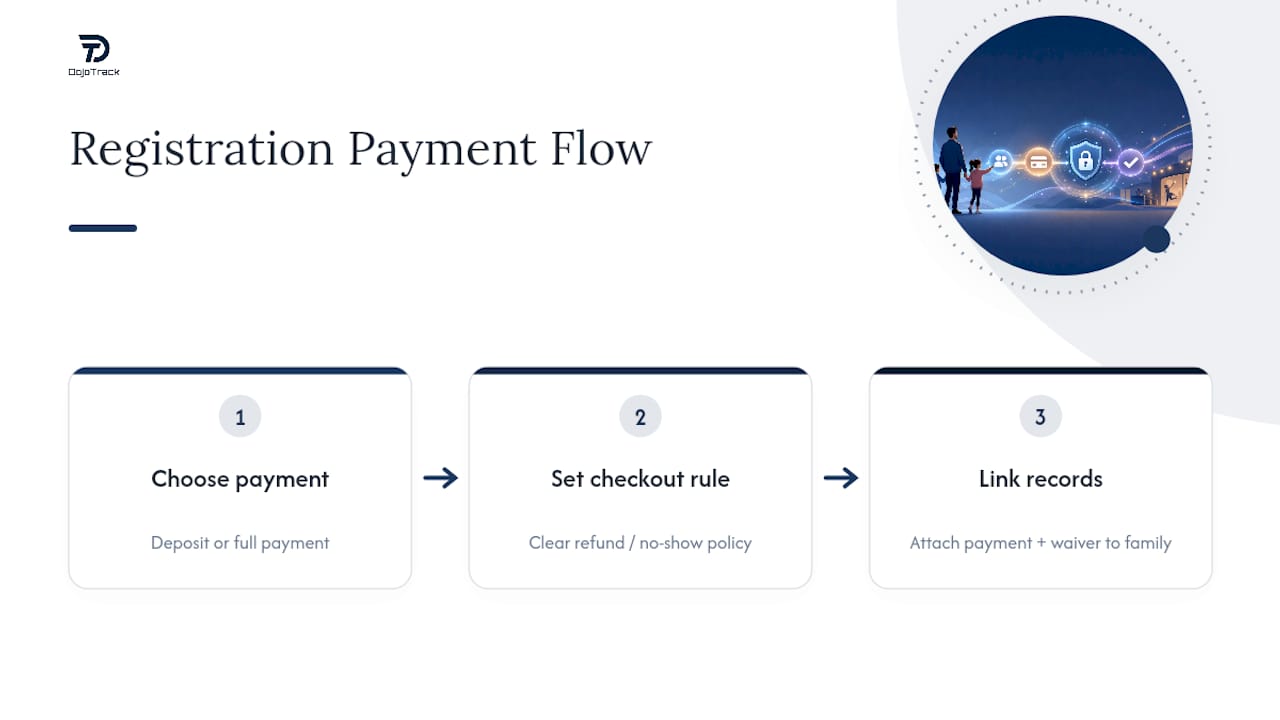
Link both records to the family account. When payment and waiver data sit inside the same family profile as regular class attendance, you can pull up a complete history in seconds instead of cross-referencing three spreadsheets during an audit or a liability question.
How Do You Turn PNO Guests Into Enrolled Students?
The event isn’t over when the last kid gets picked up. The real return on a Parents’ Night Out shows up in the week that follows.
- Send a Monday recap. Existing members get a thank-you and the next event date. Guest families get the recap plus a specific conversion offer, such as a free trial week or a discounted first month.
- Personalize the automation. Use the child’s first name and, where you can, a short quote or photo from the instructor who worked with them that night.
- Extend a personal invite from a coach, not a no-reply email address, for guest families who seemed engaged.
- Track the funnel. Use the “PNO guest” tag from signup to follow the path from guest to trial to paid enrollment, so you know which events actually produce students, not just attendance.
A Founder’s Notes on Running Parents’ Night Out
Running these events for years taught one lesson that sticks: the pickup line is your best sales floor. Forcing parents inside to sign out isn’t just a safety habit, it’s the moment staff can mention how well a kid did that night, which is the single easiest sentence to say before asking about enrollment.
The admin side matters just as much. Family accounts, event tags, and QR check-in exist so your staff spends the evening running the event, not chasing paperwork. For more on the attendance side of this, the DojoTrack blog covers tracking attendance across programs and why that data matters for retention in more depth.
— DojoTrack
Run Your Next PNO Without the Spreadsheet Chaos
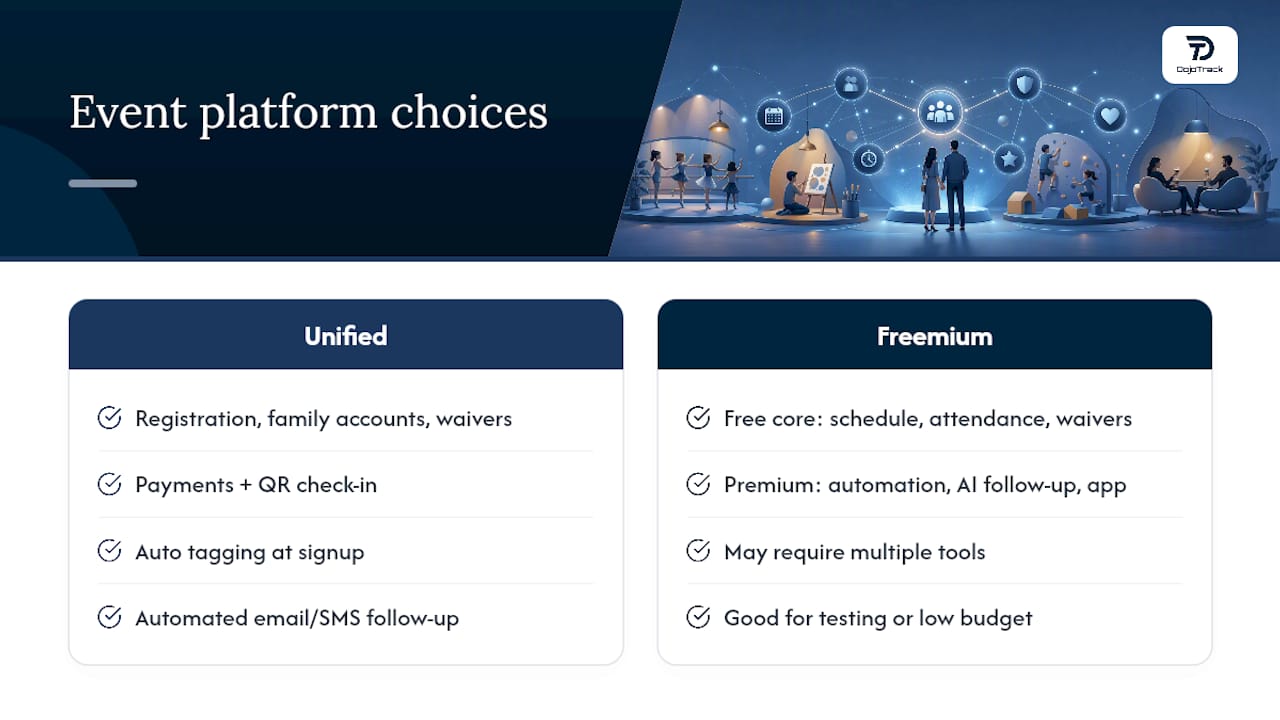
Some software platforms are designed to support event registration, family accounts, digital waivers, payments, and QR check-in within one unified system rather than multiple disconnected tools. Registrants get tagged automatically at signup, so your Monday follow-up emails and SMS sequences fire without anyone digging through a spreadsheet to figure out who attended as a guest. If you’re outfitting your event with branded spirit-wear or fundraiser merchandise, a resource like RNK Apparel’s youth sports buying checklist is worth a look too.
Some platforms offer a free core set of features such as scheduling, attendance, and waivers, with additional advanced automation, AI-driven follow-up, and mobile app features available as premium upgrades. If you’re ready to stop running PNOs off paper forms and sticky notes, set up your DojoTrack account and build your first event registration page today.
Sources
For deeper setup guidance, see DojoTrack’s event registration guide for schools and its notes on automated SMS follow-up. For camp-style event structure, Camps For Clubs covers organizer check-in tools in more detail.
- Parents Night Out 101 – 2020 Armor
- Martial Arts Studio Software Guide: Scheduling, Management & Dojo Operations | ProgramChamp™
- Boosting Revenue and Student Retention: Parent Night Out Events
FAQ
How Far in Advance Should I Open Parents’ Night Out Registration?
Two to three weeks ahead works for most schools, especially if you run the event monthly and parents already expect it on the calendar.
What Fields Are Truly Required on a Parents’ Night Out Signup Form?
At minimum, capture parent contact, emergency contact, allergies or medical needs, pickup authorization, and the child’s date of birth before payment is accepted.
Should I Require Full Payment or Just a Deposit?
Either works, but state your no-show and refund policy clearly at checkout so there’s no dispute afterward. Full payment tends to reduce no-shows more than a small deposit.
How Do I Turn Guest Families Into Enrolled Students?
Tag every non-member at signup, send a Monday follow-up with a trial or discount offer, and back it with a personal invite from an instructor rather than a generic email.
Can DojoTrack Handle Parents’ Night Out Registration and Follow-Up?
Yes. DojoTrack supports event registration, digital waivers, Stripe-powered payments, and automated email/SMS sequences tied to family accounts, which covers the full workflow this article describes.