

Lock in time-off requests four to six weeks out, publish provisional holiday hours, and assign minimum-role coverage, then automate the enforcement so exceptions don’t creep back in. That’s the whole system in one sentence. Two things to do today: set a hard deadline for holiday requests and post your provisional hours so clients and staff both see them. Everything else, the fairness rules, the tools, the timeline, builds on those two moves.
TL;DR:
- Setting a firm deadline for holiday requests and publishing provisional hours early are critical to prevent scheduling chaos during the holiday season.
- Starting planning six to eight weeks in advance, with clear documentation of approvals, helps avoid last-minute staffing shortages and disputes.
- Fair scheduling should balance rotation and volunteer models, considering seniority and role criticality, with transparent rules and approval logs.
- Using scheduling tools that automatically adjust capacity for holidays and enforce minimum staffing rules reduces overbooking and manual follow-up.
- Centralizing leave requests, swaps, and coverage gaps into one automated dashboard streamlines holiday staffing and minimizes manual errors.
Table of Contents
- What Is the Fastest Way to Fix Holiday Schedule Management?
- When Should You Start Planning for the Holidays?
- How Do You Keep Holiday Scheduling Fair?
- What Staffing Tactics Actually Preserve Service Over the Holidays?
- What Scheduling Tool Features Actually Stop Overbooking?
- What Legal Rules Affect Holiday Staffing Decisions?
- How Has DojoTrack Helped Studios Fix Holiday Scheduling?
- DojoTrack Perspective: Three Rules We Use for Holiday Planning
- Ready to Simplify Your Studio’s Holiday Staffing?
- Sources
- FAQ
What Is the Fastest Way to Fix Holiday Schedule Management?
Most scheduling chaos during the holidays comes from one root cause: too many decisions get made in the moment. Here’s the checklist to run this week to get ahead of it.
- Set a firm deadline. Pick one submission method (a form, an app, an email thread) and give staff a real cutoff, not a soft suggestion.
- Publish provisional hours. Post holiday hours and any early-closure notices for clients and members before anyone asks.
- Map essential roles. List which positions must be covered every day and the minimum headcount per shift.
- Open a swap window. Let staff trade shifts within defined rules, and decide who approves each trade.
- Line up backups. Identify part-time help, cross-trained staff, or overtime volunteers before you need them.
Running these five steps in order turns holiday shift scheduling from a scramble into a routine. Skip step one and everything downstream slips.
When Should You Start Planning for the Holidays?
Holiday staffing problems rarely come from bad luck. They come from starting too late. A short timeline, built around your busiest days from last year, prevents most of the panic.
- 6 to 8 weeks out: Open the time-off request window and forecast demand using last year’s peak days and simple attendance or sales KPIs.
- 4 weeks out: Build a provisional roster and run a gap analysis to see exactly where coverage is thin.
- 1 to 2 weeks out: Confirm shift swaps, lock in backups, and finalize who covers what.
- Final week: Publish the confirmed schedule and send client-facing holiday notices.
- Always: Keep a same-day contingency plan for unexpected absences, and document every approval so there’s no dispute later about who signed off on what.
That documentation step matters more than it sounds. When a manager approves a swap by text message and forgets to log it, the dispute that follows eats more time than the original scheduling problem ever did.
How Do You Keep Holiday Scheduling Fair?
Fairness disputes, not staffing shortages, cause most of the friction managers deal with around the holidays. Two models dominate: rotation (everyone takes a turn working the tough dates in a fixed order) and volunteer first (staff opt in, often for a shift premium, before anyone gets assigned). Rotation works well for teams with steady, predictable staffing. Volunteer first works better when you have a mix of staff who actually want the extra hours and pay.
Whichever model you pick, factor in seniority, how critical the role is, and who covered last year’s holidays, so the same people aren’t stuck working every major date. Then publish the rules in writing:
- Who’s eligible to request time off, and by when
- Any blackout days where requests aren’t accepted
- How swaps get approved and by whom
- What incentives apply for volunteering (shift premium, comp time, etc.)
Keep a simple approval log, even a shared spreadsheet works, so every swap and exception has a timestamp and a name attached.
Pro Tip: Publish last year’s holiday roster next to this year’s request form. Staff police fairness themselves once they can see the pattern.
What Staffing Tactics Actually Preserve Service Over the Holidays?
Covering shifts without wearing out your best people takes more than just hiring extra hands. A few tactics do most of the work.
- Build a simple skills matrix, a one-page chart showing who can cover which role, so cross-cover decisions take minutes, not meetings.
- Source part-time or seasonal help early, and vet them the same way you’d vet a full-time hire, background checks included.
- Offer shift premiums or comp time for holiday coverage. Straight cash on top of a base rate reduces refusal rates faster than a plain “we need volunteers” email.
- Watch for fatigue signals, missed clock-ins, short tempers, sudden call-outs, and rotate the toughest shifts before burnout hits.
None of this requires a big budget. It requires knowing who can do what before the crunch starts, not during it.
Pro Tip: Ask your two or three most reliable cross-trained staff what would make them say yes to an extra holiday shift. The answer is usually smaller than you think, an extra $2 an hour, an earlier end time, or first pick of dates next year.
What Scheduling Tool Features Actually Stop Overbooking?
The right software does the enforcement work so you don’t have to chase people down. Look for a scheduling tool that treats holidays as their own object, not just a note in a calendar.
- Auto-adjusting capacity. A properly built holiday schedule marks non-working days and automatically pulls that capacity out of the booking system, so nobody accidentally gets double-booked into a closed shift.
- Visual calendars with filters. You should be able to filter by role and sync with Google or Outlook so staff see their own hours without digging through a master roster.
- Smart approvals and minimum-staff rules. The system should block a swap or a time-off request if it would drop coverage below your set minimum, rather than let a manager catch it after the fact.
- SLA protection for client-facing teams. More advanced platforms tie holiday schedules directly to service-level timers, so a closure doesn’t unfairly count against response-time metrics, a feature Microsoft Dynamics 365 builds in for customer service teams.
Entry-level apps mostly stop at the visual calendar. Advanced platforms forecast capacity and enforce rules automatically. That gap matters more than it looks: Alight reports that 42% of employees took a leave of absence in the last two years, which means leave requests are a constant, not a seasonal spike, and manual tracking eventually fails under that volume.
What Legal Rules Affect Holiday Staffing Decisions?
A few compliance issues show up every holiday season, and they’re easy to miss when you’re moving fast.
- State paid leave varies widely. As of 2026, 14 states and Washington D.C. run their own paid family and medical leave programs; everywhere else, employees generally rely on unpaid federal FMLA job protection.
- The FMLA “rolling 12-month” window recalculates continuously. DOL guidance confirms this rolling structure is why manual spreadsheets so often miscalculate remaining leave balances.
- Religious accommodation requests need real consideration. EEOC guidance requires reasonable accommodation for religious practices, which can directly affect who requests specific holiday dates off and why you can’t treat every request the same way.
Getting these three wrong doesn’t just create staffing gaps. It creates legal exposure.
How Has DojoTrack Helped Studios Fix Holiday Scheduling?
A four-week scheduling pilot built around belt-level staff scheduling showed how quickly a studio can go from ad-hoc coverage to a structured system once shifts are tied to actual skill levels instead of a shared group chat.
- Some scheduling platforms block holiday capacity directly in the schedule, so instructors and desk staff can’t get booked into a class that’s already marked closed.
- Leave requests, swaps, and coverage gaps live in one dashboard instead of scattered texts, which is the difference between catching a gap in week one versus catching it the morning of.
- Studios managing multiple class schedules use the same centralized view to avoid overbooking during peak holiday weeks.
The pattern holds across every case: centralize first, automate second, and the holiday scramble mostly disappears.
DojoTrack Perspective: Three Rules We Use for Holiday Planning
Publish your rules early and hold the line. The moment you make one quiet exception, every future request becomes a negotiation instead of a policy. Protect your minimum staffing number like it’s non-negotiable, because it usually affects member safety, not just convenience. And automate at least one recurring decision, swap approvals or blackout-day checks, because that’s the one policy that eats hours every single season if a human has to enforce it manually.
— DojoTrack
Ready to Simplify Your Studio’s Holiday Staffing?
DojoTrack is built to handle exactly the coverage problem this article walks through: holiday closures that automatically block capacity, mobile-approved shift swaps, and a single dashboard where you see every leave request before it becomes a gap. Instead of piecing together a spreadsheet, a group chat, and a paper sign-up sheet every December, you get one system that enforces your own rules for you. Studios also use this window to review posted holiday hours and client communication alongside their internal scheduling, since both need to go out simultaneously.
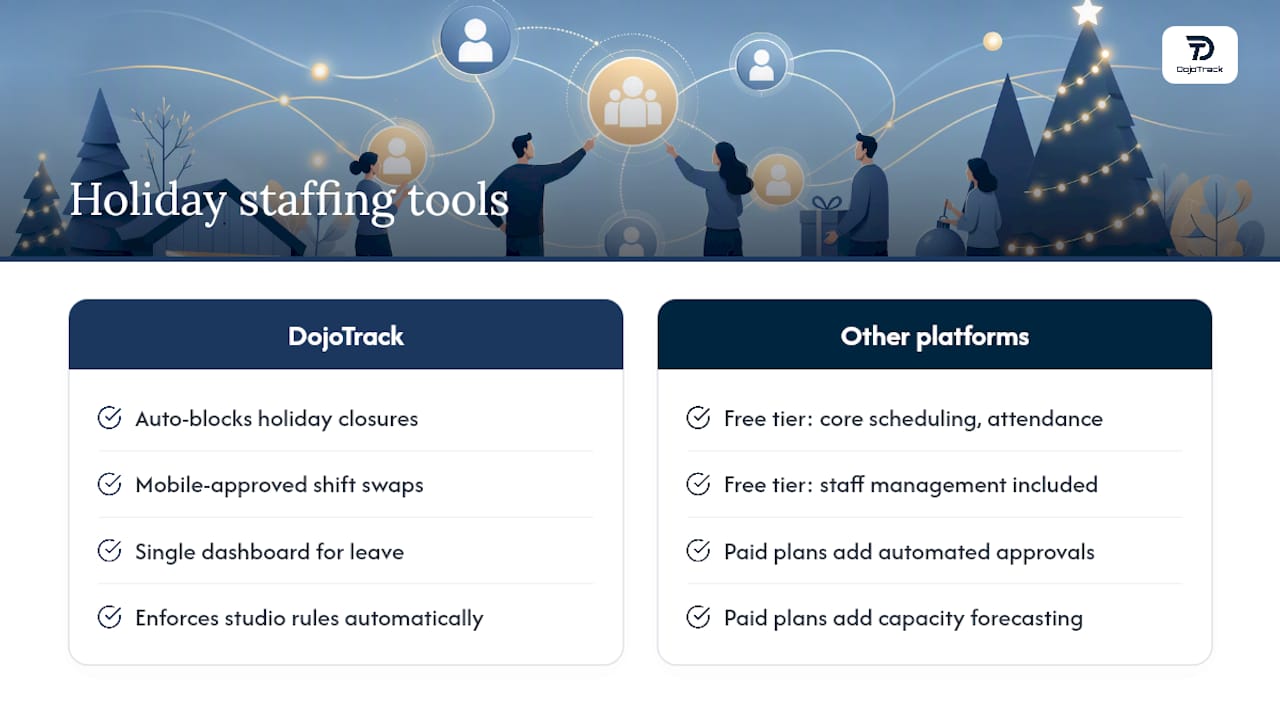
Some martial arts studio management platforms offer free tiers that include core scheduling, attendance, and staff management, with paid plans that add automated approvals, capacity forecasting, and mobile scheduling tools. Check the DojoTrack pricing page to see which plan fits your staff size, or start with the free signup and build your holiday schedule before the next request comes in.
Sources
- State paid family leave laws across the U.S. — Bipartisan Policy Center
- Alight launches Leave Planner™ — Alight
- FMLA fact sheets — U.S. Department of Labor
FAQ
What Is a Typical Company Holiday Schedule?
Most small and medium businesses publish a fixed list of paid holidays, commonly New Year’s Day, Memorial Day, Independence Day, Labor Day, Thanksgiving, and Christmas, alongside provisional hours for the days surrounding them. There’s no single legal standard; each employer sets its own list and publishes it well before the season starts.
What Is a Good Free App for Managing Staff Holidays?
DojoTrack offers a free core tier that covers scheduling, attendance, and staff management with no upfront cost, which works well for martial arts studios getting started with organized holiday planning. Broader options exist too, but any free tool should at minimum let staff submit requests and let managers see coverage gaps in one place.
Is March 23, 2026 a Holiday?
March 2026 has no federal or widely observed U.S. holiday that falls on a Monday with a standard paid-leave designation. Some states or employers may observe local or company-specific dates, so check your own published holiday calendar to confirm.
What Is the Best Tool for Schedule Management?
The best tool depends on whether you need basic visual calendars or advanced capacity forecasting and automated approvals. For martial arts studios specifically, DojoTrack combines holiday-aware scheduling with attendance tracking and staff management in one platform, starting free and scaling up as coverage needs grow.