

Five tactics recover most lost subscription revenue: smart retry scheduling, card updater and network tokenization, in-app payment links, empathetic dunning messages, and disciplined KPI tracking. Stripe’s recovery tooling alone helped businesses recover more than $6.5 billion in revenue in 2024, and most of that came from the same five moves, executed consistently rather than left to chance.
TL;DR:
- Automatic card updater and network tokenization significantly reduce expiration-related declines before they occur, enhancing recovery success.
- Implementing a retry schedule of Day 1, Day 3, and Day 7 for soft declines captures most recoverable failed payments without irritating customers.
- Segmenting decline reasons informs whether to retry automatically or escalate to manual review, especially for fraud flags or technical errors.
- Empathetic, one-click dunning messages that clearly state the failure and enable quick payment updates boost recovery rates effectively.
- Tracking decline rate, recovery rate, revenue recovered, and involuntary churn weekly allows precise measurement and continuous optimization of recovery efforts.
Table of Contents
- Failed Payment Recovery Checklist: What to Do First
- What Are Failed Payments and Why Do They Threaten Recurring Revenue?
- What Causes Most Failed Payments?
- How Often Should You Retry a Failed Payment?
- What Should a Dunning Email Actually Say?
- Do Card Updater Tools Actually Reduce Failed Payments?
- Which Metrics Actually Tell You Recovery Is Working?
- How Does DojoTrack Apply This Playbook for Martial Arts Studios?
- Author Perspective: Recovery Is a Retention Discipline, Not Collections
- Get Started With DojoTrack for Billing and Recovery in One Place
- Authoritative Resources for Technical Implementation
- Sources
- FAQ
Failed Payment Recovery Checklist: What to Do First
Failed payment recovery works best as a sequence, not a scramble. You prevent what you can, catch what slips through, recover what you catch, and measure what you recovered. Here’s the order that actually moves revenue:
- Prevent: Turn on card updater and network tokenization so expired or reissued cards update automatically before they ever decline.
- Detect: Segment declines by reason code (insufficient funds, expired card, fraud flag) so each type routes to the right fix.
- Recover: Run smart retries on a staggered schedule, paired with empathetic dunning emails and a one-click payment link.
- Measure: Track decline rate, recovery rate, and involuntary churn weekly, not quarterly.
Each step catches revenue the previous one missed. Skip prevention and you’re retrying declines that never needed to happen. Skip measurement and you’ll never know which tactic is actually working.
What Are Failed Payments and Why Do They Threaten Recurring Revenue?
A failed payment happens when a scheduled charge on a saved card or bank account gets declined. Left unresolved, it becomes involuntary churn: a customer who never chose to leave but lost access anyway because their payment method quietly stopped working.
Involuntary churn is often invisible until it isn’t. Industry estimates put failed-payment-driven losses at a meaningful share of overall subscription churn, and because recurring billing depends on the same card working month after month, even a small decline rate compounds fast. A studio charging 200 members monthly with a common decline rate is losing track of multiple payments every single billing cycle, not once, but on repeat.
What Causes Most Failed Payments?
Diagnosing the cause determines the fix, and most declines fall into a handful of predictable buckets. Stripe’s guidance on failed payments breaks decline codes into categories that call for very different responses:
- Expired or reissued cards: The most preventable cause, and the one card updater services solve automatically.
- Insufficient funds: Often temporary, tied to timing around paydays or account balances, and frequently resolved by a well-timed retry.
- Issuer or bank declines: Sometimes a security hold, sometimes a spending limit, usually resolved by the customer contacting their bank.
- Fraud flags: The card network or issuer suspects the transaction, which needs manual review rather than an automatic retry.
- Technical or gateway errors: Rare but real, often fixed by simply resubmitting the charge.
Segmenting declines this way matters because it tells you which failures deserve a retry and which need a human. Sending a fraud-flagged charge through five automatic retries wastes cycles and can trigger additional scrutiny from the card network.
How Often Should You Retry a Failed Payment?
Retry timing decides whether you recover the payment quietly or lose the customer entirely. A common cadence retries on Day 1, Day 3, and Day 7, spacing attempts out because insufficient-funds declines often resolve within a few days as paychecks land or balances refresh.
- Day 1: Retry shortly after the initial decline, since some failures are momentary gateway hiccups.
- Day 3: A second attempt catches balances that refreshed over a weekend or pay cycle.
- Day 7: A final automated attempt before escalating to manual outreach or pausing service.
- Time-of-day matters: Retrying overnight or early morning, before a customer’s other bills clear, tends to underperform a midday attempt.
Beyond three failed attempts, stop retrying blindly and switch to a direct message or a phone call, especially for high-value accounts. Retrying indefinitely annoys customers and can look like suspicious activity to card networks, which sometimes flags the merchant, not just the transaction.
Pro Tip: Test cadences with actual A/B experiments rather than copying a generic schedule. Recurring billing guidance from subscription-merchant experts points out that retry timing that works for a $15 monthly gym membership rarely performs the same way for a $200 annual plan.
What Should a Dunning Email Actually Say?
The tone of your dunning message decides whether a customer updates their card in ten seconds or ignores you until they cancel. Aggressive, collections-style language tends to backfire on involuntary declines, since most of these customers didn’t choose to stop paying. They just have an expired card sitting on file.
- Pre-dunning: Send a reminder before renewal, especially if the card on file is nearing its expiration date. This single email often prevents the decline from happening at all.
- Post-failure, message one: Lead with clarity, not urgency. State plainly that a payment didn’t go through and give a direct link to fix it.
- Channel mix: Email for the paper trail, in-app push for immediate visibility, SMS for urgency on higher-value accounts.
- One-click action: Every message should link straight to a secure payment-update page, not a general account settings screen.
Frictionless, empathetic messaging paired with a one-click update flow tends to outperform aggressive collection language, particularly for declines that were never really the customer’s fault.
Pro Tip: Keep the first post-failure email short enough to read on a lock screen. If it takes longer to read than to tap the “update payment” button, you’ve already lost some of the recovery.

Do Card Updater Tools Actually Reduce Failed Payments?
Card updater and network tokenization prevent expiration-related declines before they ever reach your dunning sequence, which makes them the highest-leverage fix on this list. When a bank reissues a card, the updater pulls the new number and expiration date automatically, so the charge processes without the customer lifting a finger.
- Card updater services: Sync updated card details from the issuing bank directly into your billing system.
- Network tokenization: Replaces the raw card number with a token that stays valid even when the physical card changes.
- Multiple payment methods: Offering a backup option (a second card, ACH, digital wallet) reduces reliance on a single point of failure.
- In-app update UX: A simple, native-feeling flow for updating a card beats redirecting customers to a clunky external form.
Most subscription businesses get more return from turning on gateway-level tokenization first, then layering in third-party recovery tools only if decline rates stay stubborn afterward.
Which Metrics Actually Tell You Recovery Is Working?
You can’t manage failed payment recovery without measuring it, and the four numbers that matter most are decline rate, recovery rate, revenue recovered, and involuntary churn. Decline rate tells you how often charges fail in the first place; recovery rate tells you what share of those failures you actually win back.
- Decline rate: Total failed charges divided by total charge attempts, tracked weekly.
- Recovery rate: Percentage of failed payments successfully recovered within your retry window.
- Revenue recovered: The dollar amount reclaimed through retries, dunning, and manual outreach combined.
- Involuntary churn: Customers lost specifically because a payment never recovered, tracked separately from voluntary cancellations.
Set alert thresholds so a spike in decline rate flags itself instead of surfacing three weeks later in a revenue report. Run periodic audits of your retry logic, A/B test cadence changes before rolling them out broadly, and reserve manual outreach for your highest-value accounts rather than trying to personally call every failed charge.
How Does DojoTrack Apply This Playbook for Martial Arts Studios?
Martial arts studios run on recurring membership dues, which makes failed payment recovery a direct retention issue, not just a billing nuisance. DojoTrack builds the playbook above directly into its Stripe-powered recurring billing, so studio owners aren’t stitching together separate tools for retries, messaging, and reporting.
- Stripe billing integration: Handles automated retries and card updater functionality without manual reconciliation.
- In-app push notifications: Alert students the moment a payment fails, right inside the same app they use to track belt progress.
- Secure payment links: Let a student update their card from their phone in one tap, no login required.
- Dunning templates: Pre-built, empathetic messaging that studios can send without writing copy from scratch.
Picture a student whose card expires mid-month. DojoTrack retries automatically, pushes a notification, and the student updates their card from the mobile app before missing a single class. Studios can start with DojoTrack’s free core platform and unlock these automations as membership volume grows.
Author Perspective: Recovery Is a Retention Discipline, Not Collections
Most billing teams treat a failed payment like a debt to chase. That framing is backwards. The customer usually still wants what they’re paying for; their card just stopped working quietly in the background. Treat the first message as a favor, not a warning, and resolution rates climb. The businesses that recover the most revenue are the ones that built recovery into their retention strategy, not their accounts receivable department.
— DojoTrack
Get Started With DojoTrack for Billing and Recovery in One Place
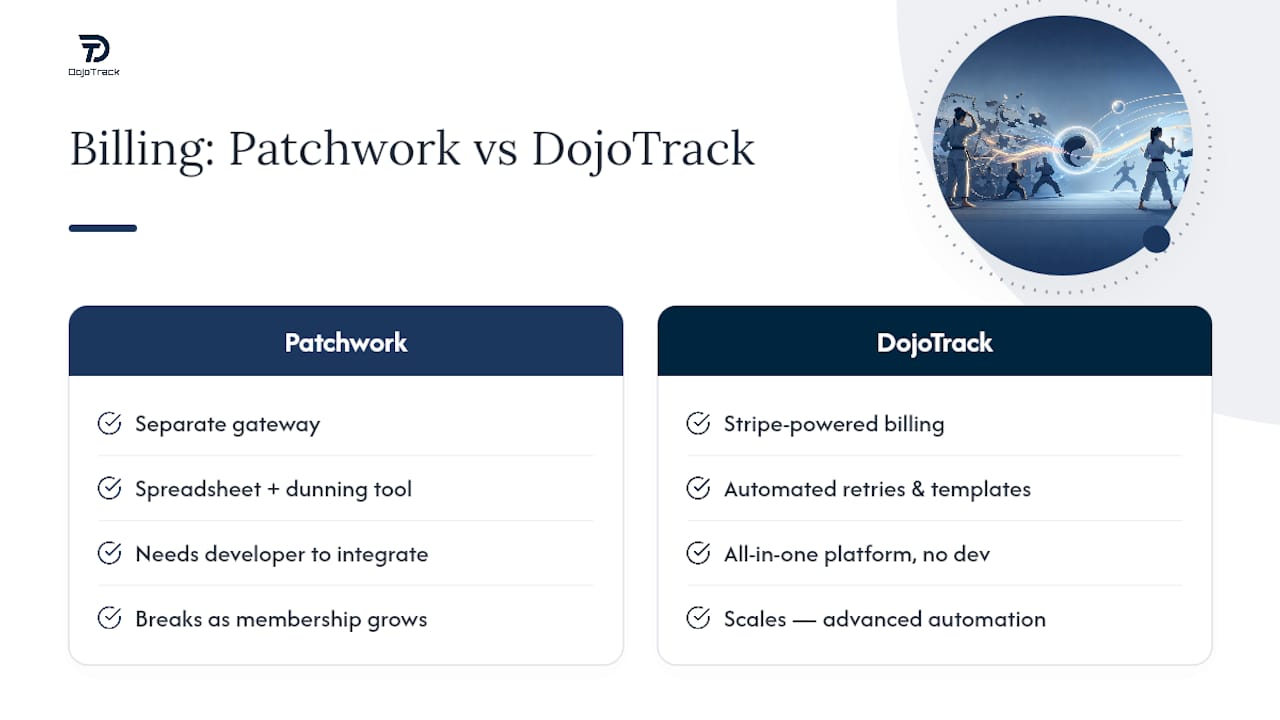
Piecing together a payment gateway, a separate dunning tool, and a spreadsheet for churn tracking works until it doesn’t, usually right when a studio’s membership count starts climbing. DojoTrack replaces that patchwork with Stripe-powered billing, automated retries, in-app payment links, and built-in dunning templates in one platform built specifically for martial arts schools. You get the retry cadences and card updater functionality covered in this guide without hiring a developer to wire it together, with options to add retention alerts once billing is under control. Studios can start on DojoTrack’s free core platform today and unlock advanced billing automation as membership volume grows. Sign up and set up your first recovery flow in under an hour.
Authoritative Resources for Technical Implementation
For decline-code specifics and integration details, go straight to the source rather than a summary. Stripe’s failed payment recovery guidance covers retry logic and card updater setup in technical detail. Its SaaS billing best practices resource addresses pre-expiry reminders. For broader recurring-billing strategy, PaymentNerds’ subscription merchant guide and Butter’s payment recovery glossary both offer practical framing worth bookmarking. Always confirm decline-code specifics against your own gateway’s documentation before building automation around them.
Sources
- How to accept recurring payments as a business | Stripe
- Recurring Billing Best Practices for Subscription Merchants
- Payment recovery | Butter
FAQ
What Should You Do When a Payment Fails?
Check the decline code first to identify the cause, then trigger an automatic retry for soft declines (insufficient funds) or an immediate card-update prompt for expired cards; fraud flags need manual review instead of a retry.
What’s the Best Way to Automate Failed Payment Retries?
A staggered cadence, commonly Day 1, Day 3, and Day 7, paired with card updater and network tokenization, catches most recoverable declines without overwhelming the customer or the card network. Platforms like Stripe and billing tools such as DojoTrack build this scheduling in natively.
What Is Payment Recovery, Exactly?
Payment recovery is the combined set of automated retries, dunning messages, and payment-update flows used to collect a subscription charge after it initially fails, aiming to prevent involuntary churn.
How Do You Fix a Failed Subscription Payment?
Send the customer a direct, low-friction link to update their payment method, retry the charge automatically on a set schedule, and escalate to manual outreach if retries fail after about a week.
How Much Revenue Can Businesses Realistically Recover?
Recovery tooling has helped businesses reclaim billions in subscription revenue industry-wide, though the exact recovery rate for any individual business depends on decline mix, retry cadence, and how quickly customers respond to dunning messages.