

The fastest way to recover a canceled or no-show spot in a martial arts class is an automated, rule-based waitlist tied to check-in triggers and sent over SMS and app push together. Set signup order as your default priority, add a membership-tier modifier only if you need one, and publish the rules where members can see them. Measure fill rate weekly. That combination beats manual phone calls and text chains almost every time.
TL;DR:
- Implementing an automated waitlist system with multi-channel SMS, app push, and email notifications significantly increases fill rates for cancelled or no-show spots.
- Auto-add models work best for high-demand, fast turnover classes, while first-to-claim models suit settings requiring explicit member confirmation before booking.
- Clear, written waitlist policies based on signup order, response windows, and documented manual overrides foster fairness and prevent disputes.
- Proper capacity settings and check-in system triggers are crucial to backfill spots accurately and avoid overfilling or leaving seats empty.
- Connecting waitlist automation with billing ensures members are only charged once their spot is confirmed, preventing overcharges or administrative reconciliation issues.
Table of Contents
- What Is Waitlist Management for a Dojo, and How Does It Actually Work?
- How Do You Write Waitlist Rules That Members Actually Trust?
- What Operational Pieces Do You Need Before Turning On a Waitlist?
- Which Metrics Actually Tell You If Your Waitlist Is Working?
- How Do You Roll Out an Automated Waitlist This Week?
- How Does Waitlist Automation Connect to Payments and Refunds?
- What Privacy and Security Rules Apply to a Dojo Waitlist?
- How Should You Communicate With Members Beyond the Initial Waitlist Alert?
- How Do Cancellations and Refunds Work for Waitlist Spots?
- DojoTrack Perspective: Why We Built These Features for Martial Arts Schools
- How DojoTrack Maps to the Waitlist Checklist You Just Read
- Sources
- FAQ
What Is Waitlist Management for a Dojo, and How Does It Actually Work?
Waitlist management for a dojo means the system and rules you use to fill a canceled or no-show spot in a class before that mat time goes to waste. Two models dominate: auto-add and first-to-claim, and picking the wrong one for your school creates more friction than having no system at all.
Auto-add automatically slots the next person in line into an open spot the moment one appears. No confirmation step, no waiting on a reply. This works best for high-demand kids’ classes or evening BJJ sessions where speed matters more than choice, and where the member has already agreed to auto-fill when they joined the waitlist.
First-to-claim alerts everyone on the list and lets the first person to respond take the spot. It suits situations where you need explicit confirmation before you charge a card or hold someone accountable for showing up, since nobody gets committed to a class they didn’t actively accept.
Notification sequencing decides whether either model actually works. Studios that lead with SMS, follow with an app push, and fall back to email recover far more open spots than those relying on a single channel, mainly because SMS response speed dramatically outpaces email in the first hour after a cancellation.
- Auto-add: fastest fill, best for high-turnover classes, low member effort
- First-to-claim: better accountability, best when payment or attendance commitment matters
- SMS first, push second, email third: the sequence that recovers spots quickest
How Do You Write Waitlist Rules That Members Actually Trust?
Most waitlist disputes at the front desk come from unclear rules, not bad luck. A member who thinks they got skipped will assume favoritism unless you can point to a written policy that explains exactly how spots get assigned.
Three rules cover almost every scenario:
- Signup order is the default. Whoever joined the waitlist first gets offered the spot first, every time, unless a documented exception applies.
- Response windows stay consistent. Give everyone the same amount of time to claim a spot, whether that’s 10 minutes for a same-day cancellation or a few hours for an advance one.
- Manual reordering requires a logged reason. If an instructor moves someone up for a genuine reason (a make-up class before a belt test, say), write it down. Undocumented overrides are what erode trust fastest.
Late-cancel windows interact directly with this list. If your policy allows cancellations up to two hours before class, your waitlist system needs to treat anything inside that window as a “fast fill” trigger, since the odds of backfilling drop the closer you get to start time. Adjusting notification timing based on how close the class is keeps early cancellations calm and last-minute ones urgent.
Tell members exactly what to expect at signup: “You’ll be notified by text when a spot opens. You have 10 minutes to confirm before it goes to the next person in line.”
Pro Tip: Post your waitlist policy on the same page where members book classes, not buried in a handbook nobody reads twice.
What Operational Pieces Do You Need Before Turning On a Waitlist?
A waitlist only works as well as the capacity number and check-in system feeding it. Get these wrong and you’ll either overfill the mat or leave spots empty that should have been filled ten minutes into class.
Start with mat-appropriate capacity, not just a round number that feels convenient. A 20 by 20 foot mat safely holds a different headcount for adult no-gi rolling than it does for a kids’ fundamentals class with more static drilling, and your cap should reflect that difference before you ever enable a waitlist.
Check-in windows are what make automation actually catch no-shows instead of just cancellations. If a registered student hasn’t checked in within a short grace period after class starts, the system should treat that spot as open and offer it to the next person waiting, the same way a canceled spot would trigger an offer.
Not everything should run on autopilot. Build a short list of exceptions staff handle manually:
- Special enrollments (trial students, seminar guests, private lesson conversions)
- Instructor overrides for belt-test prep or injury accommodations
- Family scheduling conflicts that need a human judgment call
Everything outside that short list should stay automated. Manual review for every single waitlist event defeats the purpose, and it’s the fastest way to burn front-desk hours you don’t have. Connecting these check-in and capacity rules to your broader operations system keeps attendance data, belt tracking, and scheduling working from the same source of truth.
Which Metrics Actually Tell You If Your Waitlist Is Working?
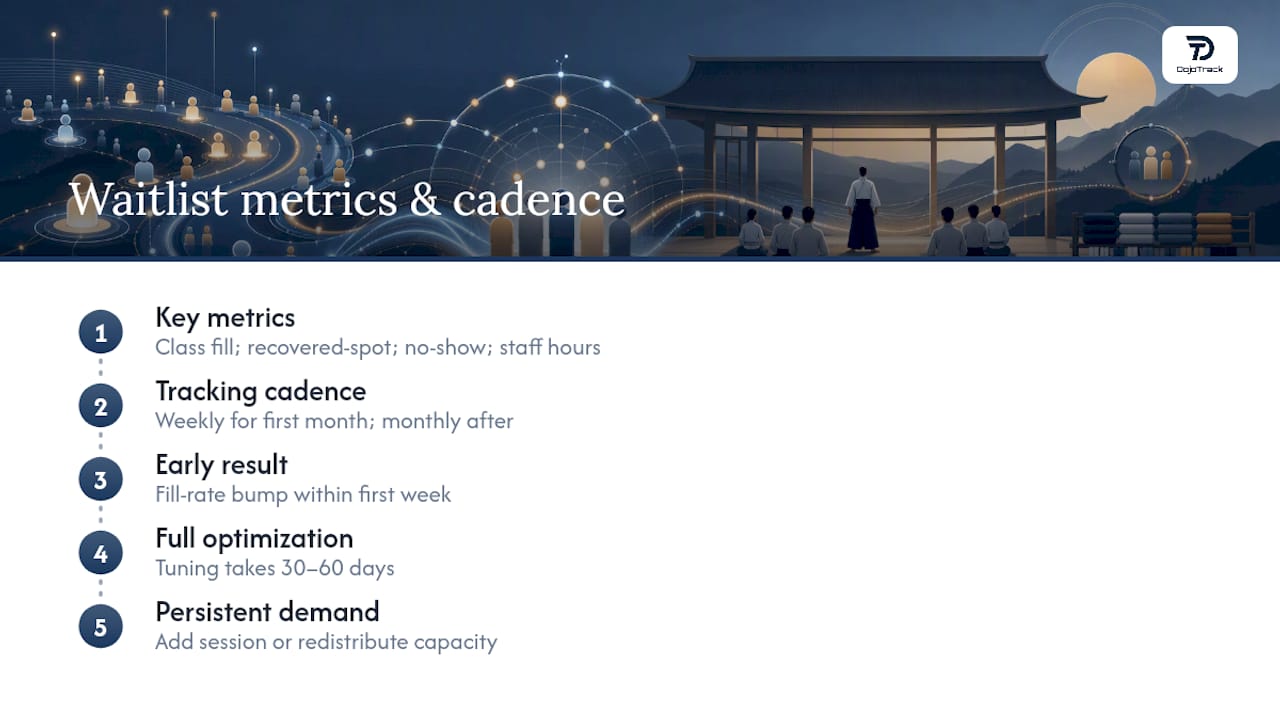
Four numbers matter more than the rest: class fill rate, recovered-spot percentage, no-show rate, and staff hours spent on waitlist tasks. Track them weekly for the first month, then monthly after that.
Fill rate tells you what percentage of your total class capacity gets used, including spots recovered from cancellations. Recovered-spot percentage narrows that down to just the canceled or no-show slots you actually backfilled. No-show rate flags whether your check-in grace period needs adjusting. Staff hours spent on waitlist tasks is the number that justifies the whole project to anyone still skeptical about automating it.
The gap is bigger than most owners expect. Manual waitlist processes commonly take more than two hours from cancellation to notification, a window that often closes before a same-day class ever fills. Automated, multi-channel sequences compress that response time dramatically and recover a much higher share of opened spots.
Expect a visible fill-rate bump within the first week of switching to automation, mostly from spots that used to go unfilled simply because nobody called fast enough. Full optimization, meaning tuned response windows and a fairness policy members have stopped questioning, usually takes 30 to 60 days. If a specific class slot stays on a persistent waitlist past that window, treat it as a demand signal: add a session or redistribute capacity rather than letting members wait indefinitely for a class that’s clearly oversubscribed.
How Do You Roll Out an Automated Waitlist This Week?
You don’t need a quarter-long rollout plan. A focused week gets you from zero to a working, rule-based waitlist if you follow the sequence in order.
- Set capacity and pick your model. Lock in a mat-appropriate cap per class, then decide auto-add versus first-to-claim based on whether payment commitment matters for that class type.
- Draft late-cancel windows and member messaging. Write the plain-language explanation members will see at signup, matching the wording style from your policy section.
- Enable multi-channel alerts. Turn on SMS as the lead channel, app push as the follow-up, and email as the fallback for anyone who hasn’t responded.
- Connect check-in triggers. Set the grace period after class start that flags a no-show and releases the spot to the waitlist.
- Set priority rules. Default to signup timestamp, and layer in a membership-tier modifier only if your business genuinely needs one.
- Run shadow mode for two weeks. Let the system generate offers without auto-adding anyone, so you can watch response times and messaging friction before committing.
- Launch, then measure. Communicate the change to members directly, then start tracking fill rate and recovered spots from day one.
Pro Tip: Test the whole sequence on your least popular class first. A quiet Tuesday afternoon slot lets you catch messaging problems without frustrating your busiest members.
How Does Waitlist Automation Connect to Payments and Refunds?
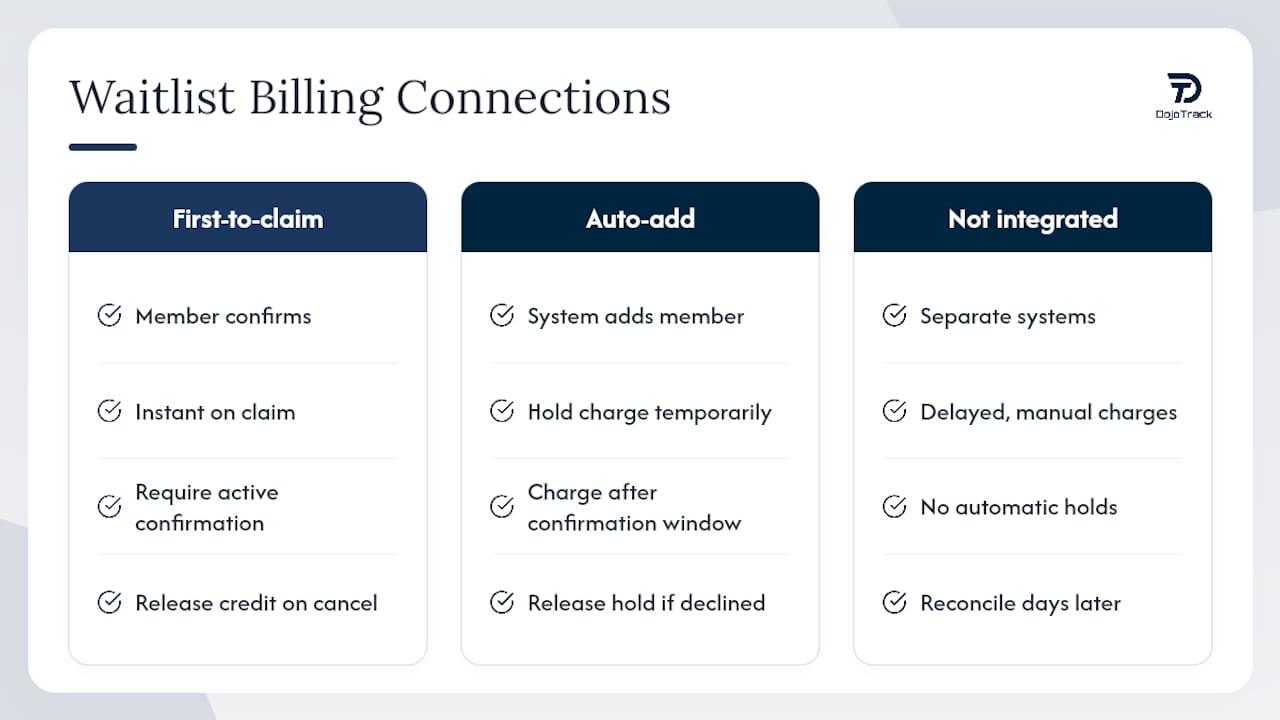
Waitlist logic and billing logic have to talk to each other, or you end up charging someone for a spot they never actually got. If a canceled member already paid for a class pack credit or a drop-in fee, your system needs to release that charge back to their account the moment the cancellation triggers a waitlist offer, not days later when someone notices the discrepancy.
The cleanest setup ties waitlist offers directly to your billing platform so a claimed spot generates a charge automatically, and an unclaimed one never does. This matters most for first-to-claim models, where a member has to actively confirm before any payment processes. Auto-add models need the opposite safeguard: since the system places someone into a spot without asking, billing should hold the charge until a short confirmation window passes, giving the member a chance to decline before money moves.
Stripe-powered billing integrations built into most modern studio software handle this automatically once configured correctly, applying class credits or processing drop-in charges the instant a waitlist spot converts to an actual booking. That removes one of the most common sources of member complaints: getting charged for a class they thought they’d waitlisted for, not confirmed. If your current setup requires a staff member to manually reconcile waitlist fills against billing at the end of each day, that’s a sign your payment and waitlist systems aren’t actually integrated, just running side by side.
What Privacy and Security Rules Apply to a Dojo Waitlist?
A waitlist system holds more personal data than owners often realize: phone numbers, email addresses, attendance patterns, and sometimes payment details tied to auto-charge features. That data needs the same handling discipline you’d apply to membership records generally.
Limit who can see waitlist contact information to front-desk staff and instructors who genuinely need it, not every login on the system. Notification platforms should use encrypted transmission for SMS and email content, and any vendor handling your text messages should be transparent about how long they retain phone numbers after a message sends.
Parents enrolling kids in youth classes deserve particular attention here, since waitlist notifications for a child’s class often go to a parent’s phone number tied to a family account. Make sure your system separates family member profiles cleanly so a notification about one child’s spot doesn’t accidentally expose another family’s waitlist position or contact details.
Ask any software vendor directly how they store historical waitlist data, whether they delete it after a retention period, and whether it’s included in any data export a member requests. A vague answer to that question is worth treating as a warning sign, not a technicality to skip past.
How Should You Communicate With Members Beyond the Initial Waitlist Alert?
The first notification is only the start of the conversation. Members who claim a waitlist spot need a confirmation message that repeats the class time, location, and any last-minute details, ideally within seconds of them accepting, so there’s no ambiguity about whether the spot actually locked in.
A reminder 24 hours before the class helps reduce the very no-shows that create waitlist openings in the first place, and a same-day reminder two to three hours out catches anyone who forgot overnight. Both should go out on the same channel priority you use for waitlist alerts: SMS first, since that’s where members respond fastest.
Confirmation messaging matters just as much for the people who didn’t get a spot. A short note letting someone know they’ve moved up in line, even without an open spot yet, keeps them engaged instead of assuming the system forgot about them. This single habit does more for perceived fairness than almost any policy change, because it makes the waitlist feel active rather than like a black hole.
How Do Cancellations and Refunds Work for Waitlist Spots?
A member who claims a waitlist spot and then needs to cancel should face the same late-cancel policy as anyone with a standard booking, applied consistently and without exceptions carved out just because they came from the waitlist. Treating waitlist bookings as somehow lower-stakes than regular ones is one of the fastest ways to undermine your own fairness rules.
Refund timing depends on how far out the cancellation happens. A member who cancels a waitlist-claimed spot well before class starts should get a straightforward credit or refund, processed the same way a regular class cancellation would be. A member who no-shows after claiming a spot, though, should be subject to the same late-cancel fee structure that applies to any other no-show, since letting waitlist claims skip that consequence removes the accountability that makes first-to-claim work in the first place.
One nuance worth building into your policy: if a member declines a waitlist offer rather than claiming it, that should never trigger any fee or penalty. Declining isn’t a cancellation, it’s simply not accepting an offer, and treating it as punishable behavior discourages people from staying on waitlists at all.
DojoTrack Perspective: Why We Built These Features for Martial Arts Schools
Generic fitness scheduling tools treat every canceled spot the same way. A dojo doesn’t work that way. A canceled adult no-gi spot and an empty kids’ fundamentals seat carry different capacity math, different instructor considerations, and often different belt-rank prerequisites for who can even fill them.
Founder Jared Reed built DojoTrack’s waitlist logic around running actual schools, where attendance data and belt curriculum tracking already lived in the same system, so automated notifications could pull from real context instead of guessing. AI-driven retention signals and automated SMS follow-ups exist specifically to cut the administrative load that pulls instructors off the mat and into front-desk triage.
A martial-arts-specific mobile app also changes the trust equation. When members can see their own waitlist position and check-in history directly, disputes drop because the system, not a staff member’s memory, becomes the record of truth.
— DojoTrack
How DojoTrack Maps to the Waitlist Checklist You Just Read
Every piece of the implementation checklist above maps to a feature you can configure directly inside DojoTrack. Multi-channel alerts cover SMS, push, and email in one sequence. Auto-add and first-to-claim are both configurable per class, so your kids’ fundamentals class and your competition team practice can run different rules without extra software. Check-in triggers connect directly to attendance and belt-tracking data already in the system, and reporting dashboards surface fill rate, recovered spots, and staff time saved without a spreadsheet in sight.
DojoTrack offers a free core tier covering student management, attendance, scheduling, and digital waivers, so you can get the operational foundation running before deciding whether to unlock advanced automation and the student mobile app. If you’re weighing whether to commit to auto-add across your whole schedule, start smaller: turn on waitlist automation for a single non-peak class first, watch how members respond over a week or two, then expand from there once the fairness rules have proven themselves. Sign up for DojoTrack to configure your first automated waitlist and see fill-rate data on your own schedule within days.
Sources
- How to Set Up a Studio Waitlist That Fills Cancellations Without Annoying People – Cloud Studio Manager
- Hit a 95% Class Fill Rate With Waitlist Automation Guide | US Tech Automations
FAQ
What Is the Difference Between Auto-Add and First-to-Claim Waitlists?
Auto-add automatically places the next person in line into an open spot with no confirmation step, while first-to-claim sends an alert and waits for a member to actively accept the spot before it’s booked.
How Fast Should a Waitlist Notification Go Out After a Cancellation?
Notifications should go out within minutes of a cancellation or a missed check-in grace period, since manual processes that take hours to notify members often miss the window to fill same-day classes entirely.
Should Membership Tier Affect Waitlist Priority?
Signup timestamp should remain the default priority rule, with a membership-tier modifier added only as a secondary factor, since leading with timestamp order preserves the perceived fairness that keeps members from disputing their position.
How Long Should Members Have to Confirm a Waitlist Spot?
Response windows should scale with how far out the class is, ranging from a few hours for advance cancellations down to around 10 minutes for same-day openings, so the spot doesn’t sit empty while everyone waits.
Does DojoTrack Support Both Waitlist Models?
Yes, DojoTrack lets schools configure auto-add or first-to-claim per class, along with multi-channel SMS, push, and email notifications tied to check-in and attendance data already in the platform.