

Switching martial arts software is routine when you follow a defined migration sequence, and it does not have to put belt history, attendance records, or billing at risk. The priorities are simple: preserve rank history, keep billing continuous, and minimize downtime during cutover. Your first move is straightforward. Export your current data today and request the new vendor’s import template so you know exactly what fields you’re working with before you commit to a switch date.
TL;DR:
- Export and verify all active student records, belt history, attendance logs, and billing data to ensure accurate migration and avoid manual reconstruction.
- Normalize date formats and maintain consistent unique IDs across files to prevent data corruption during the import process.
- Conduct a dry run import and thorough testing of belt dates, attendance, and invoices to catch errors early before full cutover.
- Re-tokenize payment methods or notify families about billing resets, as saved credit card data cannot transfer across providers due to PCI compliance.
- Train staff comprehensively and communicate clearly with families about the migration timeline, potential payment updates, and data security precautions.
Table of Contents
- Migration Checklist You Can Run This Week
- What Data to Export and How to Map It
- Migration Sequence and Timeline
- Testing and Validation Checks After Import
- Handling Billing Continuity and Saved Payment Methods
- Staff Training and Parent Communication Plan
- Data Security and Privacy During the Transition
- What We Learned Building DojoTrack: Common Migration Mistakes
- How DojoTrack Supports Your Migration
- Sources
- FAQ
Migration Checklist You Can Run This Week
A martial arts school switching software platforms benefits from breaking the process into stages instead of treating it as one big leap. Most owners who run into trouble skip preparation and jump straight to import, which is where belt records and billing history get scrambled.
Here’s the sequence that keeps things intact:
- Audit your current system. List every data type you rely on: student profiles, family groupings, belt/rank history, attendance logs, invoices, and signed waivers.
- Export everything in bulk. Most platforms allow CSV or Excel exports from the admin dashboard. Pull these before you sign anything with a new vendor.
- Decide what to migrate versus recreate. Old lead records or canceled memberships from years ago may not be worth migrating. Active students, current belts, and open invoices always are.
- Pick a cutover weekend. Choose a lower-traffic period, ideally not during a testing cycle or tournament week.
- Assign roles. One person owns exports, one owns import verification, one handles family communication.
- Back up legal records separately. Waivers and liability forms should be archived outside the software switch entirely, since compliance requirements often outlast any single platform.
This checklist alone prevents the most common failure point in a software transition: assuming the new system will “just handle it.”
What Data to Export and How to Map It
Getting the export right matters more than the import tool you use. Vendors that offer martial arts school registration and migration support typically pull five categories: family records, enrollments, attendance, belt/rank history, and billing exports. Pull each of these with enough detail that nothing needs to be reconstructed by memory.
Export these specific datasets:
- Student and family records: names, contact info, emergency contacts, and the relationship field linking children to parents.
- Belt/rank history: rank name, promotion date, and instructor of record for each historical promotion, not just the current rank.
- Attendance logs: student ID, class ID, and timestamp for every check-in, going back at least 12 months.
- Billing records: invoice history, payment dates, amounts, and outstanding balances (not card numbers, which we’ll cover separately).
- Waivers: signature date, document version, and guardian name for minors.
Normalize date formats before you hand off any file. A spreadsheet mixing MM/DD/YYYY and DD/MM/YYYY is the single fastest way to corrupt a belt history import. Also make sure every student has one consistent unique ID across every exported file. Rank naming conventions (“1st Degree Black Belt” versus “Black Belt 1”) should be standardized in the source file, not left for the new platform to guess.
Migration Sequence and Timeline
The workflow that actually reduces errors follows five gated stages: export, map, import, test, and cutover. Skipping the testing gate is where most schools get burned, because problems in belt or attendance data often don’t surface until a parent calls asking why their child’s rank looks wrong.
- Export (1 to 2 days). Pull every dataset listed above from your current platform.
- Map (2 to 3 days). Match each column in your export to the new platform’s required fields. This is where a vendor’s import template earns its keep.
- Dry run import (1 day). Import a representative subset of students before touching your full roster. This step catches mapping errors early without risking your entire database.
- Test (1 to 2 days). Verify belt dates, attendance counts, and invoice totals against the dry run.
- Full cutover (1 weekend). Once the dry run passes, import the complete dataset and go live.
A school with under 150 students can often complete this in a week. Larger academies with multiple locations and 500-plus active members should budget two to three weeks, mostly for testing and staff training, not the technical import itself.
Testing and Validation Checks After Import
Never assume an import worked just because the system didn’t throw an error. Vendor pages sometimes advertise figures like 95% data accuracy on migrations, but definitions of “accuracy” vary widely between platforms, so verify it yourself rather than taking the number at face value.
Run these checks before you fully retire your old system:
- Pull 10 random students and manually compare their belt history, promotion dates, and current rank against the old system.
- Confirm attendance totals for the last full month match between old and new platforms.
- Reconcile every open invoice and outstanding balance, dollar for dollar.
- Check that family relationship links (parent to child, sibling discounts) transferred correctly.
- Log every mismatch you find in a shared document so your migration lead can fix mapping rules, not just individual records.
Pro Tip: Fix mapping errors at the source file level, not one student at a time inside the new platform. If one family’s data is wrong, the mapping rule that caused it is probably wrong for a dozen others too.
Handling Billing Continuity and Saved Payment Methods
Saved credit cards are the part of a software switch that catches owners off guard. Vaulted payment tokens, the encrypted card data stored by your current payment processor, typically cannot transfer to a new processor because of PCI compliance rules. This isn’t a limitation specific to any one vendor; it’s an industry-wide security constraint.
Your practical options:
- Re-tokenize through the new processor, if both platforms support a secure handoff (rare, but worth asking about).
- Build a card re-entry flow where families re-enter payment info through a secure link during a defined window.
- Import invoice history without charging anything, so billing records stay intact even while payment methods reset.
Tell families about this at least a week before cutover, with a specific date and a direct link, so nobody is surprised by a “payment failed” notice or, worse, gets billed twice.
Staff Training and Parent Communication Plan
Software rarely fails during migration. Confused staff and surprised parents are what actually derail a launch. Train one lead staff member deeply on the new system, then have that person walk the rest of the team through check-in, attendance, and belt promotion workflows the week before go-live.
- Day-one staff checklist: check-in kiosk, attendance marking, belt promotion entry, and how to answer basic parent questions.
- Family messaging cadence: one email two weeks out explaining the switch, one reminder three days before cutover with payment update instructions, and one “we’re live” message on launch day.
- Feedback loop: a simple form or front-desk log for the first two weeks to catch issues fast, since early complaints often point to the same mapping error.
Data Security and Privacy During the Transition
Every export you create during a software switch is a snapshot of sensitive personal information, including minors’ data, emergency contacts, and payment history. Treat that file with the same caution you’d apply to any other confidential business record.
Password-protect export files and share them only through secure, access-controlled channels, never as an unprotected email attachment sitting in an inbox indefinitely. Delete local copies of exports once the migration is verified and complete, and confirm your old vendor’s data retention and deletion policy before you close that account entirely. If your school serves minors, which most do, your waiver and consent records may carry state-specific retention requirements independent of whatever software you use, so keep those archived separately regardless of platform.

Ask any new vendor directly how they store data in transit and at rest, and whether their platform is built with role-based access so only authorized staff can view billing or medical information. A platform purpose-built for martial arts studio management should be able to answer this clearly, not vaguely. If a sales rep can’t explain their data handling in plain terms, that’s a signal worth taking seriously before you hand over years of student records.
What We Learned Building DojoTrack: Common Migration Mistakes
One provider exists because its founder ran martial arts schools and lived through the exact frustrations this guide addresses: belt tracking scattered across spreadsheets, billing systems that didn’t talk to attendance records, and leads that fell through the cracks. That firsthand operator background shapes how we think about migrations.
The most common mistake we see isn’t technical. It’s sequencing. Owners import billing before they’ve validated belt history, discover a mapping error three weeks later, and end up manually rebuilding rank records for their entire advanced class. The five-stage sequence in this guide, export, map, dry run, test, cutover, exists specifically to catch that kind of error while it’s still cheap to fix. A staff member comparing 20 dry-run students against the old system on paper is more valuable than any accuracy percentage a vendor puts on a landing page.
— DojoTrack
How DojoTrack Supports Your Migration
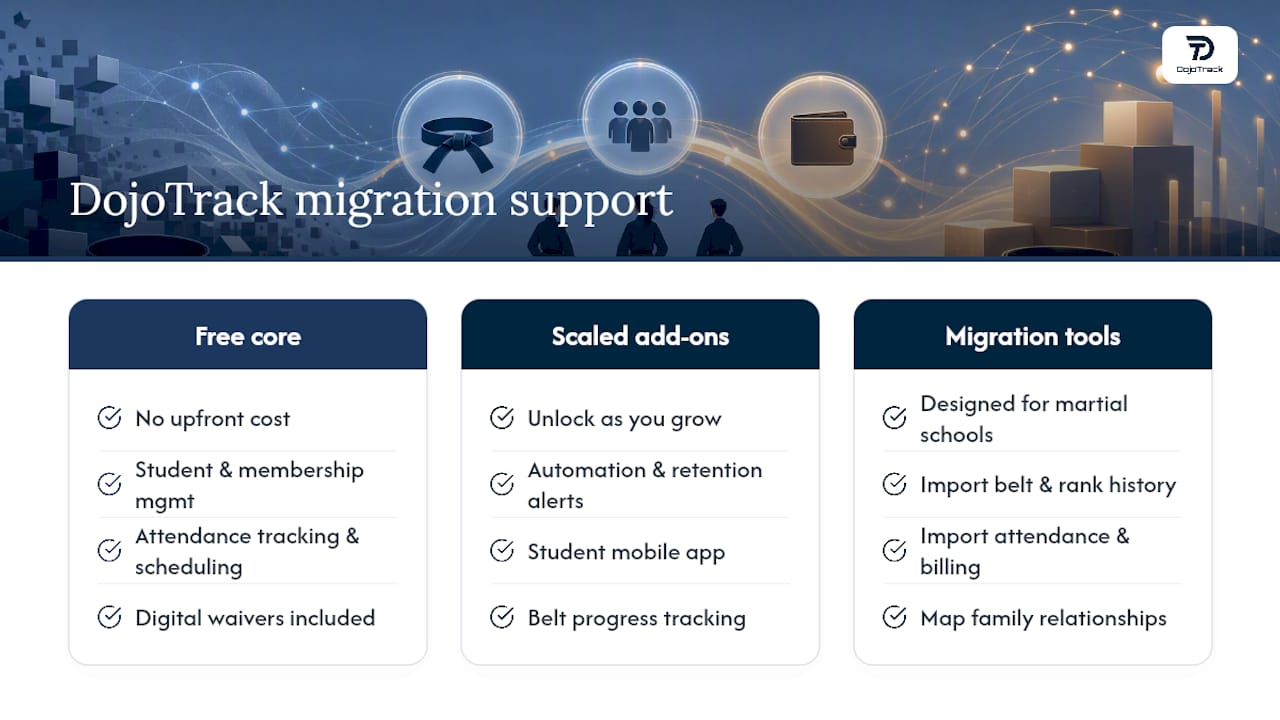
Switching platforms shouldn’t mean starting from zero, and it shouldn’t mean paying full price before you know the fit is right. DojoTrack offers a free core tier that covers student and membership management, attendance tracking, scheduling, and digital waivers, so you can move your operations over without upfront cost while you evaluate whether the platform fits your school.
Because this platform was built by someone who ran a martial arts school, its data import tooling is designed around the exact fields covered in this guide: belt and rank history, family relationships, attendance logs, and billing records. When you’re ready to add automation, retention alerts, or a student mobile app with belt progress tracking, those features unlock as you scale rather than being bundled in before you need them.
If you’re planning a switch, request a look at how DojoTrack’s migration and import tools handle your specific data, or sign up for the free core tier directly and start mapping your export today.
Sources
For deeper background on sequencing and staff readiness, the POS migration workflow guide outlines export-to-cutover staging that applies directly to studio software. For feature comparisons while you evaluate options, see how martial arts management software stacks up against generic fitness apps when belt tracking matters.
- Switching POS systems workflow: a 2026 step-by-step guide
- Martial Arts School Registration Software | Karate, Taekwondo & More | ProgramChamp™
- Martial-Arts-on-Rails profile | SoftwareAdvice
FAQ
What Is the Best Software for Managing Martial Arts Studios?
The best option depends on whether you need martial-arts-specific features like belt tracking and rank promotions, which generic fitness platforms typically don’t handle well. Purpose-built platforms combine CRM, attendance, and belt progression in one system designed around how martial arts schools actually operate.
Is 25 Too Late to Start Martial Arts?
No. Adult enrollment is common across karate, Jiu Jitsu, and Taekwondo programs, and most schools run dedicated adult classes because many students start well after youth age.
What Is the Best App for Martial Arts Training?
The strongest apps pair studio management with a student-facing mobile experience, letting students track belt curriculum progress and class schedules outside the dojo. A student app, for example, includes push notifications and curriculum tracking tied directly to the studio’s own records.
What Software Do Gyms Use?
Most gyms and martial arts schools use dedicated studio management platforms that combine scheduling, billing, and attendance rather than generic fitness apps, since those tools rarely support belt or rank tracking. Choosing platform-specific software also matters most when you’re comparing alternatives during a switch.
How Long Does Switching Martial Arts Software Take?
A school under 150 students can typically complete the full migration sequence in about a week, while larger academies with multiple locations should plan for two to three weeks, mostly for testing and staff training.