

Aim to contact high-intent inbound leads within five minutes. If a rep isn’t free, automate an immediate, meaningful acknowledgment and route the lead to a human anyway — the goal is engagement in seconds, not minutes.
That’s the whole strategy in one sentence, but here’s the SLA breakdown:
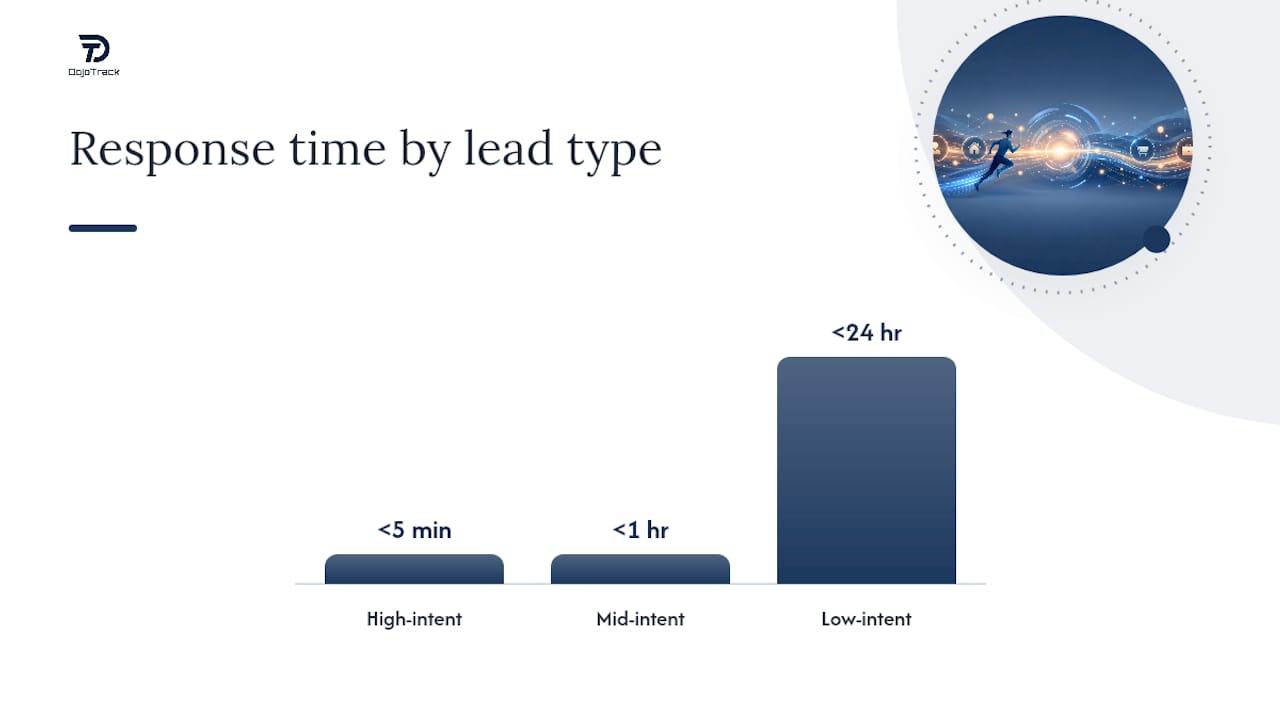
- High-intent leads (demo requests, pricing inquiries, chat starts): under 5 minutes
- Mid-intent leads (webinar signups, content downloads with a follow-up question): under 1 hour
- Low-intent leads (newsletter signups, general inquiries): under 24 hours
Your single best move this week isn’t hiring more reps or writing a better script. It’s building an automated first touch (an instant call attempt with SMS fallback, or an intelligent auto-responder that captures context) triggered directly off the form submission timestamp, not whenever your CRM happens to log the record. The payoff is not small: leads contacted within five minutes convert at roughly 21%, versus about 2.3% for teams that wait a day. Fix the system before you fix the people.
TL;DR:
- Automating instant contact attempts, such as calls or SMS, significantly increases conversion rates for high-intent leads by engaging within five minutes.
- Median response times across most teams are around 42 hours, but responding within five minutes can improve prospects’ likelihood to convert by nearly tenfold.
- Building tiered SLAs based on lead intent, with fast automated responses for high and mid-tier leads, optimizes resource allocation and response effectiveness.
- Accurate measurement heavily depends on starting the clock at the lead’s initial action and reporting median and P90, rather than average or CRM-based timestamps.
- Purpose-built platforms that automate timestamp capture, routing, follow-ups, and qualification shorten response times and improve overall lead engagement.
Table of Contents
- Why Speed to Lead Matters More Than Most Sales Teams Realize
- What Response Time Should You Target by Lead Type?
- How to Measure Speed to Lead Correctly (And Where Most Teams Get It Wrong)
- Six Steps to Cut Your Lead Response Time This Quarter
- Automation Patterns That Actually Move the Needle
- Common Speed-to-Lead Failures and How to Fix Them
- A Simple SLA Template You Can Deploy This Week
- How a Purpose-Built Studio Platform Shortens Time to Contact
- What the Data Actually Tells You to Prioritize
- Get Your Studio’s Lead Response Under Five Minutes
- Key Takeaways
- Sources
- FAQ
Why Speed to Lead Matters More Than Most Sales Teams Realize
Most sales leaders think they’re fast. The data says otherwise. The current median first response time across teams sits at roughly 42 hours, and only a small share of teams manage to respond within the five-minute window that actually moves the needle. That gap between perception and reality is where deals quietly die.
The 42-Hour Problem: While the industry median response time sits at 42 hours, roughly 35% of teams take longer than a full day to make first contact. Meanwhile, five-minute responders see conversion rates near 21%, compared to about 2.3% for next-day follow-up.
The conversion math is stark enough to change how you staff and budget. Harvard Business Review’s foundational research on this topic found that companies contacting leads within an hour were several times more likely to have a meaningful conversation than those who waited even a few hours longer. That study is over a decade old, and the underlying pattern hasn’t shifted. Buyer attention decays fast, and a prospect who filled out a form is actively comparing options in that exact moment. Every hour you wait, they’re one step closer to a competitor’s inbox.
Here’s where terminology gets muddled, and it’s worth untangling before you build anything. Speed to lead and lead response time get used interchangeably, but they describe different things:
- Speed to lead is the system-level discipline: the SLA targets, routing rules, and automation architecture your team commits to as policy.
- Lead response time is the metric: the actual measured duration between a lead’s action and your team’s first real response, tracked lead by lead.
You need both. Speed to lead is the strategy; lead response time is the scoreboard. Teams that treat them as the same thing tend to obsess over a single average number without ever fixing the process failures that produced it. A studio, agency, or SaaS company can have a beautiful speed-to-lead policy on paper and still post a 20-hour median lead response time because nobody built the automation to enforce it.
Optimizing lead response speed isn’t about panic or urgency theater. It’s about recognizing that the buyer’s intent is highest at the moment of submission and decays from there. Fast lead follow-up captures that intent while it’s still warm. Slow follow-up asks the prospect to re-generate interest on your behalf, and most won’t bother.
What Response Time Should You Target by Lead Type?
Not every lead deserves the same urgency, and treating them identically wastes resources on low-value contacts while starving your hottest prospects of attention. Effective lead management means building tiered SLAs around intent, not blasting every submission with the same five-minute panic button.
RevOps guidance across multiple benchmark studies converges on a similar tiered structure, and it’s worth adopting close to verbatim:
- High-intent triggers (demo requests, pricing page form fills, live chat initiations, “call me back” clicks): target under 5 minutes. These leads are actively evaluating and comparing you against alternatives right now.
- Mid-intent triggers (gated content downloads, webinar registrations, email replies asking a follow-up question): target under 1 hour. Interest is real but not yet urgent.
- Low-intent triggers (newsletter signups, generic contact form submissions with no specific ask): target under 24 hours. A thoughtful response still works here.
This tiered approach lines up with what RevOps Report’s benchmark analysis recommends: sub-five-minute response for demo and pricing intent, sub-hour for mid-tier engagement, and sub-24-hour for everything else. The mistake most teams make is either ignoring the tiers entirely (treating every lead like a five-alarm fire) or inverting them (making high-intent leads wait in the same queue as newsletter signups).
There’s a subtler point buried in this data that’s easy to miss: chasing sub-60-second response times on chat or live inquiries has real diminishing returns once you’ve already solved the bigger problem of not responding at all. Perspective AI’s analysis makes the case that context completeness often matters more than shaving another 30 seconds off an already-fast response. A rep who calls in four minutes with the lead’s actual question in hand outperforms one who calls in 45 seconds with zero context and has to start the conversation from scratch.
So where does the marginal effort belong? Once you’re reliably under five minutes for high-intent leads, redirect your energy toward making that first contact smarter rather than faster. Capture what page they were on, what they typed in a chat widget, or what pricing tier they viewed. That context turns a cold “just following up” call into a relevant conversation, and relevant conversations close.
How to Measure Speed to Lead Correctly (And Where Most Teams Get It Wrong)
Your measurement method can quietly lie to you, and most dashboards do exactly that. Here’s how to fix it:
- Start the clock at the lead’s action, not your system’s ingestion. Use the form submission timestamp, the chat session start time, or the inbound call time. Never start the clock when your CRM finally processes the record; that can introduce a 10 to 30-minute lag before anyone even knows the lead exists.
- Report median and P90, not the mean. A single lead that waited three days will distort an average and make your team look worse (or a single instant response can flatter it). Median tells you what a typical lead experiences. P90 tells you about your worst 10% of cases, which is usually where after-hours coverage gaps hide. Perspective AI and RevOps analyses both point to median and P90 as the more honest operational metrics.
- Track percent within SLA, broken out by channel and hour of week. A blended number hides the fact that leads submitted at 9 PM on a Friday might wait until Monday morning. Segmenting by channel and time surfaces exactly where coverage breaks down.
- Measure time-to-qualified-context (TTQC), not just time-to-first-touch. A response can technically happen in three minutes and still be worthless if it’s a generic autoresponder that doesn’t advance the conversation. TTQC asks: how long until the lead has had a real, qualifying interaction with a human or a capable AI agent?
Three pitfalls sink most measurement efforts before they start. Using the mean instead of median skews results toward whichever extreme happened that week. Timestamping from CRM creation instead of the lead’s actual action hides real delay inside your reporting. And counting a bare “Thanks for reaching out, someone will contact you soon” autoresponder as a completed response gives you a flattering number that has nothing to do with actual engagement. Fix these three things before you touch anything else, because you can’t improve what you’re measuring wrong.
Six Steps to Cut Your Lead Response Time This Quarter
Speed to lead improvements fail when teams try to fix everything simultaneously. This sequence works because each step builds the foundation the next one needs.
1. Instrument and baseline your current performance
Before changing anything, pull the raw timestamps for your top three lead sources over the last 90 days. Calculate median and P90 response time for each source separately; a paid search lead and an organic blog lead often have wildly different response patterns because they route through different systems. If you don’t have clean timestamp data yet, this step alone might take a week, and that’s fine. You can’t design a fix for a problem you haven’t measured accurately.
2. Design tiered SLAs and assign clear ownership
Using the high, mid, and low-intent framework, write down your actual target windows and, critically, name who owns each tier. “The sales team” is not an owner. “Whoever is on lead-duty rotation, checked against the shared calendar” is an owner. Ambiguous ownership is the number one reason SLAs exist on paper but not in practice.
3. Automate routing and notification
Manual lead assignment, where someone checks a shared inbox and forwards leads by hand, is where most speed-to-lead programs quietly die. Replace it with rule-based routing that assigns leads instantly based on territory, product interest, or round-robin logic, then fires an immediate notification through Slack, push alert, or SMS to the assigned rep’s phone. The notification needs to reach a device the rep actually looks at within seconds of the lead landing, not an email they’ll check in two hours.
4. Implement instant first touches that don’t depend on a human being free
This is the step that actually gets you under five minutes reliably. The pattern that works: an automated call attempt fires the moment the lead submits, and if that call goes unanswered, a personalized SMS follows within seconds. If both fail to connect, a genuinely useful auto-responder (not a “we’ll be in touch” placeholder, but something that answers their likely question or offers a booking link) closes the gap. DojoTrack’s automation approach for connecting leads instantly follows this exact pattern for studios, pairing SMS with direct booking links so the lead can schedule a trial class without waiting on a callback at all.

Pro Tip: Don’t let your auto-responder just say “we’ll be in touch soon.” Give it a specific next step, like a booking link or a direct answer to the most common question tied to that lead source. A useless acknowledgment counts as a non-response in the customer’s mind, even if it counts as a response on your dashboard.
5. Build escalation and coverage rules for missed SLAs and after-hours leads
Every SLA needs a failure mode. If the assigned rep doesn’t respond within the target window, the lead should automatically escalate to a manager or a backup rep, not sit quietly in a queue. For after-hours coverage, decide upfront whether you’re rotating a duty rep, relying on AI intake to hold the lead’s interest until morning, or some combination. Leads submitted at 11 PM shouldn’t default to “wait until 9 AM” without at least an automated acknowledgment closing that gap.
6. Measure TTQC and conversion by response bucket, then iterate
Once the system is running, segment your conversion rate by response time bucket (under 5 minutes, 5 to 60 minutes, 1 to 24 hours, over 24 hours) and watch where the drop-off happens. If your under-5-minute bucket isn’t converting meaningfully better than your 1-hour bucket, the problem probably isn’t speed. It’s the quality of that first contact, and that’s your signal to focus on context and script quality rather than shaving more seconds.
Automation Patterns That Actually Move the Needle
The teams that consistently hit five-minute response times didn’t get there by hiring faster typists. They redesigned the system so a lead gets engaged whether or not a rep happens to be sitting at their desk. That’s the core insight behind every pattern below, and it’s worth internalizing before you shop for tools: most winning teams don’t make humans faster, they change the system so leads are engaged in seconds regardless of staffing.
Parallel multi-touch coverage is the architecture that shows up again and again in top-performing setups. Instead of a single channel (just a phone call, or just an email), the system fires an outbound call attempt, an SMS fallback, and an AI intake conversation in a coordinated sequence within the first few minutes of submission. If the call connects, great, the other channels stand down. If it doesn’t, the SMS keeps the conversation alive without requiring the prospect to pick up a phone. This layered approach is what benchmark data shows separates the top tier of responders from everyone else.
Embedded scheduling at the point of submission removes an entire round-trip of back-and-forth. Rather than “someone will call you to set up a time,” the confirmation screen or follow-up SMS includes a direct booking link the prospect can use immediately, while their intent is still fresh. This single change often does more for actual contact rates than any amount of rep training, because it takes the timing decision out of your hands and puts it in the moment of highest interest.
AI intake that gathers real qualifying context turns the gap between submission and human contact into something useful instead of dead air. A well-built AI conversation can ask two or three qualifying questions (what they’re interested in, their timeline, their specific concern) before a human ever gets involved. That means the eventual handoff to a rep starts with actual information instead of “so, what brings you in today?” This is where the earlier point about context completeness pays off directly: a rep walking into a call with real intake data closes faster than one starting cold, even if their raw response time is a few minutes slower.
Phone number reputation and branded caller ID solve a problem almost nobody accounts for when building speed-to-lead systems: an unrecognized number gets ignored or flagged as spam, no matter how fast you call. Using a consistent, properly registered business line and, where available, branded caller ID that displays your business name instead of a raw number, meaningfully improves pickup rates. All the automation in the world doesn’t help if the call shows up as “Spam Likely” on the prospect’s screen. For SMS specifically, staying within compliance frameworks matters just as much for deliverability as for legal exposure. SMS compliance guidance for local service businesses covers the practical rules worth following before scaling any text-based follow-up program.
Common Speed-to-Lead Failures and How to Fix Them
Most speed-to-lead programs don’t fail because of bad strategy. They fail because of small operational leaks that compound over weeks.
- Missed notifications: A lead routes correctly but the assigned rep never sees the alert because it went to an email inbox they check twice a day. Fix it with multimodal alerting, meaning push notifications to a mobile device plus a backup channel like SMS, so the alert can’t get buried.
- Routing bottlenecks: Manual assignment, where a human has to review and forward each lead, introduces delay by design. Replace it with automated routing rules based on lead source, territory, or product interest, and build in automatic escalation if the first assignee doesn’t act within the SLA window.
- After-hours abandonment: Leads that arrive outside business hours often just sit until the next morning. Set up a duty-rep rotation for evenings and weekends, or lean on AI intake to hold the conversation and schedule a human follow-up first thing the next day.
- Thin handoffs: A fast response that captures zero context wastes the speed advantage you just built. Require a short qualification script or a minimal set of intake fields before any lead gets marked as “contacted,” so the next touch actually advances the deal instead of restarting the conversation.
A Simple SLA Template You Can Deploy This Week
Here’s a starting framework you can adapt to your own funnel without reinventing the wheel:
| Tier | Trigger Example | Target Window | Escalation Example |
|---|---|---|---|
| High-intent | Demo request, pricing page form, live chat start | Under 5 minutes | Auto-escalate to manager after 5 minutes unanswered |
| Mid-intent | Content download with follow-up question, webinar signup | Under 1 hour | Route to next available rep after 1 hour |
| Low-intent | Newsletter signup, general inquiry | Under 24 hours | Flag for next-business-day review if unresolved |
Before you consider the system live, run through this checklist:
- Confirm timestamps start at the lead’s action (form, chat, call), not CRM ingestion.
- Verify automated routing rules are assigning leads without manual review.
- Test that notifications reach a mobile device within seconds of assignment.
- Confirm instant first-touch automation (call attempt, SMS fallback, or intake bot) fires immediately.
- Set escalation rules for missed SLAs and after-hours coverage.
- Build a dashboard tracking median, P90, percent within SLA, and TTQC by lead source.
How a Purpose-Built Studio Platform Shortens Time to Contact
Generic CRMs make you assemble this entire system yourself, stitching together a form tool, a texting platform, and a calendar app that don’t talk to each other. Dojotrack was built by a martial arts studio owner who lived the alternative: leads sitting in a spreadsheet while a Tuesday afternoon got away from him.
The platform maps directly onto the playbook above. Lead capture timestamps are recorded automatically the moment a prospect fills out a form, so median and P90 reporting doesn’t depend on manual CRM entry. Automated SMS follow-ups fire without a rep lifting a finger, and AI-powered lead scoring flags which prospects need attention first, so high-intent inquiries about a trial class don’t sit behind a general newsletter signup in the queue. Booking links embedded in that first SMS let a prospect schedule a trial class directly, cutting out the callback round-trip entirely. Every one of these features exists because automated follow-up systems solve a problem specific to combat sports enrollment, not a generic sales funnel.
What the Data Actually Tells You to Prioritize
The conventional advice on speed to lead has a blind spot: it treats “respond faster” as a training problem, something you fix by pushing reps to check their phone more often. That’s backwards. The 42-hour median response time isn’t a motivation problem. It’s a coverage problem, and coverage gets fixed by automation and system design, not by asking already-busy people to be more vigilant.
Where most guides oversell urgency is the sub-60-second chase. Once you’re reliably under five minutes, the bigger lever is context, not speed. A rep who calls in four minutes with the prospect’s actual question in hand will outperform one who calls in 90 seconds and has to start from zero. Prioritize building a system that captures context automatically before you obsess over shaving another 30 seconds.
If you take one thing from this article, take this: fix the system first. Measure your median and P90 accurately, build tiered SLAs by intent, and automate the first touch so a lead gets engaged whether or not a human happens to be free. Everything else is optimization on top of a foundation that either exists or doesn’t.
— DojoTrack
Get Your Studio’s Lead Response Under Five Minutes
Dojotrack replaces the patchwork of spreadsheets, texting apps, and disconnected forms most studios cobble together with a system built around this exact playbook. Automated timestamp capture, instant SMS follow-ups, AI-driven lead scoring, and embedded booking links come standard, meaning the instrumentation and instant first-touch steps above are already built in rather than something you assemble from three separate tools.
If you’re currently tracking leads by hand or relying on a rep to remember to call back, that gap is costing you enrollments every single week. Dojotrack’s free core platform gives you student management, attendance tracking, and lead capture at no upfront cost, with automated SMS follow-ups and AI lead scoring available as you scale. Sign up for the free tier or book a walkthrough to see how fast your first response could be next week.
Key Takeaways
Cutting lead response time to under five minutes for high-intent inquiries can lift conversion from roughly 2.3% to 21%, but only if the system, not the rep, drives that speed.
| Point | Details |
|---|---|
| Set tiered SLAs | High-intent under 5 minutes, mid-intent under 1 hour, low-intent under 24 hours. |
| Fix measurement first | Use form/chat submission timestamps, report median and P90, not the mean. |
| Automate the first touch | Pair an instant call attempt with SMS fallback so no lead waits on a free rep. |
| Prioritize context over seconds | Once under five minutes, focus on time-to-qualified-context, not micro-second gains. |
| Use a purpose-built system | Dojotrack automates timestamp capture, SMS follow-ups, and lead scoring for martial arts studios out of the box. |
Sources
- Lead Response Time Benchmarks (2026): The Real Numbers
- The short life of online sales leads (Harvard Business Review)
- Lead Response Time in 2026: Benchmarks, the Five-Minute Rule, and What Actually Converts | Perspective AI
- Speed to Lead Benchmarks and Optimization | RevOps Report
FAQ
What Does Speed to Lead Mean?
Speed to lead is the system-level discipline of contacting new prospects as fast as possible after they show interest, typically measured in minutes for high-intent inquiries. It differs from lead response time, which is the actual measured duration for a specific lead.
How Important Is Speed to Lead for Conversion Rates?
It’s one of the strongest levers available to sales teams: leads contacted within five minutes convert at roughly 21%, compared to about 2.3% for teams that wait a full day. Harvard Business Review’s research similarly found that contacting leads within an hour produced far more meaningful conversations than slower follow-up.
What’s a Realistic Speed-to-Lead Target for My Team?
Aim for under 5 minutes on high-intent leads like demo requests, under 1 hour for mid-intent leads, and under 24 hours for low-intent inquiries. Most teams currently average a 42-hour median response time, so even hitting the mid-intent tier consistently puts you ahead of the pack.
Can Automation Really Replace a Fast Sales Rep?
Automation doesn’t replace the rep, it covers the gap when a rep isn’t immediately available. Platforms like Dojotrack pair automated SMS follow-ups and AI lead scoring with instant booking links so a prospect stays engaged even before a human joins the conversation.