

TL;DR:
- Managing karate tournament registrations with a clear system ensures documentation and payment are verified before check-in, reducing errors and delays. Implementing guided online forms, enforced payment, and QR code check-in streamlines the process from sign-up through event day. Proper pre-event audits and robust data validation prevent common issues, leading to smoother, more organized competitions.
Running a karate tournament takes months of preparation, and nothing unravels that work faster than a broken registration process. When you try to manage karate tournament registrations without a clear system, the problems stack up fast: competitors show up without proof of rank, payments get missed, brackets get built on incomplete data, and check-in lines back up before the first match. This guide walks you through exactly what you need to set up a registration workflow that actually holds together, from the documents you collect upfront to the QR code scan at the door.
Table of Contents
- Key takeaways
- Managing karate tournament registrations: the required foundation
- The step-by-step registration workflow
- Common challenges and how to handle them
- Verification and post-registration workflows
- Choosing the right registration system
- My take on what most organizers get wrong
- How DojoTrack helps you run tighter tournaments
- FAQ
Key takeaways
| Point | Details |
|---|---|
| Collect documents upfront | Require proof of age, rank, and signed waivers before any competitor is placed in a bracket. |
| Enforce payment at sign-up | Require payment during registration to eliminate unpaid entries and reduce no-shows on event day. |
| Use guided registration tools | Platforms with registration wizards reduce incomplete applications before they reach check-in. |
| Prepare for proxy registrations | Build your forms to handle guardian and representative submissions for minors cleanly. |
| Verify before brackets close | Run a full registration audit before finalizing divisions to catch errors while they are still fixable. |
Managing karate tournament registrations: the required foundation
Before you build a workflow, you need to know what a complete registration actually looks like. Skipping this step is where most organizers run into trouble. Proof of age, rank, and signed medical waivers are mandatory before a competitor can be placed in a division. Missing even one of those can trigger a rejection or force a last-minute scramble at check-in.
Here is what a complete registration package typically includes:
- Proof of age (birth certificate, government ID, or school ID for minors)
- Current rank documentation (belt certificate or instructor sign-off letter)
- Signed medical waiver (parent or guardian signature required for competitors under 18)
- Membership proof (if the event is affiliated with a governing body like USA Karate)
- Competitor division selection (kata, kumite, age group, weight class where applicable)
Beyond documents, you also need clear payment terms from the start. Posting one fee for early registration and a separate, higher fee for late entries changes competitor behavior. The 2026 USA Open Karate Championships charges a $100 late fee for onsite registration, which gives competitors a real financial reason to register early and cuts down on the last-minute pile-up your check-in desk would otherwise face.
| Registration requirement | Details |
|---|---|
| Proof of age | Required for correct division placement and age-group eligibility |
| Rank documentation | Verifies competitor is entered in the appropriate skill division |
| Signed medical waiver | Legally required; parent/guardian must sign for under-18 competitors |
| Payment confirmation | Proof of fee payment before bracket assignment is finalized |
| Membership proof | Required for sanctioned events affiliated with governing bodies |
Pro Tip: Set your late fee deadline at least 10 days before the event, not the day before. That buffer gives you time to finalize brackets without a flood of last-minute changes.
For tools, you have options ranging from basic spreadsheets to purpose-built tournament registration software. The more competitors you manage, the more the investment in dedicated software pays off in time saved and errors avoided.
The step-by-step registration workflow
A well-designed registration workflow does not leave room for half-finished applications. Here is how to build one that works from first sign-up through confirmed entry.
-
Publish registration with a firm deadline. Post your registration open and close dates on your website, social channels, and directly to affiliated schools. Communicate the late fee cutoff separately so it stands out. Competitors who see a deadline with a financial consequence attached take it seriously.
-
Use a guided online registration form. Guided registration wizards reduce incomplete registrations by walking competitors through each required field before they can proceed. This is not just a convenience feature. It is an operational safeguard.
-
Require payment at checkout, not later. Forced checkout during registration is one of the most effective ways to eliminate unpaid entries from reaching your bracket system. If a competitor cannot complete payment, their spot is not confirmed.
-
Capture division-specific data during sign-up. Collect competitor name, date of birth, belt rank, and chosen event divisions during registration itself. Do not wait until check-in to sort out whether someone belongs in the 14-to-17 age group or the adult division. That conversation at the door costs you time and costs them stress.
-
Support batch payment for schools and teams. The Okinawa Karate World Festival allows a single transaction for multiple competitors, requiring each participant’s name and showing a total before checkout. This model works well for instructors registering an entire class. It reduces the number of individual transactions you process while keeping per-competitor data clean and separate.
-
Send confirmation receipts with QR codes immediately. Once payment clears, send an automated confirmation to the registrant with their QR code ticket attached. This does two things: it gives the competitor their proof of registration and it gives your check-in desk a scannable record that is tied directly to their data.
Pro Tip: Send a reminder 72 hours before the event asking competitors to confirm they have their QR code and required documents. This single touchpoint catches a surprising number of issues before they arrive at your door.
Common challenges and how to handle them
Even with a solid registration process, things go sideways. Knowing which problems come up most often means you can plan for them instead of reacting to them.
-
Incomplete registrations reaching check-in. This usually happens when the sign-up process allows partial submissions. If your system does not enforce completeness, you will spend event morning chasing down missing waivers and rank documents. A guided form with required fields closes that gap before it opens.
-
Unpaid entries in your data. When payment is optional at sign-up, some competitors assume they can pay at the door. Some do not show up at all. Immediate payment enforcement during registration removes this ambiguity entirely.
-
Proxy and guardian registrations for minors. When a parent or instructor registers on behalf of a competitor, the data entry risk goes up. Mismatched names, wrong birthdates, and missing signatures are all common. Proxy-friendly registration systems that clearly separate the registrant from the competitor prevent most of these errors. Clear instructions on what the proxy is authorized to submit also reduce friction at check-in.
-
Duplicate entries. This happens most often with batch registrations or when competitors register through multiple channels. Build a duplicate-check step into your system, or at minimum run a manual check before closing registration.
-
Late registrations causing bracket headaches. Late entries after brackets are set can disrupt division balance. Charge the late fee, yes. But also have a policy for whether late registrants are placed in existing brackets or held for a late-division slot.
The most common day-of registration failure is not a technology problem. It is an enforcement problem. When organizers allow exceptions to payment or documentation rules, word spreads and the exceptions become the norm.
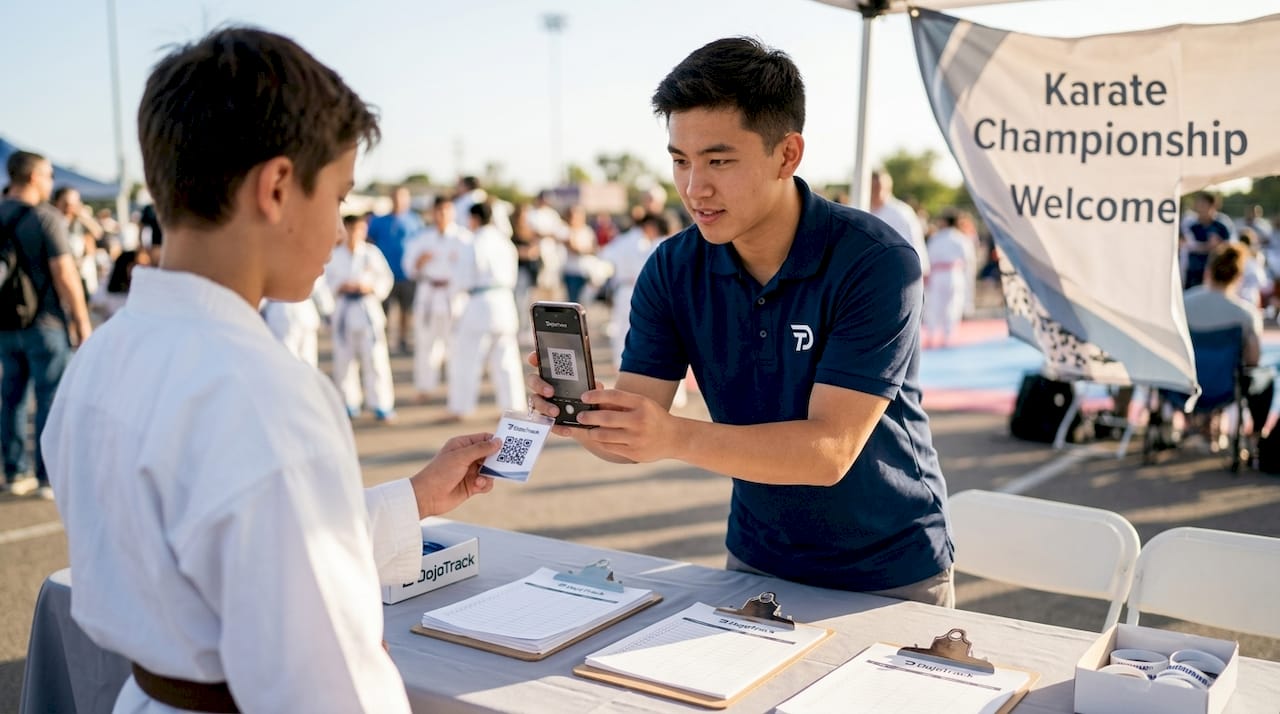
QR code scanning at check-in speeds up entry and reduces human error. Barcode and QR code ticketing lets your staff verify payment and registration data in seconds rather than manually searching a spreadsheet. That matters when you have 200 competitors arriving in a two-hour window.
Verification and post-registration workflows
Collecting registrations is only half the job. What you do with that data before event day determines how smoothly the morning goes.
-
Run a completeness audit 7 days before the event. Pull a report of every registration and flag any missing documents, unpaid balances, or unclear division placements. Seven days gives you time to contact the competitor and resolve the issue without rushing.
-
Send automated reminders to incomplete registrants. A direct message that says “Your registration is missing a signed waiver. Please upload it by [date] or your entry will be removed” is specific enough to get action. Generic reminders get ignored.
-
Confirm division accuracy before brackets are finalized. Cross-reference each competitor’s listed rank and age against their submitted documentation. A competitor entered in the wrong division because of a data error is a problem you absolutely do not want to discover during the event.
-
Set up your check-in desk workflow. Your check-in process should have two lanes: one for competitors with QR codes who have all documents ready, and one for issues. The Valley of the Sun National Karate Tournament requires QR code entry and on-site verification of name, age division, and waiver agreement. That two-step scan-and-verify model is worth adopting.
-
Keep a payment and registration audit trail. Every payment, every document upload, and every division change should be logged with a timestamp. If a competitor disputes their bracket placement or claims they paid, you need a record.
| Pre-event task | Timeline |
|---|---|
| Registration completeness audit | 7 days before event |
| Automated reminders to incomplete registrants | 6 days before event |
| Division accuracy cross-check | 5 days before event |
| Bracket finalization | 3 days before event |
| Check-in desk setup and staff briefing | 1 day before event |
Choosing the right registration system
Not all registration tools are built the same, and the gap between manual, hybrid, and fully digital systems is significant once your event exceeds 50 competitors.
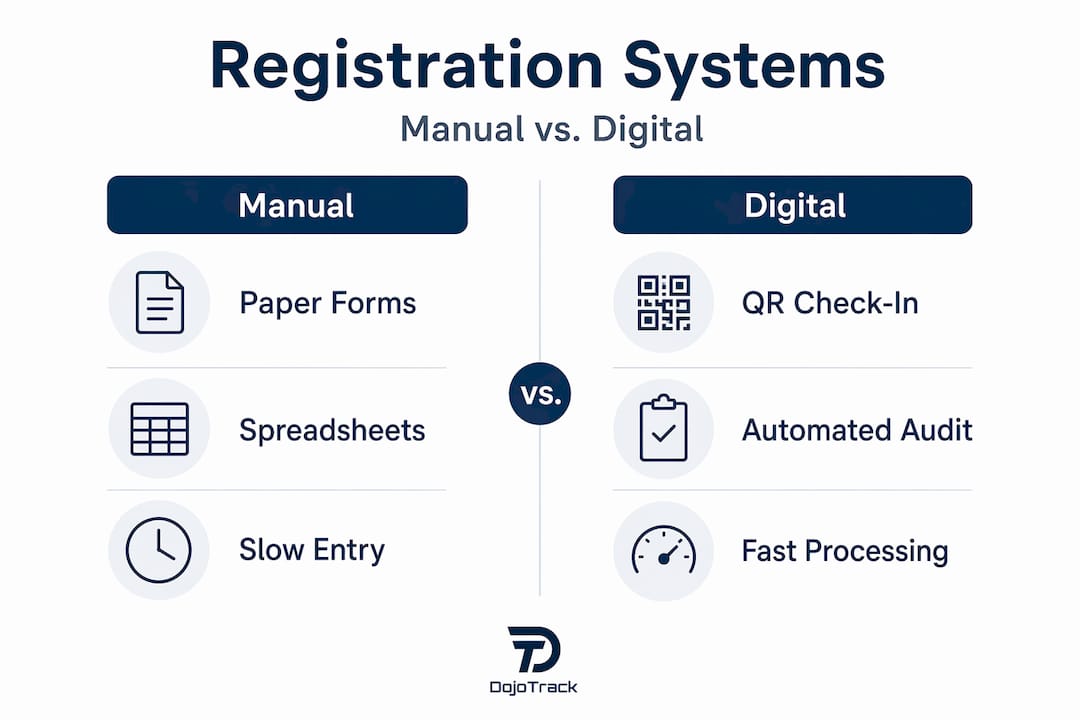
| System type | Best for | Key limitations |
|---|---|---|
| Manual (spreadsheets, paper forms) | Small, informal events under 30 competitors | High error rate, no payment integration, slow check-in |
| Hybrid (forms + manual payment) | Mid-size events with limited tech budget | Payment reconciliation issues, still requires manual verification |
| Fully digital platform | Events of any size wanting clean data and fast check-in | Requires setup time and some technology comfort |
When evaluating karate event management software, look for these specific features. Payment integration that processes fees at the time of registration is non-negotiable for serious events. Data validation at the form level catches errors before they enter your system. Batch payment support lets schools register multiple competitors in one transaction while keeping competitor data accurate per individual. QR code ticketing speeds up check-in. Proxy registration support handles guardian submissions cleanly.
USA Karate’s Tournament in a Box 2.0 is a strong example of what a purpose-built platform looks like in practice. Its guided wizard and forced checkout directly reduce the incomplete registration and unpaid entry problems that show up at check-in.
Pro Tip: Before committing to any platform, test its check-in workflow specifically. A system that is great for sign-ups but slow or clunky at check-in creates a bottleneck at the worst possible moment.
My take on what most organizers get wrong
I’ve watched tournaments run beautifully on paper fall apart at the registration desk, and the cause is almost always the same. Organizers design the sign-up process with the ideal competitor in mind: someone who reads instructions carefully, submits everything on time, and pays immediately. But real events are full of parents registering kids at the last minute, instructors batch-submitting for schools, and competitors who lose their confirmation email.
In my experience, the organizers who run the tightest events are the ones who design for the exception, not the rule. They build forms that require complete data before submission. They enforce payment before confirming a spot, not as a follow-up step. They treat proxy registrations as a first-class use case rather than an edge case, because at any youth-heavy tournament, proxies are common.
What I’ve found actually makes the biggest difference is real-time data validation during registration. When the form tells a user immediately that the date of birth does not match the selected age division, that person fixes it on the spot. When that error slips through and gets caught at check-in, it becomes a confrontation with a waiting line behind it.
The other thing most guides skip is the audit trail. Tracking payments and changes over time feels like extra work until the day a competitor claims they paid and your spreadsheet says otherwise. Build the record-keeping into the system from day one. It saves you from disputes that have no clean resolution.
— DojoTrack
How DojoTrack helps you run tighter tournaments
If you are ready to stop managing registrations manually and want a platform built specifically for the martial arts world, DojoTrack is worth a close look. Built by a martial arts school owner who understood the operational headaches firsthand, DojoTrack handles event registration, digital waivers, payment processing, and competitor data management in one place. You can collect fees automatically, send confirmation receipts, and keep a full audit trail without stitching together three separate tools.
DojoTrack’s martial arts management platform connects registration data directly to your broader school operations, so your tournament work lives alongside your student records, billing, and attendance tracking. For US-based instructors and coordinators running events of any size, it removes the administrative weight that gets in the way of actually running a great competition. Explore the full platform features to see how it fits your event workflow.
FAQ
What documents are required for karate tournament registration?
Most tournaments require proof of age, rank documentation, and a signed medical waiver before a competitor can be placed in a division. Missing any of these typically results in rejection or removal from the bracket.
How do you handle registration for minors at karate tournaments?
A parent or guardian must sign the medical waiver, and many tournaments allow proxy check-in where a representative completes the admission process. Proxy-friendly registration systems that separate the registrant from the competitor help keep the data clean.
What is the best way to reduce incomplete registrations?
Using a guided registration wizard that requires each field before advancing, combined with forced payment at checkout, is the most effective approach. These features directly cut the number of incomplete entries that reach check-in.
How does QR code check-in work at karate tournaments?
Competitors present their QR code ticket at entry, and staff scan it to instantly verify payment status, division, and waiver agreement. QR code ticketing replaces manual list lookups and significantly speeds up check-in for large events.
What is karate tournament event registration, and why does it matter?
Karate tournament event registration is the process of collecting competitor information, verifying eligibility, and confirming payment before allowing entry into competition brackets. A well-managed registration system protects event integrity, reduces day-of errors, and gives competitors a smoother experience from sign-up to the mat.
Recommended
- 5 Tips to Get the Most from Your Martial Arts CRM | DojoTrack
- Stop Wasting Time on Manual Tasks: 5 Dojo Management Software Features That Actually Work | DojoTrack
- DojoTrack Setup: 10 Essential Steps | DojoTrack
- What is DojoTrack? The All-in-One Martial Arts CRM for the Modern Martial Arts School – DojoTrack