

Prorated billing is the right call for mid-cycle enrollments, holds, and plan changes at any martial arts school. The standard policy: charge new students only for the days or classes remaining in the current billing period, then move them to full recurring tuition at the next cycle. Some studio platforms can automate this calculation, so you set the rule once instead of doing manual math every time someone joins on a Wednesday, which is a key benefit highlighted by Gym SEO Services | Get Discovered & Grow Memberships.
TL;DR:
- Most martial arts schools should implement automatic proration policies based on either per-day or per-class methods, depending on their program type.
- Prorating only the first month simplifies billing, but always prorating ensures fairness for mid-cycle changes with the support of automation tools.
- Using a holiday calendar and clear written policies reduces disputes over charges when schools are closed or members modify their plans.
- When setting up software, test enrollments thoroughly to ensure calculations match manual formulas, especially for mid-cycle starts and adjustments.
- Clear invoice line items with specific dates and counts help prevent billing questions and disputes from members.
Table of Contents
- What Prorated Billing Means for Martial Arts Schools
- How Do You Calculate Prorated Fees for Classes?
- Which Billing Schedule Should You Pair With Proration?
- How Does Studio Software Automate Proration?
- How Should Invoices Show Prorated Charges?
- DojoTrack’s Studio-Tested Proration Defaults
- What Legal and Compliance Rules Apply to Prorated Billing?
- Rolling Out Prorated Billing on Your Current Platform
- Your One-Day Playbook for Switching to Prorated Billing
- Automate Proration With DojoTrack’s Billing Tools
- Primary Sources and Further Reading
- Sources
- FAQ
What Prorated Billing Means for Martial Arts Schools
Prorated billing splits a membership fee into partial amounts based on how much of a billing period a student actually uses. Instead of charging a full month’s tuition to a kid who joins on the 22nd, you charge for the nine or ten days remaining. It sounds like a small detail. It is actually one of the most common sources of billing disputes in martial arts programs, right behind failed card charges.
Here’s where proration shows up constantly in a typical school:
- A new student signs up mid-month after a trial class, and you need to bill only the remaining days.
- A member requests a hold for travel or injury, then resumes mid-cycle.
- A family adds a second child partway through the month and expects a partial family-discount rate.
- A student upgrades from a two-day-a-week plan to unlimited classes in week three.
- A student cancels mid-cycle and you owe a partial refund or credit.
Schools that don’t standardize this end up improvising a different discount for every situation, which erodes trust fast. Parents talk to each other. If one family gets a “we’ll just round down” deal and another gets charged full price for the same scenario, you’ll hear about it. Gymdesk’s review of martial arts billing platforms points out that generic gym software often lacks the family-account and charge-item flexibility martial arts schools actually need, which is exactly where inconsistent manual proration creeps in.
A written proration policy, applied automatically by your billing software, removes the guesswork and the awkward front-desk negotiations.
How Do You Calculate Prorated Fees for Classes?
Two formulas cover almost every martial arts billing scenario: per-day and per-class. Pick one as your default and use it consistently.
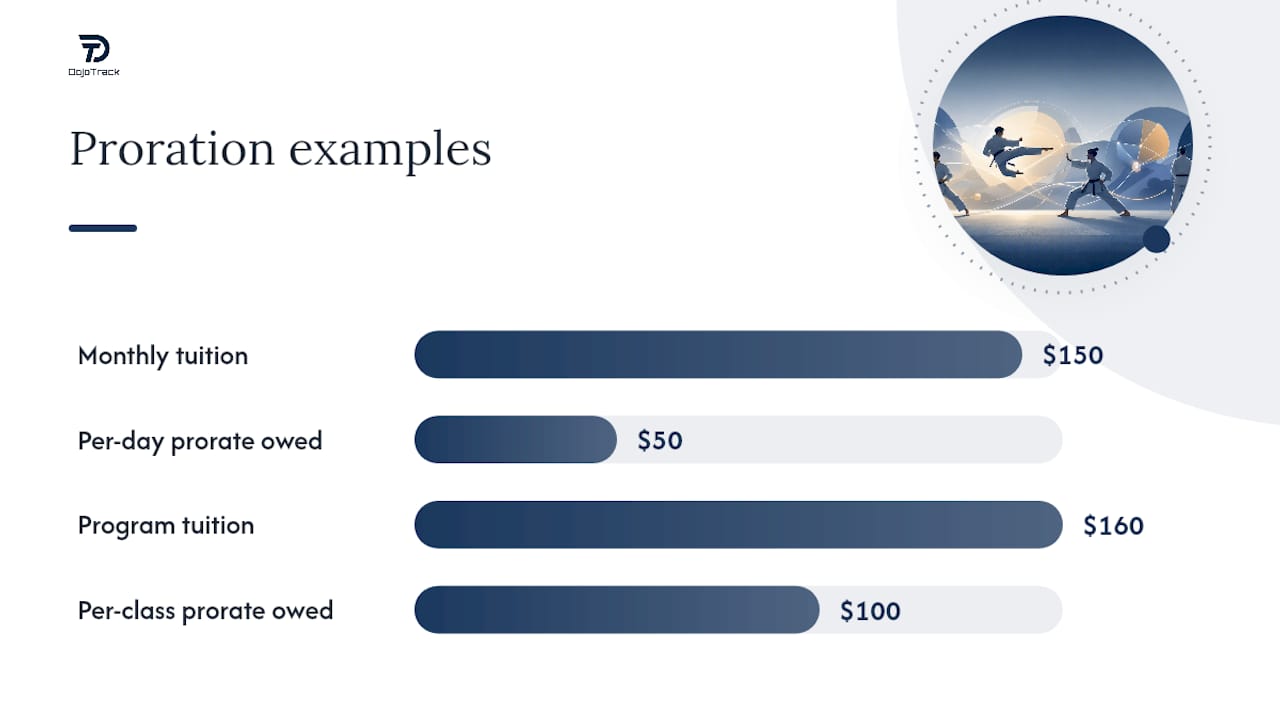
- Per-day proration. Divide monthly tuition by the number of days in that billing month, then multiply by the days remaining. Example: a $150 monthly membership in a 30-day month equals $5 per day. A student joining on day 21 has 10 days left, so they owe $50 for that first partial month.
- Per-class proration. Divide the program’s total tuition by the total number of scheduled classes, then multiply by classes remaining. Example: an 8-week Kids Karate program costs $160 for 16 classes, or $10 per class. A student who enrolls after 6 classes have already run owes $10 times 10 remaining classes, or $100.
- Flat fees stay flat. Enrollment fees, uniform charges, and belt-testing fees are one-time costs and should never be prorated. Charge them in full at signup, on a separate invoice line from prorated tuition.
- Scheduled payment plans need manual pricing. If your program splits total tuition across multiple scheduled payments, automatic equal-split plans often ignore proration entirely. You typically need to set a manual price on the affected payment event, a detail Enrollsy’s proration documentation calls out directly.
Quick math check: for per-day proration, the formula is (monthly fee ÷ days in month) × days remaining. For per-class proration, it’s (program total ÷ total classes) × classes remaining. Run both formulas against a test student before you trust either one in production.
Which method fits your program? Continuous programs with rolling monthly billing (adult BJJ, unlimited memberships) usually fit per-day proration better, since attendance varies week to week. Fixed-schedule class-count programs (an 8-week kids belt cycle, a 6-class trial series) fit per-class proration more naturally, since the value delivered is tied to specific sessions, not calendar days. Gymdesk’s platform comparison backs this same split, recommending class-count-based proration for structured youth programs specifically because attendance in those programs is fixed by design.
Which Billing Schedule Should You Pair With Proration?
Your billing day and your proration rule have to agree with each other, or you’ll get charges that make no sense to the member reading their bank statement. There are really two policy templates worth choosing between.
Option A: Prorate the first month only. New students pay a prorated amount for their partial first period, then move to standard full-price billing on the same day of the month going forward. This is simpler to explain and easier for staff to apply consistently. The tradeoff: mid-cycle holds, cancellations, or plan upgrades later in the membership still need a manual adjustment unless your software prorates those too.
Option B: Always prorate. Every mid-cycle change (join, upgrade, downgrade, resume from hold) gets a prorated calculation, every time. This is more consistent and fairer to the member, but it demands software that actually automates the math. Doing this by hand for a 200-student school is not realistic.
For enrollment pages and invoices, plain language beats legal-sounding disclaimers. Something like: “Your first tuition charge is prorated based on your enrollment date and covers only the classes remaining in the current billing period. Full tuition begins on your next billing date.”
A few policy defaults worth adopting up front:
- Prorate holiday closures automatically using a holiday calendar, so families aren’t billed for days the dojo is dark.
- Apply holds as a pause on billing, not a discount. The clock and the charge both stop.
- Calculate family discounts on the prorated amount, not the full-price amount, so a mid-month sibling addition gets the same math treatment as everyone else.
Pro Tip: Put your proration policy in writing on the enrollment form itself, not just in a staff manual. When members can point to the exact sentence they agreed to, disputes turn into two-minute conversations instead of ten-minute arguments.
How Does Studio Software Automate Proration?
Automating proration comes down to four settings you configure once and then trust: billing day, start-date rules, which charge items get prorated, and your holiday calendar. Get these wrong at setup and every invoice after that inherits the error.
Before going live, run through this setup checklist:
- Set your standard billing day (the 1st, the 15th, or a rolling anniversary date) and confirm the system prorates against that specific date.
- Choose which charge items are eligible for proration. Tuition should be prorated; enrollment fees and uniform costs usually should not.
- Load your holiday and closure calendar so class-count proration excludes days the school is closed, a step Enrollsy’s setup guide specifically recommends configuring before testing.
- Run a test enrollment with a mid-cycle start date and confirm the charge amount matches your manual calculation.
- Repeat the test using a private or incognito browser window to see exactly what the customer sees, since staff-side and customer-side views can differ.
Common mistakes that produce wrong amounts include leaving the holiday calendar empty (charging for days you’re closed), prorating enrollment fees by accident, and using an automatic equal-split payment plan when the program actually needs manually priced installments.
Stripe-powered recurring billing generally handles the recurring side of tuition cleanly once the first prorated charge is set correctly. The pattern DojoTrack documents in its own Stripe billing guide for martial arts studios is to calculate the prorated amount as a one-time charge, then let the recurring subscription take over at full price on the next cycle. That two-step approach avoids the messy math of trying to make a subscription engine calculate irregular first-period amounts on its own.
How Should Invoices Show Prorated Charges?
Members trust a bill they can read in ten seconds. Vague line items like “Membership – Partial” invite phone calls. Specific line items with dates and counts don’t.
Good invoice wording looks like this:
- “Prorated tuition — Jun 15 to Jun 30 (8 classes) — $80.00”
- “Prorated credit: 12 days remaining — -$51.60”
- “Enrollment fee (one-time, non-prorated) — $50.00”
- “Belt testing fee — due at enrollment — $35.00”
InvoiceQuick’s martial arts invoice template recommends keeping prorated credits on their own line, separate from flat fees, so the family can see exactly what changed and why.
| Line Item | Type | Example Amount |
|---|---|---|
| Prorated tuition (partial period) | Recurring, adjusted | $80.00 |
| Enrollment fee | One-time, flat | $50.00 |
| Belt testing fee | One-time, flat | $35.00 |
| Hold/restart fee | One-time, flat | $15.00 |
A short confirmation text or email at signup (“Your first charge of $80.00 covers June 15 through June 30, 8 classes. Full tuition of $150 begins July 1.”) stops most billing questions before they start. For bookkeeping, record the prorated charge as its own transaction line rather than folding it into a generic tuition category, so your revenue reports stay accurate month over month.
DojoTrack’s Studio-Tested Proration Defaults
DojoTrack was built by Jared Reed, a martial arts school owner who ran into the same billing headaches this article covers before writing a line of code. Manual proration math and disconnected billing tools were part of the original frustration DojoTrack set out to fix, which shaped how the platform handles charge items and recurring tuition together.
Typical defaults for specialized martial arts billing software reflect real studio operations, not generic gym assumptions:
- Billing day often defaults to anniversary-of-enrollment to keep proration math simple and predictable for families.
- Class-count programs (kids belt cycles, trial series) commonly default to per-class proration; continuous programs default to per-day.
- Charge items eligible for proration are generally limited to tuition by default, while enrollment fees, testing fees, and uniforms remain flat unless settings are changed.
Studios that switch to a purpose-built platform tend to report fewer billing disputes within the first month, since the family-account and charge-item structure Gymdesk identifies as martial-arts-specific needs gets handled automatically instead of manually.
What Legal and Compliance Rules Apply to Prorated Billing?
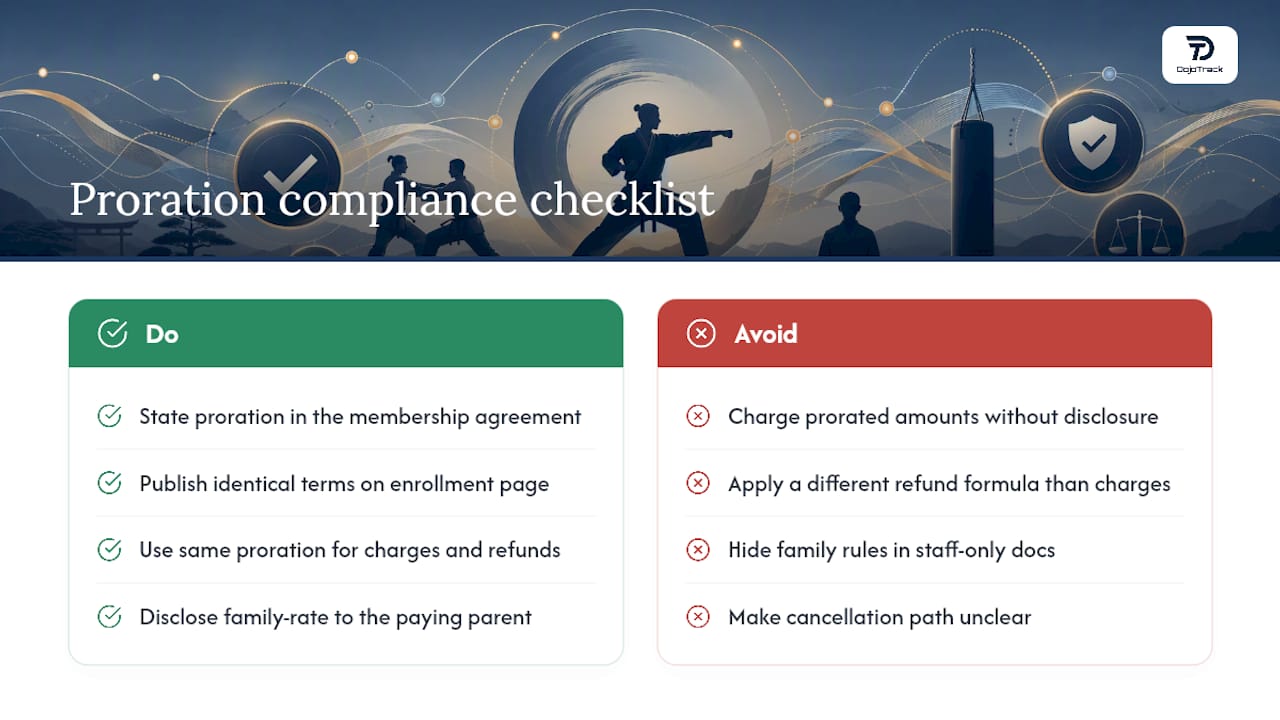
Prorated billing itself isn’t heavily regulated, but the contracts and disclosures around it are. Most states require gym and studio membership agreements to clearly state the billing terms a member is agreeing to, including how partial periods are charged and how cancellations or refunds are calculated. If your enrollment agreement doesn’t mention proration at all, but you charge prorated amounts anyway, you’re creating a mismatch between what was signed and what was billed. That gap is exactly what triggers chargebacks and, in some states, consumer complaint filings.
Automatic recurring billing also falls under card network rules and, in many states, health club or membership cancellation statutes that require a clear, easy cancellation path. Prorated refunds on cancellation should follow the same formula you use for prorated charges on enrollment. Applying one method to collect money and a different method to refund it is the kind of inconsistency that draws scrutiny.
Family accounts add another layer. If one parent signs the agreement but a sibling is added later under a family discount, make sure your prorated family-rate calculation is disclosed somewhere the paying parent actually sees it, not buried in a staff-only policy document.
None of this requires a lawyer for every invoice. It does require that your written membership agreement, your enrollment page language, and your actual billing software behavior all say the same thing. When they match, proration disputes rarely escalate past a short conversation at the front desk.
Rolling Out Prorated Billing on Your Current Platform
Most studio management platforms follow a similar setup sequence, whether you’re on DojoTrack or another system. Start by auditing your current charge items and separating anything that should stay flat (testing fees, uniforms, enrollment fees) from anything that should prorate (monthly or program tuition).
Next, pick your proration method per program type using the per-day or per-class logic covered earlier, and document it in one place your whole staff can reference. Then configure the platform settings: billing day, holiday calendar, and which charge items are eligible for proration. This is also the point where you decide between the “first month only” and “always prorate” policy templates.
Before opening this up to real members, run at least three test enrollments that cover your most common scenarios: a mid-month new student, a mid-cycle hold resumption, and a family plan addition. Compare each system-generated amount against your manual formula. If DojoTrack or your current platform supports a private-browser test mode, use it, since staff-view and customer-view amounts can differ in ways that only show up from the customer’s side, a gap Enrollsy’s own setup documentation flags directly.
Once testing checks out, update your enrollment page and membership agreement language before flipping proration on for new sign-ups. Existing members on legacy billing can transition at their next renewal date rather than mid-cycle, which avoids retroactive confusion.
Your One-Day Playbook for Switching to Prorated Billing
Here’s the sequence that gets a school from “we wing it” to “it’s automated” in a single working day:
- Decide your policy (first-month-only vs. always-prorate) and pick per-day or per-class defaults for each program type.
- Configure your software: billing day, charge-item eligibility, and holiday calendar.
- Run three test enrollments and check each amount against manual math.
- Update your enrollment page and post the policy language where families can see it.
- Announce the change to current families before their next renewal, not mid-cycle.
Watch your first week closely. Flag any invoice under $5 or over your normal monthly tuition, since those extremes usually point to a misconfigured charge item or a missing holiday date. If something looks off, roll back to manual billing for that one student while you fix the setting, rather than pausing the whole rollout.
— DojoTrack
Automate Proration With DojoTrack’s Billing Tools
Some martial arts management platforms replace spreadsheet math for partial-month billing with Stripe-powered recurring charges that calculate proration automatically once the policy is set. You control which charge items get prorated, load a holiday calendar so closures don’t get billed, and run test enrollments before anything goes live for real families. Setup support and data migration assistance are available if you’re moving billing history over from another system.
The DojoTrack pricing page lists plans from the free core platform up through Master, so you can start with essential billing tools and unlock Stripe-powered recurring billing and automation as your school grows. If you’re ready to stop calculating prorated amounts by hand, sign up for DojoTrack and get your first test enrollment running today.
Primary Sources and Further Reading
Proration setup: Enrollsy documentation. Invoice wording: InvoiceQuick template. Platform comparison: Gymdesk. Family billing setup: DojoTrack guide.
Sources
- How to Set Up Proration for Programs or Classes | Enrollsy Support Center
- Martial Arts Instructor Invoice Template
- Martial Arts Billing Software: 7 Platforms Compared for 2026
FAQ
Are Martial Arts Classes Expensive?
Martial arts tuition varies widely by region and program. Prorated billing keeps costs fair for new students by charging only for the classes or days remaining in their first billing period rather than a full month.
How Do I Prorate Fees for a Trial Class Program?
Trial and short-term programs work best with per-class proration: divide the program’s total price by its total number of classes, then charge for classes remaining after enrollment.
Does DojoTrack Handle Prorated Billing Automatically?
DojoTrack uses Stripe-powered recurring billing with configurable charge items, letting you set per-day or per-class proration defaults by program type. Current pricing for all plans, including the free core tier, is listed on the DojoTrack pricing page.
Can You Learn Karate in One Month?
One month is enough time to learn basic stances, strikes, and etiquette, but earning any real belt rank or skill level takes consistent training over several months to years. Most schools structure their entry-level programs, and their prorated billing for mid-month joiners, around multi-week or multi-month class blocks rather than single-month mastery.
What’s the Difference Between Prorating the First Month Only and Always Prorating?
Prorating only the first month is simpler to explain and administer, since every later charge is a flat full-price amount. Always prorating applies the same fair, partial-period math to every mid-cycle change, including holds and upgrades, but requires software automation to stay manageable at scale.