
TL;DR:
- Using dedicated practice management software streamlines administrative tasks, allowing martial arts instructors to focus on teaching. Proper setup and understanding your studio’s needs are essential to maximize software benefits and reduce errors. Cost-effective, integrated platforms like DojoTrack offer tailored features that enhance retention, scheduling, and billing for martial arts schools.
Running a martial arts school means you got into this to teach, not to spend three hours a week chasing unpaid memberships or updating a spreadsheet. Yet that is exactly where most studio owners end up when manual processes take over. An affordable studio management software setup, what the industry also calls practice management software, changes that equation entirely. This guide walks you through how to choose, set up, and get real results from a budget-friendly system built for how your studio actually operates.
Table of Contents
- Key takeaways
- Affordable studio management software setup: where to start
- What affordable actually costs: software pricing explained
- How to set up your studio management software
- Common setup mistakes and how to avoid them
- What to expect after a good setup
- My take on choosing and setting up studio software
- DojoTrack: built for martial arts studios
- FAQ
Key takeaways
| Point | Details |
|---|---|
| Assess your studio’s needs first | Know your size, billing model, and must-have features before comparing software options. |
| Pricing is more affordable than you think | All-in-one plans start as low as $29/month for solo studio owners. |
| Run a full workflow test during trials | Book a class, process a payment, and send a reminder before you commit to any platform. |
| Flat-rate pricing protects your budget | Flat subscriptions cost less than pay-per-seat models once your team grows beyond three people. |
| Centralized software beats multiple apps | One platform for scheduling, billing, and communication reduces errors and saves hours each week. |
Affordable studio management software setup: where to start
Before you compare any software, you need a clear picture of what your studio actually requires. Skipping this step is the number one reason studio owners end up paying for features they never use or, worse, switching platforms six months later.
Start with your operating model. Ask yourself these questions:
- Solo-run or team-based? A single instructor teaching evening classes has different needs than a school with three instructors, a front desk coordinator, and weekend seminars.
- Membership-based or drop-in? Recurring billing, automated renewals, and retention tracking matter far more when your revenue depends on consistent monthly memberships.
- Single location or growing? If you are planning to open a second location in the next two years, choosing software that can scale now saves a painful migration later.
- What does your day actually look like? Track where your administrative time goes for one week. Most owners discover that billing follow-ups, class scheduling, and student communication eat the most hours.
Once you know your operating model, separate your must-haves from nice-to-haves. For most martial arts studios, the non-negotiables are attendance tracking, recurring billing, and class scheduling. Features like automated belt promotions, a student-facing mobile app, or AI-driven retention alerts are genuinely useful, but they should not drive your initial decision if budget is your primary concern.
Aligning software with your growth plans also matters. A solo Jiu Jitsu instructor with 40 students has different long-term needs than a Taekwondo academy with 200 students and ambitions to franchise. Choosing specialized martial arts software over a generic fitness app from the start puts the right infrastructure in place before you need it.
What affordable actually costs: software pricing explained
Here is something most studios do not realize until they are already committed: affordable does not mean stripped-down. The right platform gives you serious functionality for a fraction of what most owners assume software costs.
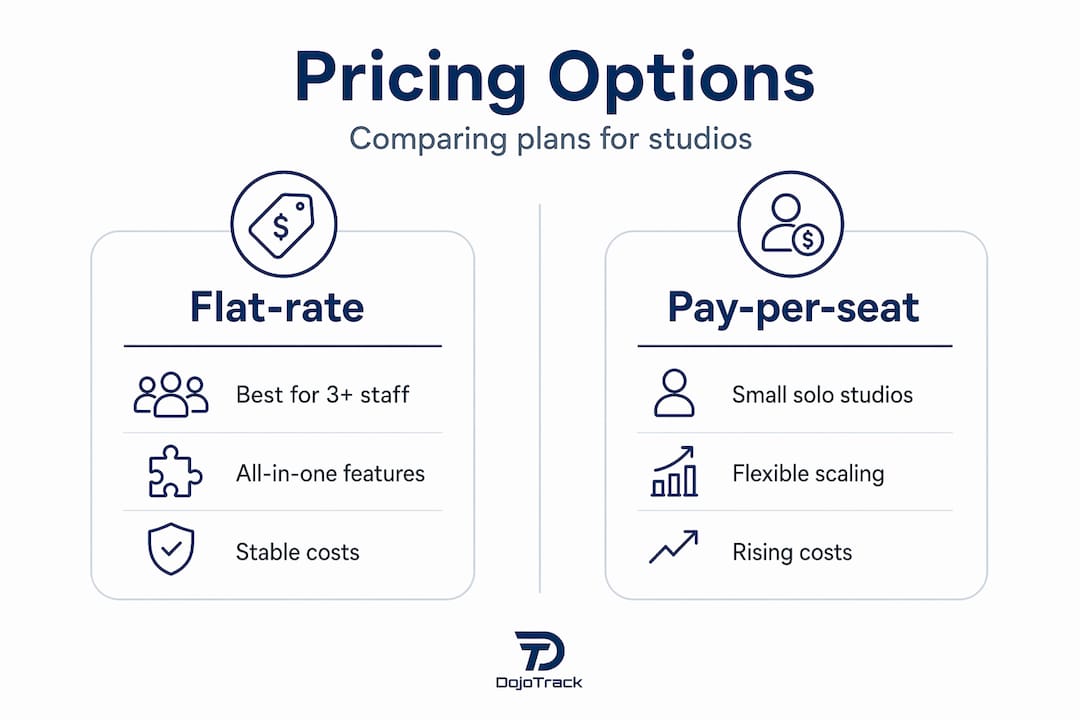
Solo plans start around $29/month, while small team configurations that include scheduling, point-of-sale, and client management average around $69/month. Those price points are realistic for a well-run martial arts school with under 150 students.
The bigger decision is the pricing model itself:
| Pricing model | Best for | Watch out for |
|---|---|---|
| Flat-rate monthly | Studios with 3+ staff or multiple instructors | Higher starting price than per-seat options |
| Pay-per-seat | Very small solo setups | Costs scale quickly as your team grows |
| Free or freemium plans | Testing scheduling basics | Limited features; no billing or retention tools |
| Per-student billing | Larger academies | Unpredictable monthly costs as enrollment grows |
Flat-rate subscriptions are almost always the smarter long-term choice once you have more than three staff members. Pay-per-seat pricing looks cheaper on day one, but the math flips fast. Add an assistant instructor, a front desk person, and a part-time coach, and you could be paying double what a flat monthly plan would cost.
All-in-one platforms, where scheduling, POS, client management, and communication live in the same system, deliver the best value per dollar. Paying for three separate tools to do what one platform handles is not a cost-saving strategy. It is just a more expensive version of the same problem.
Pro Tip: When evaluating a free trial, ask the sales team directly about pricing as you grow. Some platforms offer attractive entry pricing but charge steep upgrade fees once you cross a student threshold. Get the full pricing tier in writing before committing.
Flexible pricing with a free trial option is now a standard expectation for quality software, so if a vendor resists letting you test before you buy, that is a red flag.
How to set up your studio management software
A good setup takes between two and four weeks for a full system, though lighter scheduling-only tools can go live much faster. Here is a workflow that actually works:
-
Gather your existing data first. Export your student roster, contact information, membership types, billing amounts, and any outstanding balances from whatever you are using now. Even if it is a spreadsheet, clean data before migration saves hours of cleanup later. Onboarding success depends heavily on data quality.
-
Start a free trial and test every core workflow. Do not just click around. Create a real student profile, schedule a class, process a simulated payment, and send an automated reminder. Testing full end-to-end workflows during the trial predicts exactly how the software will behave on a busy Monday evening.
-
Set up your membership and billing structures. Configure your recurring membership tiers, family discount rules, and payment processing before anything else goes live. Billing errors on day one destroy trust with your members.
-
Customize your class schedule and attendance settings. Build your weekly class schedule, assign instructors, and configure how attendance gets recorded. If your software supports a sign-in kiosk or QR check-in, set that up now so students build the habit from day one.
-
Train your staff before launch. Even a one-hour walkthrough of the key workflows reduces mistakes and frustration during the first week. Designate one person as your internal point of contact for questions.
-
Activate automation. Turn on payment reminders, class confirmation messages, and any attendance-based alerts. Automating reminders and billing reduces your weekly administrative workload more than almost any other single feature.
Pro Tip: Do not migrate everyone at once. Start with a small group of 10 to 15 students, run them through the full billing and attendance cycle for two weeks, and fix any issues before rolling out to your entire roster.
Setting up recurring membership payments correctly from the start is one of the highest-leverage tasks in this entire process. Get it right early and you protect your monthly revenue from day one.

Common setup mistakes and how to avoid them
Most software problems are not software problems. They are setup problems. And almost all of them are predictable.
- Tool sprawl is a real threat. Running disconnected apps for scheduling, billing, communication, and attendance creates a fractured system where data lives in five places and errors slip through the cracks. One integrated platform eliminates this entirely.
- Skipping the trial workflow test. Clicking through a demo is not testing. Create a fake student, book them into a class, run a payment, issue a refund, and cancel a booking. If any of those steps feel clunky or unclear, they will feel worse when a real parent is standing at your front desk.
- Underestimating pay-per-seat cost growth. Costs increase quickly after three users on per-seat pricing models. Map out what your pricing looks like at your current team size and at double your team size before committing.
- Importing messy data. Migrating duplicate records, outdated email addresses, or inconsistent membership types creates billing errors that take weeks to untangle. Deduplicate and standardize your student list before importing anything.
“The biggest mistake I see studios make is choosing software based on price per month without testing whether it can actually handle their daily workflows. A $29/month tool that breaks down during peak enrollment costs far more in staff time and frustrated members than a $69/month platform that works smoothly every day.”
Smooth onboarding also means communicating with your students. Send a simple email before you switch systems explaining that they may receive a new login invite or updated billing notification. That one step eliminates the majority of confused phone calls you would otherwise get.
What to expect after a good setup
The results from a well-executed software migration are measurable and they show up within the first 30 to 60 days.
| Benefit | What it looks like in practice |
|---|---|
| Time savings | Scheduling and billing tasks drop from several hours per week to minutes |
| Better retention | Automated attendance alerts catch at-risk students before they quietly quit |
| Financial clarity | Integrated reporting shows monthly revenue, outstanding balances, and growth trends in real time |
| Improved communication | Automated reminders reduce no-shows and keep members informed without manual follow-up |
| Scalability | Adding new students, instructors, or class types takes minutes rather than a restructured spreadsheet |
Software automation improves scheduling, payments, and reminders while freeing up time you could spend on the mat. That is not marketing language. It is what studio owners consistently report after making the switch from manual or disconnected systems.
The financial reporting piece is often the biggest surprise. When your billing, attendance, and membership data all live in one place, you can see exactly which membership tiers are most profitable, which class times have the lowest retention, and where you are leaving money on the table.
My take on choosing and setting up studio software
I have worked closely with martial arts school owners across the country, and the pattern is remarkably consistent. Studios that succeed with software pick one solid platform and commit to it fully. Studios that struggle keep one foot in their old spreadsheet “just in case” and never get the full benefit of what the software can do.
Here is what I have learned: simplicity beats feature overload for most small studios. The platform with 47 features you use three of is not a bargain. The platform with 15 features you use all of is worth every dollar. Resist the urge to choose software based on a feature checklist and instead test how it performs on your actual daily workflow.
The hidden value of a centralized platform is time that compounds. Saving 30 minutes a day on admin does not sound dramatic, but it adds up to over 180 hours a year. That is time you could spend coaching, marketing, or actually growing your school.
My recommendation: start with a free trial, run the full setup workflow I outlined above, and make your decision based on how the software behaves under real conditions. Price matters, but friction costs you more than dollars.
— DojoTrack
DojoTrack: built for martial arts studios
If you are a martial arts studio owner in the United States looking for a cost-effective software solution built specifically for how your school operates, DojoTrack is worth a close look. It handles student memberships, attendance, belt tracking, recurring billing through Stripe, digital waivers, and family discounts in one unified platform, with no need to stitch together separate apps.
DojoTrack’s AI-powered retention system identifies students at risk of dropping out before they disappear, while automated lead scoring and SMS follow-ups help you convert more prospects into paying members. The full feature set is designed around the specific workflows of martial arts schools, MMA gyms, Taekwondo academies, and Jiu Jitsu schools. If you are migrating from a manual system or another platform, DojoTrack’s data migration support makes the transition straightforward.
FAQ
How much does martial arts studio management software cost?
Affordable options start at $29/month for solo studio setups, with small team plans averaging around $69/month. All-in-one platforms that include scheduling, billing, and client management offer the best value.
How long does it take to set up studio management software?
Full system setup typically takes two to four weeks, including data migration and staff training. Simpler scheduling-only tools can go live in a day or two.
What features should a martial arts studio prioritize in management software?
Start with attendance tracking, recurring billing, and class scheduling as non-negotiables. Features like automated belt promotions, a student mobile app, and AI-driven retention alerts add significant value as your school grows.
Is flat-rate or pay-per-seat pricing better for a martial arts school?
Flat-rate pricing is more cost-effective for studios with three or more staff members, since pay-per-seat costs grow quickly with your team. Flat-rate subscriptions also make monthly budgeting more predictable.
Can a small martial arts studio afford an all-in-one management platform?
Yes. Smaller studios can access powerful features for low monthly fees by choosing purpose-built platforms over generic tools. Many quality platforms also offer free trials so you can test before committing.